

Design / Monday June 15, 2026
Essential Tips for Improving User Experience and Conversions

Improving user experience (UX) starts with making your website faster, easier to navigate, mobile-friendly, and focused on your visitors’ needs. All this will create a positive user experience, helping visitors find information quickly, complete desired actions with less effort, and develop greater trust in your brand. In turn, this can lead to higher engagement, improved conversion rates, and lower bounce rates.
From intuitive navigation and effective calls to action to page speed optimization and responsive design, every element contributes to how users perceive and interact with your website. Let’s have a look at some practical UX tips that can help you create a more user-friendly website and keep visitors coming back.
Know Your Users and Gather Feedback
Knowing your target audience is a basic element of a successful UX. After all, your users will be interacting with your website, and understanding their needs and demands is essential to developing a website that “speaks their language”.
Start by performing careful research on the demographic stats of your audience – gather as much information as possible, like their gender, age range, technical knowledge, devices they use, and so on. Analyzing your audience will help you make informed decisions based on their preferences and specifically tailor your design and functionalities with consideration to their needs.
The next most important step is to thoroughly test all your components to ensure they function properly. Furthermore, try putting yourself in your users’ shoes and assess how user-friendly your UI is from their perspective.
Your users are the most important source of information about how well your website is designed. Observe how they interact with your site and regularly gather feedback on their personal experience with it. Analyzing their opinions on what they like, dislike, find easy, or find troublesome to use should be the basis for improving your UX.
Map the User Journey Before Making UX Changes
Before redesigning a page, identify the main action users should take, the questions they need answered, and the points where they may hesitate. Mapping the user journey allows you to understand how visitors move through your website and where friction may occur. By analyzing each step of the process, you can make informed improvements to navigation, calls to action, page layout, and content organization. A well-defined user journey helps ensure visitors can accomplish their goals quickly and efficiently, resulting in a more intuitive experience and higher engagement.
Simplify Your Navigation System
According to another research, 94% of the respondents claim that easy navigation is one of the most critical elements of a user-friendly website. That is not surprising at all. We are all aware of how annoying it can get if you spend a long time trying to find your way through a website. Potentially, you will get frustrated, leave, and never come back.
There is a good reason for most websites to be structured in a similar pattern – it just works well, and users are accustomed to the typical navigation layers. We would recommend that you stick to the tried and proven layouts. For example, there is no reason to relocate the top navigation menu somewhere else. You can save the innovative thinking for some other aspects where it will actually have a positive impact.
When developing your navigation system, you need to ensure it is visible at first glance and allows your visitors to easily access the key features they might need. Organize everything in an intuitive hierarchical structure so they can easily navigate back and forth.
Take HostArmada navigation layout, for example – it is clean and contains all key components of our services. It’s not loaded with unnecessary menu items, and most importantly, it is visible at first glance.

Keep It Simple
As your goal is to keep the user focused on what they have come for, you should avoid distracting them. Whenever you can, cut down on the elements on your page. Keeping everything neat and simple can positively impact your UX and massively reduce the bounce-back rates. Each page has a single primary purpose, including inessential information, can be a major user experience turn-off. A well-structured page will have the key information at the beginning and all additional details at the end. Keep in mind that the longer the page is, the less likely it is for someone to scroll down to the very bottom.
Incorporate Adequate Space
Well-thought-out design is as integral as proper functionality to a website’s UX. Adequately used space can increase users’ attention toward the elements you want them to focus on.
You should balance your page elements and highlight important products and information by adding enough white space. A structured web page is always easier to read and navigate than a jam-packed one.
Use Clear and Action-Oriented Calls to Action
You need to follow your website users’ natural flow by ensuring their “journey” will be straightforward. To keep everything consistent, you need to think from the visitors’ perspective and consider what they will do step by step. This way, you can easily navigate them through their way no matter what the purpose is. Any interaction they have with your website directly impacts their impression of the brand as a whole, and you want to keep it positive.
Using intuitive Calls to Action (CTAs), such as buttons, links, and pointers, will help your visitors easily navigate your website and reach the intended destination. When labeling these CTA elements and choosing their colors, consider the message you want to convey to your users. Selecting an optimal combination could be beneficial for your conversion.
Optimize Page Speed and Core Web Vitals
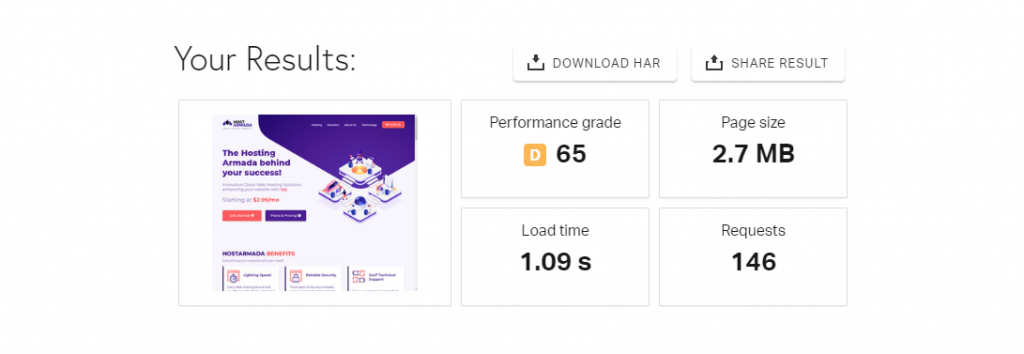
Page speed remains a core UX and SEO factor. There are various free online tools you can use to test how your website performs – Google PageSpeed, Pingdom, GTmetrix – to name a few. In addition to the speed analysis, you will receive useful tips on exactly what requires your attention.
Use Core Web Vitals as your performance baseline when evaluating page speed. These metrics provide valuable insights into how users experience your website in real-world conditions. Monitor Largest Contentful Paint (LCP) to measure loading performance, Interaction to Next Paint (INP) to assess responsiveness, and Cumulative Layout Shift (CLS) to evaluate visual stability. Regularly reviewing these metrics can help you identify performance bottlenecks and prioritize improvements that enhance both user experience and search engine visibility.
Keep in mind that speed-related issues might not always be caused by poor website code, unoptimized images, or large page sizes. Sometimes, the issues could be related to low server performance. As a web hosting provider at HostArmada, we understand how critical speed and performance are to our customers, and we are dedicated to delivering exceptional service and tailored optimizations for our clients’ websites.
Ensure Your Website is Responsive and Mobile-Friendly

Considering the number of users relying on their mobile devices is constantly rising, developing a mobile version is a must.
Make sure mobile pages contain the same important content, headings, internal links, images, and structured data as the desktop version. Consistency across devices ensures users receive the same information regardless of how they access your website. It also supports search engine indexing and helps maintain a seamless experience when visitors switch between desktop and mobile devices. Regular testing across different screen sizes can help identify usability issues and ensure your content remains accessible and easy to navigate.
An adaptive design that does not require users to zoom in or out is essential for UX. Your users must have all the information served in a quick-to-navigate layout.
Conclusion
Focusing on a seamless UX is a powerful way to drive and retain customers. At the end of the day, this is the main goal of any business. When they land on your page, the design is the first thing that will make an impression – well-organized, neat, and clean content is essential for a positive and long-lasting impact. Proper functionality, easy navigation, and smooth flow are also imperative aspects that will affect users’ interaction with your website and their overall opinion.
FAQs
User experience (UX) refers to how visitors interact with and perceive a website. It includes factors such as usability, navigation, page speed, accessibility, design consistency, and overall satisfaction when completing tasks on the site.
A good user experience can improve engagement metrics such as time on site, pages per session, and bounce rate. Search engines prioritize websites that provide valuable, accessible, and user-friendly experiences, making UX an important part of SEO.
You can improve UX by simplifying navigation, optimizing page speed, using clear calls to action, ensuring mobile responsiveness, improving readability, and gathering user feedback to identify pain points.
Mobile users benefit from responsive layouts, fast-loading pages, readable text, properly sized buttons, intuitive navigation, and content that is easy to access without excessive zooming or scrolling.
