

Blog / Wednesday September 23, 2026
How to Improve Blog Readability Beyond Yoast SEO (With Examples)

Improving your blog’s readability beyond Yoast SEO means focusing on clear structure, simple language, and a smooth reading flow that helps readers quickly find the information they need. While Yoast’s readability analysis is a useful guideline, it relies on general rules that do not always reflect how real people read and engage with content.
Let’s have a look at how Yoast evaluates readability and show you practical ways to improve your blog posts beyond its suggestions. By applying better formatting, stronger headlines, and clearer writing, you can create content that is both search-engine friendly and genuinely helpful for your audience.
Why Readability Matters
Good readability improves the overall user experience and often leads to better SEO performance because search engines prioritize content that satisfies users. Readers visit a blog post to quickly find an answer or solve a problem. If the content is clear, structured, and easy to scan, they can understand the key points faster and stay engaged longer.
However, readability should not be optimized only for search engines. Writing purely to meet algorithmic checks can make content feel unnatural and harder to follow. The primary goal should always be clear communication with your audience.
The best approach is to balance both. Follow basic readability guidelines, so search engines can interpret your content easily, but focus mainly on making your writing clear, organized, and useful for readers. Tools like the Yoast SEO plugin for WordPress can help identify readability issues and provide suggestions for improvement.
What Is Yoast?
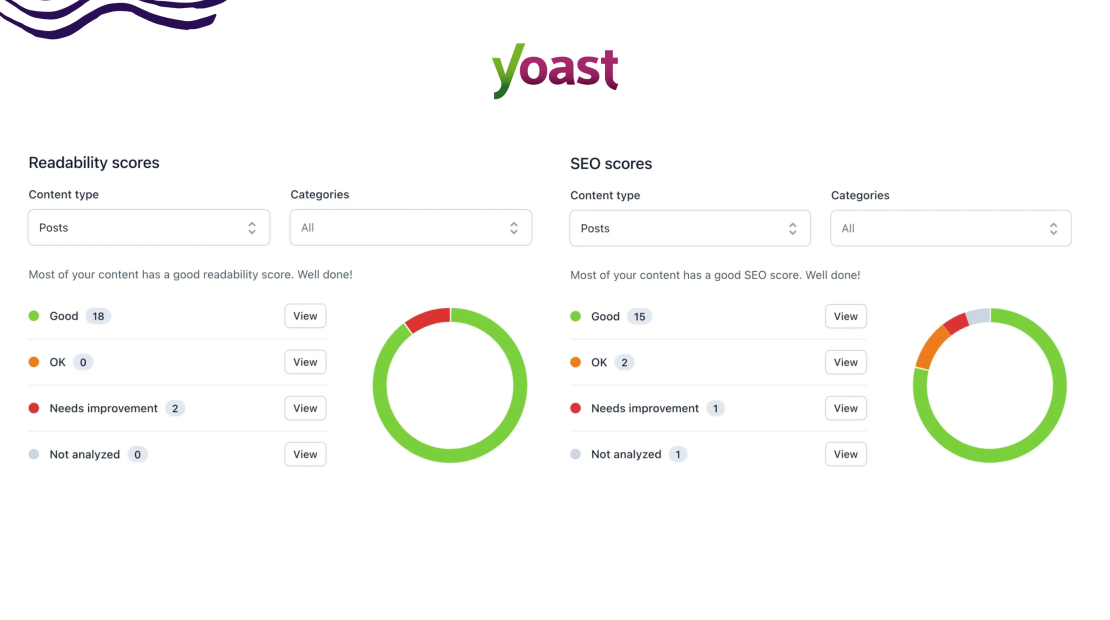
Yoast is a popular WordPress plugin that provides an accessible, comprehensive overview of your blog posts’ SEO and readability. The plugin scans your text and suggests ways to improve your readability and SEO based on Google’s recommendations on how a blog post should look. Here are some of the key readability features of Yoast SEO:
Subheading Distribution
Subheadings break your blog post into clear sections, making it easier for readers to scan and find the information they need. Many readers do not read an article from start to finish – they skim the page and focus only on the sections that answer their specific question. Well-placed subheadings help them navigate the content quickly.
For example, if you are reviewing the features of a vacuum cleaner, a reader may care only about suction power. A dedicated subheading for that feature lets them jump directly to the relevant section without searching the entire article.
Subheadings also offer an opportunity to naturally include relevant keywords in your text. However, they should always reflect the section’s content rather than being created solely for keyword optimization. Overloading subheadings with long-tail keywords can make the article feel unnatural and harder to read.
As a general guideline, keep each subsection around 200–300 words. This way, you won’t over-explain, but you’ll still have enough room to include all the relevant information with examples. If a topic requires more detail, break it down further with H3 subheadings to maintain a clear, logical structure.
Paragraph Length
Paragraphs organize ideas and make your content easier to read. They come naturally within the text, making it much more readable. Still, you must be careful not to extend a paragraph for too long. You need to be able to finish your thought within 5-6 sentences, all of which should be a total of 150 words.
What Yoast won’t tell you is that you must avoid one-word or one-sentence paragraphs as well. Yes, there are times when you can place such, but they are extremely rare. You are not writing a WhatsApp message. You are writing a blog post. So, use one-sentence or one-word paragraphs only when you want to underline a point heavily.
Sentence Length
Have you ever read a sentence that has no end in sight? Not a great read, you will undoubtedly agree. Long sentences are sometimes a necessity. Still, if your entire blog post is filled with complex sentences with several subordinate clauses, then you might lose your readers along the way. Keep the majority of your sentences below 20 words to avoid this problem. You can, of course, have occasional lengthy sentences. Just make sure to keep them to a minimum and only when you can’t make them into two sentences. After all, you are trying to explain a complicated topic in a simple language, not creating a literary masterpiece.

Word Complexity
Do not assume knowledge is one of the few golden rules of content writing. Using lingo, industry slang, and other complex words that might be known to professionals but not to the broader audience is a huge deal-breaker for many readers. Imagine if you are looking for car tires. You open an article to see the best choices for your car, and you are flooded by definitions, measurements, and stats that mean absolutely nothing to you. Would you stay and try to understand what the writer had in mind, or would you go to another article that explains everything more simply?
The same goes for uncommon and highly complicated words that even fluent speakers would barely understand. The English language is abundant in complex terms that only scholars and snobs use nowadays. So, try to avoid them, especially if your audience is not filled with snobs and scholars.
Transitional Words
You should write as you talk. Well, not strictly, but you should follow the same logic. When you speak, you use transitional words so your listeners will follow your thoughts easily. The same goes for your written words. If you want your readers to follow the flow of your thoughts, adding transitional words is a must. The lack of such transitional words indicates the absence of a coherent idea behind your writing. So, make sure to give your text the flow it deserves through some transitional words like “so,” “therefore,” “however,” “besides that,” “also,” and others.
Passive Voice
This is the bane of any text. Passive voice makes the text seem distant and boring. Moreover, it makes your sentences wordier and harder to understand. That doesn’t mean you should entirely cut passive voice from your texts. But keep them at a reasonable number and try to use an active voice where possible.
Sentence Beginnings
Finally, we have the start of your text. Beginning sentences with the same word or structure is just a sign of bad writing. Of course, this rule has some exceptions, but they are extremely rare. You can use the same beginning to several consecutive sentences, only to accentuate a point, and only once in your entire text. Naturally, this should be the climax of your text. Still, as a general rule of thumb, try to avoid starting consecutive sentences with the same structure, let alone the exact words.
You can count on Yoast to track all these signs of excellent readability. Moreover, if you have made some of these mistakes, Yoast will underline them, so you won’t have to search in your entire text. That’s quite handy when you’ve written a 3000-word article. But is this enough?
Are Yoast’s Suggestions Enough?
Yoast’s readability checks are useful guidelines, not strict rules. They rely on general formulas that cannot fully account for context, audience expectations, or writing style. Treat these suggestions as indicators, but prioritize clarity, tone, and usefulness for your readers.
After all, no one is going to count what percentage of your sentences are above 20 words. That’s Google’s arbitrary suggestion that presumes that longer sentences are harder to understand. And this is not too far off. Still, there are far more important factors that can make a text easier to understand.
10 Ways To Improve Readability Beyond Yoast’s Suggestions
Most of these factors are quite intuitive. Yet many blog posts lack them for one reason or another. The main idea behind these points is not to increase your SEO rating but to better the user experience and make your blog post more readable for humans.
1. Know Your Audience
If you are a marketer, you would know that every action, no matter what it is, starts precisely with knowing your audience. Your entire establishment is dedicated to a particular group of people interested in your product or service.
Naturally, pinpointing this group will give you invaluable information on how to make your blog posts more readable for them. For example, if your blog posts target younger or non-specialist audiences, you must give them shorter and to-the-point answers to their questions. The younger generation has no patience for lengthy explanations.
Still, that doesn’t mean you can’t add all the relevant information. All it means is that you must format it to suit their needs. Thus, you will need shorter subheadings that focus more on the why than on the how.
On the other hand, if your blog post targets professionals, they’d much rather have a full explanation with examples and specific scenarios. Thus, your subheading sections will have additional divisions. Actually, this blog post is an excellent example.
2. Don’t Overbulk Your Post
You are not writing a high-school assignment, so there is no specific word count that you must get. Well, okay, there is. Actually, the best practices show that blog posts between 1000 and 2000 words are the norm. If you are trying to produce high-quality content, 2000 words are the minimum. However, that doesn’t mean that you must overbulk your articles. Keep it to the point. Most topics, especially those for specialists, have enough relevant information to share, so don’t worry. You will reach the recommended word count and beyond. Still, if the topic doesn’t allow you to reach a specific word count, don’t force it. Better to keep it short and simple rather than just blabber on and on.
For example, the topic of how to build a winning marketing strategy is obviously not something you can explain in 1,000 or even 2,000 words. It’s not an easy concept. On the other hand, an article on how to tie your shoelaces so they won’t untie can be explained more quickly, with far less detail.
3. Don’t Over-Format
Speaking of overdoing it, you need to consider how much formatting you do on your blog. Yes, your blog post should be skimmable, but over-formatting will do more harm than good.
Naturally, using some italicized words is okay. The same goes for occasional bolding. But having every third word different than the last is too much.
So, instead, go for the H2 and H3 subheadings. If you need to do a further division, consider whether some bullet points won’t do the trick. However, don’t overdo it with bullet points as well. They are a great tool for listing features or highlighting information. But if there is a bullet list in every section, the reader will get lost. Moreover, this stops being a blog post and becomes a very bad infographic. If you want to list information in bullet points, at least put in the extra effort to build a proper infographic.
Check out what proper formatting should look like:

4. Highlight Key Points
This being said, don’t shy away from highlighting the most important parts of your text. In general, these are the exceptions. We talked about single sentences or single-word paragraphs. We spoke about bolding, underlining, and italicizing. But when it comes to highlighting, you must use visual hierarchy to your full advantage.
Make sure all your key points are visually distinguishable. Make them look appealing and easy to skim. You can do that by using bullet points and listings, and if there is something you want your audience to remember, then it’s time to use single-sentence paragraphs. Make sure this is the one thing you want your audience to remember, as there is a place for only one such paragraph.
5. Use Keywords but in Moderation
This is the part where content writers usually get on edge with the SEO team. The SEO team wants to follow protocol. They want to include as many keywords as possible in a single piece of text. Google will love this. Your readers will hate it. Stuffing keywords everywhere in bulk shows you are more interested in Google than your readers, and they will quickly become frustrated. Moreover, this comes across as condescending, which is not a great look if you want to win hearts.
6. Break the Tension With Visuals
Usually, lengthy texts are heavy. Readers feel exhausted and often lose concentration. That’s inevitable, especially if you are trying to explain complex concepts. So, instead of skipping on vital information, a much better strategy is to offer some tension relief.
The best way to do so is by adding a picture, a video, or another visual. Graphics often help illustrate your point while also relieving the reader’s eyes from the text.
For some topics, an interactive quiz can work just as well, giving readers a break from the text while keeping them engaged.
Many writers use humor to break the tension, and that’s a great idea on paper. However, jokes must be handled extremely carefully, and you must have established your brand persona and brand voice accordingly. You can’t be all serious and place a deadpan joke out of nowhere.
So, if you are not sure if you can pull off a joke persona without offending or alienating part of your audience, just stick to the classics. Provide your audience with a visual tension break in the form of pictures or videos.
7. Don’t Over-Link
When creating your blog post, remember you are not Wikipedia, so not every sentence must contain 3-4 links. Links are a delicate art. Naturally, when you are citing someone, it’s common courtesy to link them in your text. Moreover, linking authoritative websites will give you an SEO boost.
However, this can’t be your entire content strategy. You must provide your readers with something more – to build upon existing information. Furthermore, you don’t want to divert your audience from your website. You want them glued to your page for as long as possible.
Naturally, links can’t be completely avoided. That’s what building a proper backlink portfolio is all about. However, be sure never to link to your competitors or divert your audience to another website unless absolutely necessary. For example, when offering statistics.
8. Forget About Clickbait Headlines
Ten years ago, clickbait was huge, with content writers using every method to gain traction and stay ahead of their competitors. Today, that certainly doesn’t work. On the contrary, making your headline sound clickbait-ish is off-putting, since internet users have been burned one too many times by false promises. So, while headlines like “10 content strategies that you won’t believe will work (but they do)” might have worked back in 2013, today, they are avoided like the plague.
The same goes for elevating readers’ anticipation to unbelievable heights. So, avoid headlines that promise “Unique,” “Never before seen,” or “100% fail proof…” even if you actually can fulfill your promise.

Of course, that doesn’t mean you should use only dry, unimaginative headlines. Using powerful adjectives is definitely a good idea. Still, make sure that you can deliver what you promise. For instance, if you want to turn the clickbait-ish headline we used as an example above into a readable blog post headline, you can rephrase it as “10 powerful content strategies to help you grow your audience”. The difference is obvious.
You can see some additional examples in the picture below:
9. Get to the Point Straight Away
Whenever you want to find out something, you don’t want to read through a 500-word-long introduction of the problem. You want a fast and clear answer. Then, if you have the time, you can read the detailed explanations. So, when writing a blog post, try to stick to the point from the very top.
Go straight to the topic and provide an answer right from the beginning. Naturally, topics like this don’t answer a specific question but offer a step-by-step tutorial on improving your content. So, obviously, we can’t give an answer in the intro itself. However, if we are talking about “Is SEO worth investing in?”, the resounding “Yes” should be in the first sentence. Then, you can explain why you think so.
10. Give Your Text a Flow
Most importantly, your text must have a flow. This will help your readers follow it more easily, making it a better read overall. Placing just facts without context will provide information, but what will set you apart from everyone else in your industry is the entertainment and readability of your content. So, structure your text soundly, use transitional phrases and words, avoid plot holes, and don’t be afraid to use pronouns. Make sure your next section starts where the previous one ended.
Quick Readability Checklist
Before you publish, quickly review these readability basics:
- Keep paragraphs short (2–4 sentences each) so the text is easy to scan.
- Use clear subheadings every few paragraphs to guide readers through the content.
- Write mostly short sentences, but prioritize clarity over strict word limits.
- Avoid complex words or jargon unless your audience expects them.
- Use bullet points or numbered lists to present steps or key ideas.
- Highlight important points with bold text, but use it sparingly.
- Add relevant internal links only when they help the reader explore the topic further.
Website Readability Starts Before Blog Post Creation
There is a simple truth. A blog post is only good when the website it is on is well-maintained. This includes the load time, uptime, and security of your website. Even if you follow our advice to the letter and you manage to create a masterpiece of a blog post, it will all be in vain if users can’t reach it half the time. The loading speed is just as instrumental to your success as your content, as people don’t wait for a website to open. They simply move to the next one.
So, if you want to avoid this uncomfortable situation, you must find a great web hosting provider. HostArmada is just what you are looking for. We offer lightning-fast load speed, 99.9% guaranteed uptime, and top-notch security. Check out our plans and find the one that best fits your business needs.
Remember, a fast, secure, and reliable website is always the first step toward your business success.
FAQs
No, Yoast SEO does not guarantee good readability. It provides automated suggestions based on general readability rules such as sentence length, paragraph size, and passive voice. However, real readability depends on how clearly your content communicates ideas to your specific audience.
Readability is essential for both SEO and user engagement. Clear, well-structured content helps readers find information quickly, increasing time on page and reducing bounce rates. Search engines often favor content that users can easily understand and navigate.
Common readability mistakes include long paragraphs, overly complex sentences, lack of subheadings, and excessive jargon. These issues make content harder to scan and understand, reducing reader engagement and overall content effectiveness.
You can improve readability by using clear headings, short paragraphs, simple language, and logical structure. Adding bullet points, highlighting key ideas, and writing with your audience in mind also make your content easier to read and understand.
