

WordPress / Saturday December 13, 2025
WordPress 6.9: Smarter Features, Stronger AI, and Fewer Plugins to Maintain
WordPress 6.9 is now live, bringing a fresh set of upgrades that many site owners have been waiting for. This WordPress new release focuses on solving everyday problems that slow down content work, development, and site maintenance. More importantly, it adds tools that empower users to drastically reduce plugin use, making their websites lighter, safer, and faster.
The AI groundwork is the most noticeable change. WP 6.9 introduces shared systems that make AI tools easier to use and safer to integrate. These additions cut the need for separate plugins that often slow sites down, clash during updates, or increase maintenance work.
The result is a release that gives users more control with fewer moving parts. WordPress 6.9 reduces plugin pressure, improves workflow speed, and prepares sites for upcoming AI-powered features.
So, here is everything you need to know about WordPress 6.9
What’s New at a Glance
| Area | Feature | What it does | Who benefits | Where you use it |
| AI | Canonical AI plugin | Creates a safe space for AI features to evolve without conflicts | Site owners, agencies, developers | Installed plugin, managed in wp-admin |
| AI | PHP AI Client | Standardizes how plugins connect to AI tools | Developers, platforms | As a shared library in plugins |
| AI | Abilities API | Makes site capabilities machine readable for AI tools | Agencies, enterprise sites | Themes, plugins, workflows |
| Collaboration | Block-level Notes | Adds threaded comments directly on blocks | Editors, teams | Post and Site Editor |
| Workflow | Hide and Show Blocks | Lets users hide blocks without deleting them | Bloggers, marketers, shops | Block toolbar |
| Editing UX | Drag and Drop Preview | Shows clear drop zones when moving blocks | All users | Block editor canvas |
| Guardrails | Allowed Blocks UI | Controls which blocks can appear in locked areas | Agencies, multisite admins | Templates and patterns |
| Design | Fit Text | Auto-adjusts text to fit its container | Designers, marketers | Heading and paragraph blocks |
| Media | Gallery Aspect Ratios | Keeps image grids visually consistent | Portfolios, stores, blogs | Gallery block settings |
| Media | Cover Poster Image | Adds a poster frame to video covers | Bloggers, landing page creators | Cover block with video |
| New Blocks | Accordion | Creates collapsible sections for structured content | Stores, blogs, documentation | Pages and posts |
| New Blocks | Time to Read | Shows estimated reading time | Blogs, publishers | Post templates |
| New Blocks | Math Block | Typesets LaTeX formulas | Education, tech, research sites | Posts and pages |
| Templates | Term Query + Term Template | Builds dynamic taxonomy pages with term data | Content-heavy sites | Archive templates |
| Admin | Command Palette | Speeds up navigation with quick commands | Power users, admins | Across wp-admin |
| Performance | On-demand CSS | Loads only the CSS that the page needs | All users | Front end |
| Performance | Faster Cron | Runs scheduled tasks more efficiently | Busy and dynamic sites | Server runtime |
| Performance | Skip Hidden Block Styles | Avoids loading CSS for hidden blocks | All sites | Front end |
A Whole Lot of AI Features
AI tools now appear in almost every part of modern websites, yet many WordPress users still rely on separate plugins to add them. This creates slowdowns, conflicts, and extra work each time an update rolls out. WordPress 6.9 responds to this problem with a new set of foundations that help AI run in a safer and more unified way.
The biggest shift comes from the new Canonical AI plugin. It gives WordPress a shared place where AI features can grow without forcing owners to install multiple small tools. The plugin helps developers test new ideas and follow consistent patterns, reducing the risk of script clashes and duplicate code.

The new PHP AI Client takes this a step further. It creates one standard method for connecting WordPress to different AI services. Many plugins previously built this logic on their own, which often caused errors or heavy requests. A shared client removes this duplication and helps sites stay fast and predictable. The Abilities API supports this work by making each site’s features readable to AI tools. It helps automated systems understand what the site can do and how content or workflows can adjust based on available features. This supports the growing trend of AI in the future of web hosting and helps developers plan smarter automation.
These AI foundations help WordPress feel lighter and more predictable, which becomes clear when you look at the new tools that improve everyday editing and collaboration.
Better Editing and Collaboration
Content teams often lose time fixing layout mistakes and hunting for misplaced blocks. WordPress 6.9 makes this process smoother with tools that keep feedback close, protect layouts, and support safer experimenting. These improvements remove many small tasks that slow down editors during busy days.
Block-Level Notes Bring Feedback Into the Editor
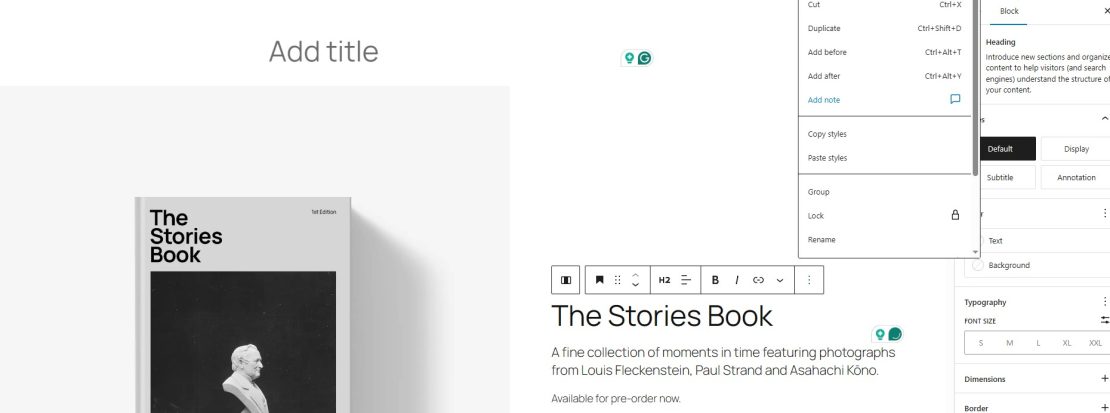
Notes attach directly to the block they describe. Threaded comments stay readable as conversations grow. Editors no longer need separate chats or documents to track instructions. Context stays in front of them throughout every edit, keeping the work clear and consistent. These changes reduce the confusion that often appears when teams collaborate on complex pages.
Hide and Show Blocks for Safer Drafting
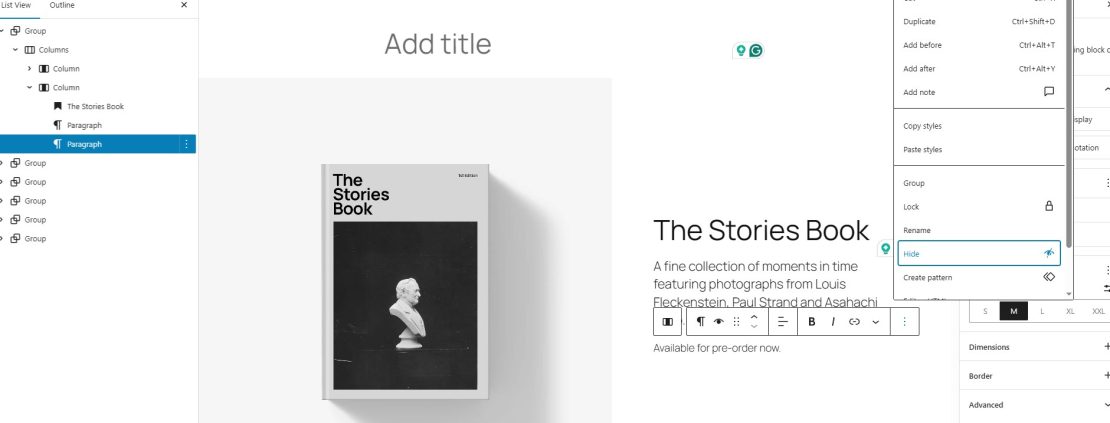
Editors can now hide blocks without deleting them. Draft variations become easy to test in the same workspace. Seasonal content can stay hidden until it is needed again. Teams avoid rebuilding layouts that were removed during testing. This feature helps editors experiment without fear of losing work.
Clearer Drag and Drop Keeps Layouts Intact
Drop zones show exactly where a block will land. Users avoid placing elements in the wrong area. Fixing broken layouts becomes faster because fewer mistakes occur. New users gain confidence when moving complex blocks. These changes cut the time spent repairing pages after simple drag errors.
Allowed Blocks Protect Your Structure
Designers can now limit which blocks appear in specific areas. Templates stay consistent even with many authors. Brand styling remains stable across pages. Teams avoid breaking layouts by inserting the wrong elements. This control helps sites keep a clean and predictable structure.
These workflow upgrades support cleaner design work, which becomes even clearer once you explore the new tools that shape how pages look.
Design Power-Ups
Many WordPress sites look uneven because small styling details take too long to fix. WordPress 6.9 brings practical design upgrades that help users build cleaner pages without extra tools. These improvements give editors more control over how pages look and feel, even when they work with simple layouts.
Fit Text Helps Headings Adjust Naturally
Fit Text lets headings scale to match their container. This helps users build strong hero sections without custom CSS. It also eliminates the need for additional styling plugins, which often slow sites down. The feature supports more flexible layouts and keeps headings readable on different screens. These changes help pages feel more polished with less manual work.
Gallery Aspect Ratios Keep Image Grids Even
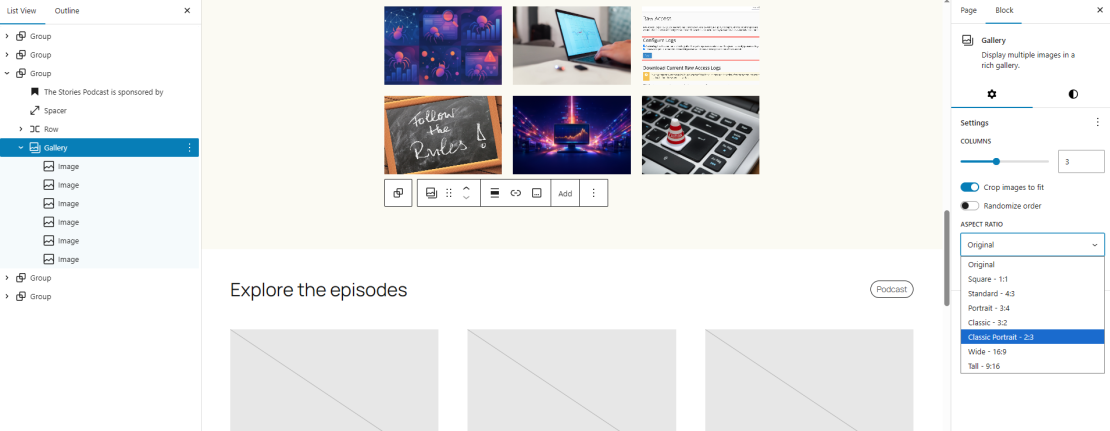
Galleries often break layouts when images load with different sizes. Set aspect ratios solve this by making every item follow the same visual shape. This prevents layout shifts and saves time that users usually spend editing or cropping images. A gallery with even ratios feels like a wall of frames hung with care. These updates help portfolios, blogs, and stores look consistent on all devices.
Cover Block Poster Image Improves Video Presentation
Videos often show a blank frame before they load, which makes pages look unfinished. The new poster image option fixes this by letting users choose a clean thumbnail frame. This upgrade improves the look of landing pages and removes the need for theme-specific video blocks. It also keeps visuals steady across pages that mix images, text, and video.
New Core Blocks You’ll Actually Use
It seems that reducing the used plugins was one of the primary ideas behind WordPress 6.9. With their new core blocks, WP allows users to scrap a bunch of add-ons that served small cosmetic roles, yet loaded the servers and complicated every update immensely.
Accordion Block
The Accordion block helps users create quick FAQ sections or product details.
- It replaces many third-party FAQ plugins.
- It loads only the essentials and keeps layouts clean.
- It works well with simple and complex designs.
- It helps sites reduce plugin dependency.
- This block supports a clear structure without adding extra weight to the page.
Time to Read Block
The Time to Read block gives visitors a simple estimate of reading time.
- It removes the need for small reading-time plugins.
- It works with post templates in a natural way.
- It keeps pages light by avoiding extra scripts.
- It supports more straightforward content presentation.
- This option helps blogs and publishers set reader expectations with no extra setup.
Math Block (LaTeX)
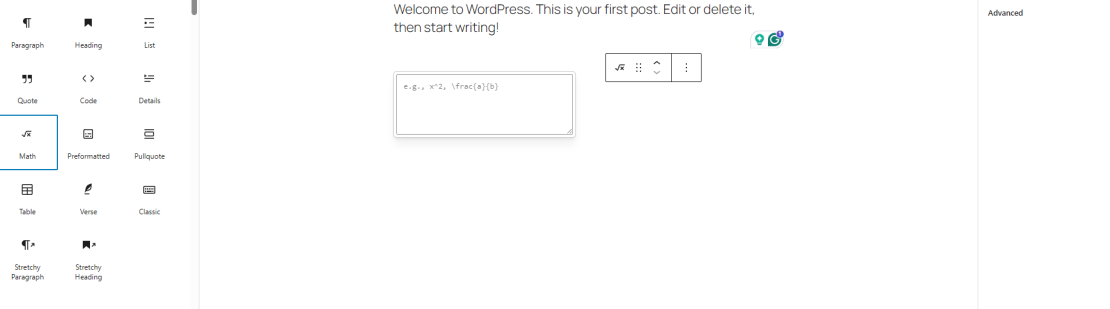
The Math block offers a clean way to write formulas in posts and pages.
- It replaces heavy math or education plugins.
- It supports LaTeX formatting in a readable way.
- It works well across themes.
- It helps schools and technical blogs present content better.
- This block brings a stable math-writing option to the core.
Term Query and Term Template
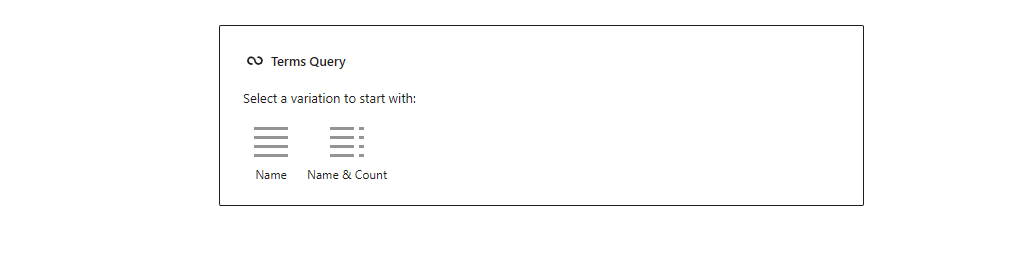
These tools create dynamic category or taxonomy pages with less effort.
- They help users group posts into useful content hubs.
- They reduce the need for custom templates.
- They support flexible layouts for large sites.
- They work well with complex taxonomies.
- This makes category pages easier to build and maintain.
These new blocks simplify content building in a practical way, which supports a cleaner plugin list. This idea appears again in the tools that make daily site management faster.
Admin Speed and Quality of Life
Many users spend more time navigating the dashboard than editing content. WordPress 6.9 helps reduce this problem with tools that make the admin area feel faster and more direct. These changes help both beginners and experienced users complete tasks with fewer clicks and less guesswork.
Command Palette Across wp-admin
The Command Palette now works in more areas of the dashboard.
- Users can search for settings, tools, and pages.
- Quick actions help reduce the time spent navigating.
- Frequent tasks become easier to reach.
- Admin shortcut plugins become less necessary.
- This option works like a search bar for the tools you use every day.
Starter Patterns in More Places
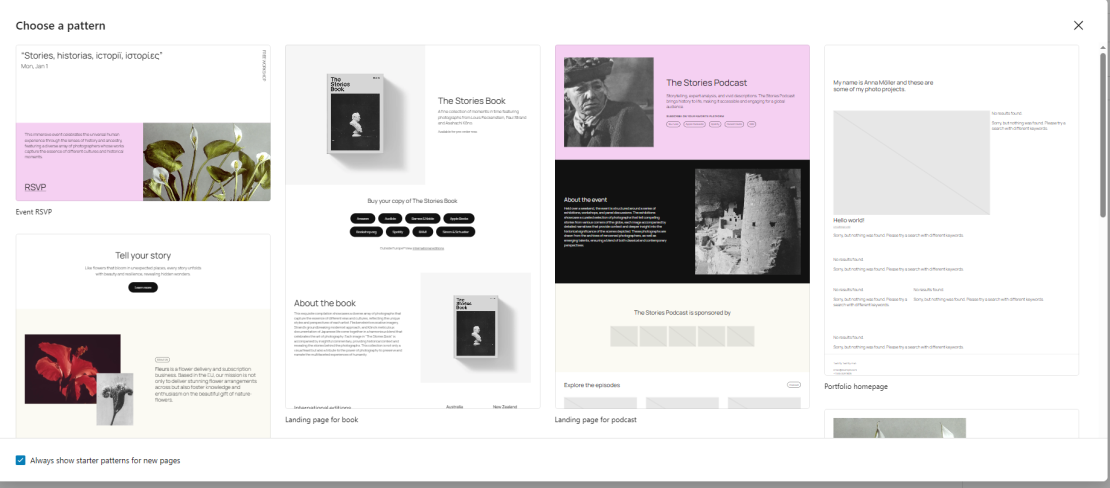
Starter patterns now appear in more editing screens.
- Users get ready-made layouts when starting new pages.
- Blank screens no longer slow down the process.
- Beginners avoid common structure mistakes.
- Teams can keep a more consistent style.
- These patterns help users build pages with a clear structure from the start.
Cleaner Admin Workflows
WordPress 6.9 reduces minor friction points in the admin area.
- Menus feel more consistent across different tools.
- Users reach common areas with fewer redirects.
- Admin enhancement plugins become less important.
- Workflows feel more predictable.
- These updates help users who build and test multiple sites or install WordPress on localhost.
These workflow shortcuts save time inside the dashboard, and the next set of updates helps your site feel faster on the front end as well.
Performance Improvements You’ll Feel
Slow pages often come from small details that load more code than the site needs. WordPress 6.9 improves page load times by trimming unnecessary CSS, speeding up background tasks, and preventing hidden content from adding extra weight. These updates make sites feel smoother without forcing owners to change themes or install optimization plugins.
On-demand Block CSS
WordPress now loads CSS only for the blocks used on the current page.
- Classic themes benefit from reduced style bloat.
- Pages skip unused CSS that slows rendering.
- Large layouts load faster.
- Sites with many blocks feel more responsive.
- This update removes extra styles that used to load by default, delivering cleaner pages.
Faster Cron Execution
Cron tasks run more efficiently during shutdown.
- Heavy tasks create fewer delays for visitors.
- Busy blogs and stores stay more responsive.
- Shared hosting users face fewer slowdowns.
- Risk of timeouts drops for active sites.
- These changes make background jobs less noticeable during regular traffic spikes.
Skipping Hidden Block Styles
Hidden blocks no longer load their styles.
- Seasonal or draft content stays light.
- Complex layouts load fewer unnecessary files.
- Users gain safer drafting options.
- Pages feel more predictable across devices.
- This feature helps teams experiment without extra performance costs.
These improvements support faster loading times and work well with caching strategies like web cache. These changes help sites feel faster, and the next set of updates gives developers more control over how these improvements work behind the scenes.
Developer Upgrades That Matter
Developers often spend more time cleaning up code than building new features. WordPress 6.9 reduces this problem by refining the tools that developers use every day. These upgrades make scripts more predictable, improve HTML handling, and support cleaner workflows for large and complex sites.
Interactivity API Refinements
The Interactivity API receives updates that make dynamic features easier to build.
- Event handling becomes more stable across blocks.
- Partial updates run with fewer glitches.
- Many custom JavaScript patches become unnecessary.
- Dynamic blocks behave in a more predictable way.
- These improvements help developers create interactive components without heavy custom code.
HTML API Improvements
The HTML API helps developers work with cleaner markup.
- Attributes follow more reliable rules.
- Parsing becomes easier across different contexts.
- Transformations avoid common edge cases.
- Fewer regex-based workarounds are needed.
- This upgrade reduces time spent fixing markup generated by older blocks or themes.
Data Views Enhancements
Data Views load faster and handle large lists more smoothly.
- Filtering tools feel clearer and more direct.
- Large blogs manage high-volume content with less friction.
- Agencies benefit from more stable admin screens.
- Editors find it easier to locate the items they need.
- These changes support sites that handle thousands of posts, pages, or patterns.
Unified Script Loading Strategies
Script loading now follows a more consistent order.
- Conflicts between theme and plugin scripts become less common.
- Layout flashes appear less often.
- Modern loading patterns integrate more easily.
- Developers avoid patching scripts after updates.
- These updates help sites stay stable across different environments, including VPS and shared hosting for WordPress.
These developer upgrades shape how WordPress works behind the scenes, and their impact becomes clear once you look at what they mean for everyday site owners.
What These Changes Mean for You
WordPress 6.9 introduces many improvements, but their value becomes clear only when you see how they change your daily work. These updates make sites feel lighter, faster, and easier to manage, even for small teams or solo creators.
• Fewer Plugins to Maintain
You no longer need several small plugins to handle simple tasks. Many features now live in the core, which reduces conflicts and makes updates safer. A shorter plugin list often leads to better performance and fewer surprises during busy periods.
• Smoother Editing for Teams
New tools fix common workflow problems. Notes stay inside the editor, drag actions feel clearer, and hidden blocks let teams test ideas without losing work. These improvements help content teams work faster and avoid layout mistakes.
• Stronger Design Control Without Extra Tools
Fit Text, gallery ratios, and poster frames give users reliable design options. Pages look cleaner on all screens, and editors spend less time adjusting small details. This saves time and reduces the need for custom CSS or heavy design plugins.
• Faster Pages With Less Effort
Performance gains appear without extra setup. On-demand CSS, quicker cron tasks, and skipped hidden styles reduce page weight. Sites feel more responsive and place less load on shared or entry-level hosting plans.
• Cleaner Foundations for Developers
Developers gain tools that remove many small frustrations. The improved HTML API, stable interactivity features, and consistent script loading reduce long-term maintenance. This creates cleaner projects that scale better and break less often.
• A Platform Ready for AI Growth
All improvements support a WordPress core that works smoothly with AI tools. The system now handles AI logic with fewer conflicts and fewer plugins, setting a strong foundation for upcoming AI features that rely on stability.
Forget the Heavy Lifting. HostArmada Helps You Use WordPress 6.9 to Its Full Potential
WordPress 6.9 gives site owners faster tools, cleaner workflows, and fewer plugins to maintain. These changes matter most when your hosting platform supports them with speed, stability, and a secure environment. This is where HostArmada makes a clear difference.
Our servers handle the lighter, smarter core of WordPress 6.9 with ease. Faster cron tasks, reduced CSS loads, and cleaner scripts benefit from strong caching layers and high-performance storage. Your pages load quickly, even during peak traffic, and your site stays stable while you test new features or update templates.
Teams also gain a simpler workflow. Block-level notes, structured patterns, and safer drafting work best when your site runs on a platform that prevents slowdowns and random errors. You focus on your content and growth, and we take care of the infrastructure behind it.
If you need a hosting plan that supports the new direction of WordPress and helps your site stay fast, safe, and easy to manage, check our WordPress hosting plans. They give you the reliable foundation you need to take full advantage of WordPress 6.9 and the updates still to come.
