

Blog / Friday March 20, 2026
What Scripting Tools Do You Need For Smooth Operations
A scripting language on its own is like a recipe without a kitchen. You may know exactly what you want to make, but without the right space, tools, and conditions, the outcome depends on luck more than skill. The same applies to scripting tools. They do not change what the language can express, but they decide whether a script runs predictably, fails loudly, or quietly breaks when something around it shifts.
This usually shows up the moment a script leaves its comfort zone. A small utility works fine when run by hand, then starts misbehaving once it is scheduled, deployed, or moved to another machine. Nothing in the code changed, yet the behavior did. What changed was everything around the script: how it was executed, which version ran it, and what assumptions the environment allowed.
Once you look at scripting through that lens, the focus naturally moves away from syntax and toward the support systems that keep scripts stable over time. That is where scripting tools quietly shape how far a script can go before it becomes fragile.
Runtimes and Interpreters
Scripts tend to behave predictably right up until they are moved somewhere else. The same file runs perfectly in a terminal, then fails when scheduled, deployed, or executed on another machine. This pattern shows up so often that it is easy to miss the cause. The issue is rarely the script itself. It is the runtime that executes it, and the assumptions it makes about its environment.
A runtime or interpreter is the layer that actually reads and executes your script. It defines which features are available, how errors surface, and how the script interacts with the surrounding system. This distinction matters in scripting workflows, where execution often happens outside an application context. That boundary is also where scripting differs from application development, a difference already explored in scripting vs programming, but here it becomes operational rather than conceptual.
In practice, most people already rely on several runtime and interpreter tools, even if they do not think of them that way:
- Python interpreter
- Node.js runtime
- PHP CLI
- Bash shell
- PowerShell runtime
These tools behave like appliances that require the correct voltage. A script written for one runtime version may still start under another, but small differences in defaults, paths, or available modules can change the outcome. A common example is a script that works when run manually, then fails under automation because the scheduled task points to a different runtime binary. At that point, scripting tools stop being optional conveniences and become the first line of defense against instability. This is also why runtime control should not be confused with scripting performance. Speed comes later. Predictable execution comes first.
Package and Dependency Managers
Scripts usually start small, then quietly grow teeth. A few lines turn into a file that relies on external libraries, helpers, or system tools. Everything still works until it does not. A script that ran yesterday suddenly fails today, even though no one touched the code. In most cases, the breakage has nothing to do with logic. It comes from what the script depends on.
Dependency and package managers exist to control that moving ground. They define which external code a script is allowed to use and lock those choices in place. This matters most in environments that pull in many third-party components, which is why ecosystems discussed in top scripting languages often rise or fall based on how disciplined their dependency tooling is. Without that layer, scripts inherit whatever versions happen to be installed on a machine at the time they run.
In practice, these scripting tools show up early, often without much ceremony:
- pip, pipenv, poetry
- npm, yarn, pnpm
- Composer
- system package managers for shell-based scripts
A useful way to think about dependency managers is as a packing list for a trip. If you rely on memory alone, you only notice what you forgot after you arrive. The same happens with scripts. A local machine might already have the right library installed, while a server does not. The result is a script that works perfectly for one person and fails immediately for another. In environments that are best for web scripting, where external libraries are the norm rather than the exception, dependency control is what keeps scripts reproducible instead of fragile.
Debugging and Inspection Scritping Tools
A script fails, prints nothing useful, and exits without warning. You rerun it, add a print statement, try again, and still learn very little. This is the moment when scripting stops feeling efficient and starts feeling like guesswork. Without visibility, even a small problem can take far longer to fix than it should.

Debugging and inspection tools exist to turn that darkness into something readable. They show what a script is doing while it runs, not just where it ends up. Logging, stack traces, and interactive debuggers expose execution paths, variable states, and failure points that would otherwise stay hidden. This is one of the clearest examples of scripting tools earning their keep. They do not change the script’s behavior, but they change how quickly you can understand it.
In practice, these tools are usually already part of a scripting workflow:
- Interactive debuggers
- Logging libraries and log levels
- Stack traces and error output
- Runtime inspection and REPL tools
When we troubleshoot broken scripts, the difference is immediate. A script with basic logging and inspection hooks usually reveals its problem within minutes. A script without them forces you to speculate. It is like trying to fix an electrical issue in a dark room, where every step risks making things worse. This is also where visibility often gets confused with scripting performance. Faster execution does not help if you cannot tell where things went wrong. Clear signals do.
Linters and Formatters
Most people treat formatting as a cosmetic concern. If the script runs, the thinking goes, style can wait. In practice, that assumption breaks quickly. Scripts are read far more often than they are written, and inconsistent structure is one of the fastest ways to turn a small utility into something no one wants to touch.
Linters and formatters exist to stop that decay early. Linters flag risky patterns, unused variables, and structural mistakes before a script ever runs. Formatters enforce consistent spacing, naming, and layout so the script reads the same no matter who last edited it. Together, they remove ambiguity from the code. This is where scripting tools quietly improve reliability, not by changing behavior, but by reducing human error.
Most scripting environments already rely on a familiar set of linting and formatting tools:
- ESLint and Prettier
- Flake8, Pylint, and Black
- PHP_CodeSniffer and PHP CS Fixer
- ShellCheck for shell scripts
- Built-in PowerShell analysis tools
You can think of these tools like standardized handwriting. When every note follows the same structure, mistakes stand out immediately. When scripts lack that discipline, even simple fixes take longer because the reader has to decode intent first. This is also why tooling often influences how easy a language feels early on. Clean defaults and strong linting support can shape what feels like the best scripting language to learn, even before complexity enters the picture. That relationship between language choice and tooling discipline is closely tied to decisions discussed when you choose a scripting language for longer-term work.
Task Runners and Automation Scripting Tools
A script that only runs when you remember to execute it is already halfway to failure. At first, that feels manageable. You run a command, then another one, maybe adjust a flag depending on the day. Over time, those small manual steps turn into a routine that exists only in someone’s head. That is where mistakes creep in.
Task runners and automation tools exist to remove memory from the equation. They define when, how, and in what order scripts run, so the same steps happen every time. Instead of relying on habit, they turn scripts into repeatable workflows. This is one of the most practical scripting tools categories, because it shifts scripts from being commands you remember to processes you can trust.

Most environments already lean on a familiar set of automation and task-running tools:
- Make and Makefiles
- npm scripts
- Gulp and Grunt
- Cron and system schedulers
- CI-based runners such as GitHub Actions or GitLab CI
A useful way to think about these tools is as a checklist you never skip. When tasks are automated, steps are not forgotten or reordered. When they are manual, they inevitably are. This is why automation failures are rarely caused by complex logic. They usually come from a missing step that worked fine last time. Once scripts start coordinating multiple actions, the boundary between scripting and automation becomes very thin, and task runners are what keep that boundary stable rather than brittle.
Testing and Validation Scripting Tools
Writing a script is fast. Trusting it is slower. The trade-off shows up the moment a script finishes successfully but produces the wrong result. Nothing crashes, nothing looks broken, yet the output is quietly incorrect. Without validation, those mistakes often go unnoticed until they cause real damage.
Testing and validation tools exist to close that gap. They verify that a script behaves as expected, not just that it runs without errors. Tests check outputs, edge cases, and assumptions that are easy to forget once a script grows beyond a quick experiment. This is one of those scripting tools categories that only feels optional until something goes wrong.
Most scripting environments already rely on a familiar set of testing and validation tools:
- pytest and unittest
- Jest and Mocha
- PHPUnit
- simple Bash test harnesses
- validation checks built into linters
A useful way to think about testing is as checking a scale before weighing ingredients. If the scale is off, every measurement that follows is wrong, no matter how careful you are. The same applies to scripts. Once they start feeding into automated workflows, the line between a harmless mistake and a costly one disappears. That is why validation becomes inseparable from scripting automation, even for scripts that began as small, one-off utilities.
Environment and Execution Context Tools
A script works perfectly on a laptop, then fails the moment it is moved to a server. Nothing about the code changed, yet the behavior did. This is one of the most common real-world scripting failures, and it usually has nothing to do with logic. It comes from hidden differences in the environment where the script runs.
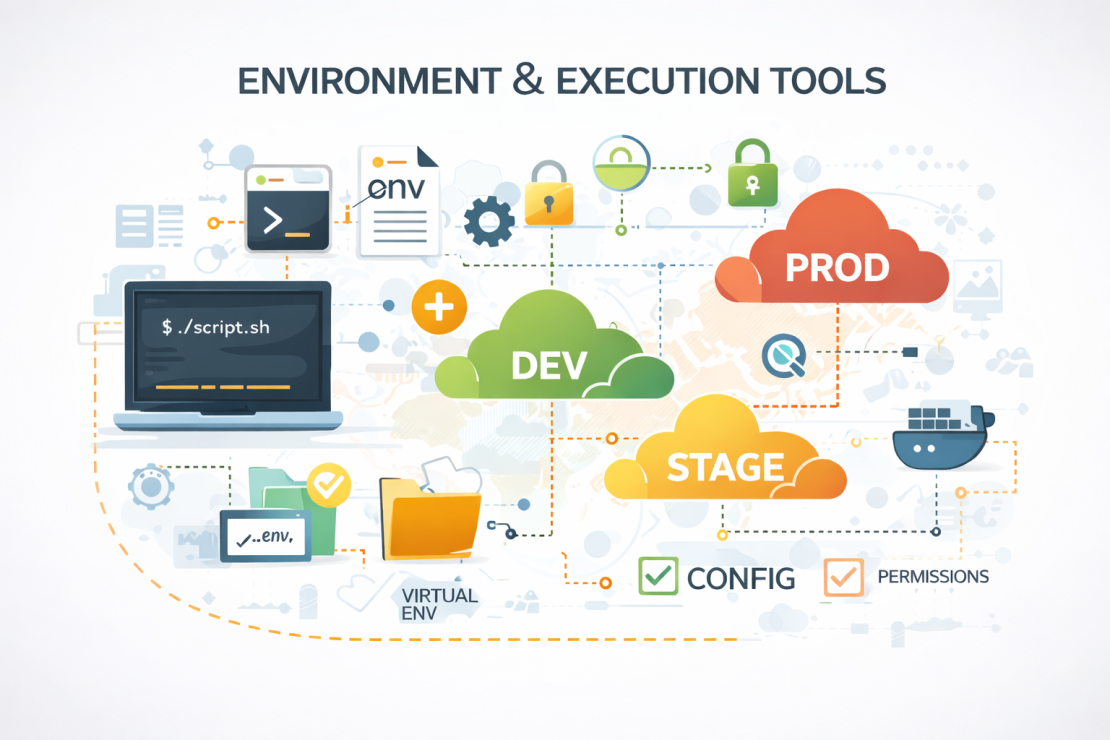
Environment and execution context tools exist to make those differences explicit. They control configuration, isolation, permissions, and defaults so a script runs under known conditions instead of inherited ones. This category of scripting tools is less visible than debuggers or linters, but it quietly decides whether scripts are portable or fragile.
In practice, these tools are already part of most scripting setups, even when they are not treated as such:
- Environment variables and .env files
- Virtual environments and isolated runtimes
- Container-based execution environments
- Shell profiles and execution context settings
- Permission and user-level execution controls
A helpful way to think about this layer is cooking in a different kitchen. The recipe is the same, but the tools, ingredients, and layout are not. If you do not account for those differences, the result changes. The same applies to scripts. Paths, permissions, and configuration values vary between machines, especially in setups that are best for web scripting, where scripts often run across development, staging, and production environments. Making the execution context explicit is what turns a script from something that works once into something that works everywhere.
Where Scripting Tools Depend on the Right Hosting Environment
Even the best tooling stack has limits if the environment underneath it is unstable. Scripts rely on predictable execution, consistent performance, and a secure baseline to do their job properly. When hosting introduces latency spikes, permission inconsistencies, or unexpected downtime, scripting tools end up compensating for problems they were never meant to solve.
This is where infrastructure stops being an abstract concern and becomes part of the scripting workflow itself. Scripts that manage deployments, automate backups, or coordinate services assume the environment will respond reliably. When that assumption breaks, the symptoms look like script failures, even though the root cause sits lower in the stack. At that point, choosing tools or even the best scripting language stops mattering as much as where those scripts actually run.
That is where HostArmada fits in. A fast, consistently available, and securely configured hosting environment removes entire categories of failure before scripts ever execute. Predictable resource allocation, modern security layers, and a 99.9% uptime guarantee mean scripts can focus on logic instead of defensive workarounds. For workflows that are best for web scripting, where automation, scheduled execution, and environment consistency matter every day, the hosting layer quietly becomes one of the most important tools in the chain.
So, check our hosting plans and choose the one that best fits your needs. What Scripting Tools Do You Need For Smooth Operations
