

Announcements / Tuesday July 21, 2026
HostArmada Introduces a New OpenClaw Hosting Experience

HostArmada has launched a new OpenClaw hosting experience that makes it easier to order, configure, deploy, and manage your OpenClaw server.
Previously, OpenClaw hosting was offered through our unmanaged VPS services with additional configuration options. While that setup worked well, it limited our ability to build a smoother ordering process and introduce application-specific features.
To solve this, we created a dedicated AI Apps product group. OpenClaw hosting now has its own product flow, onboarding process, automated setup, and direct dashboard access.
The service still runs on HostArmada infrastructure, and customers do not need to handle the initial server or application installation themselves. The main difference is that the whole experience is now designed specifically around OpenClaw.
1. A Dedicated AI Apps Section
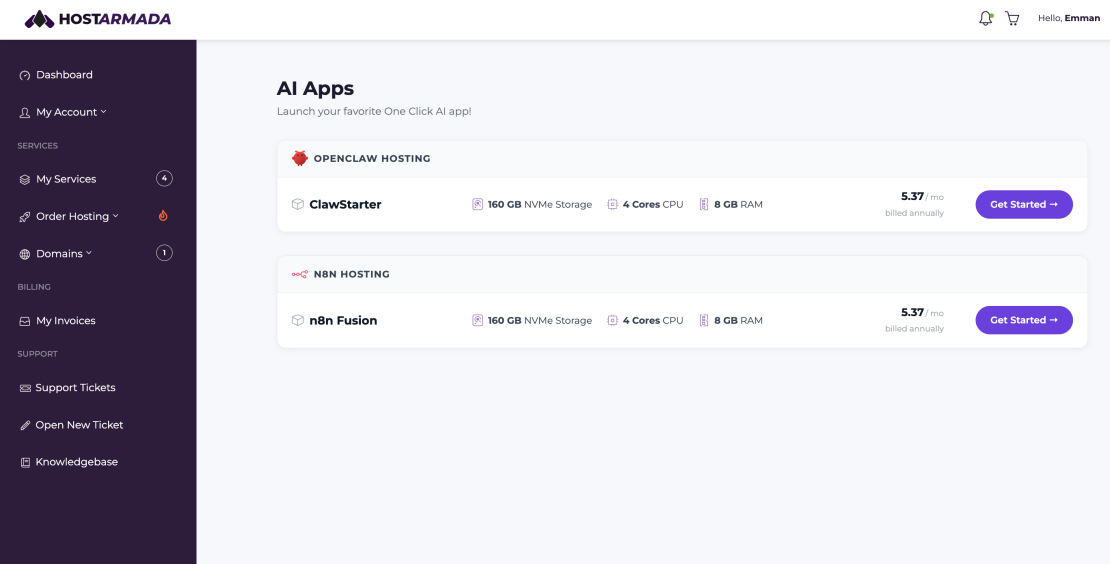
The first visible change is the new AI Apps section on the HostArmada website.
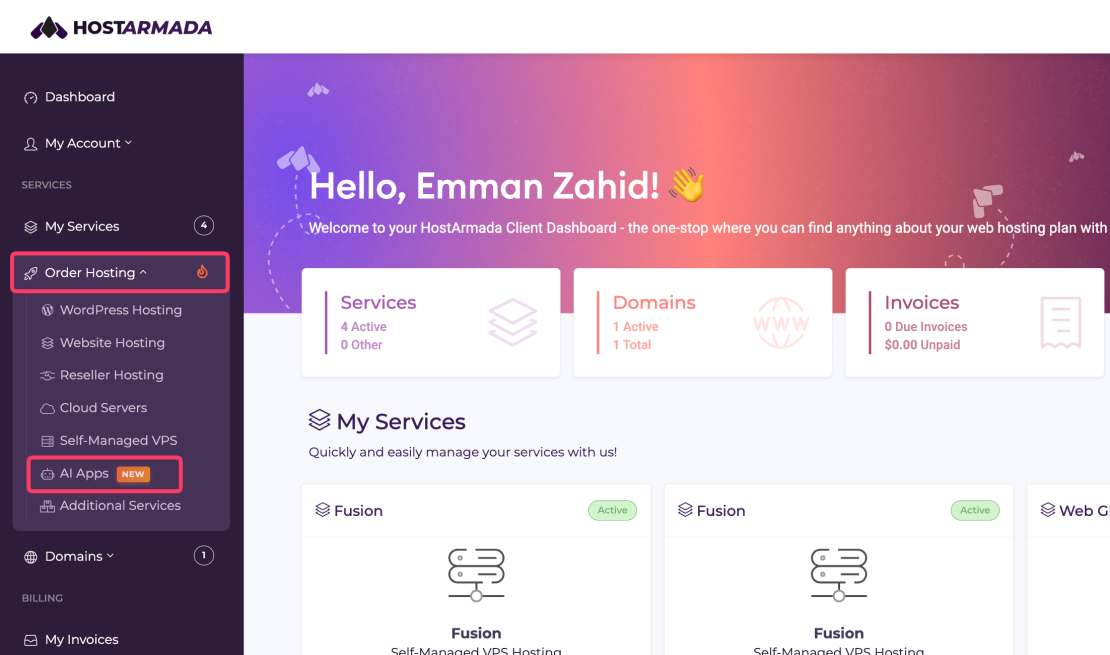
This page brings our AI-related applications and available hosting plans together in one place. Instead of searching through general hosting or VPS products, customers can quickly find the application they want to use and select a suitable plan.
The hosting order menu has also been reorganized, making it easier to identify the right type of hosting service.
2. A Faster OpenClaw Ordering Process
OpenClaw hosting no longer follows the traditional web hosting order flow.
Because OpenClaw does not require customers to register or connect a domain name during checkout, clicking the Get Started button takes you directly to the product configuration page.
HostArmada automatically assigns a hostname to the service. This removes an unnecessary step and helps customers complete their orders more quickly.
You can select the appropriate plan, configure the available options, complete the checkout process, and move directly to onboarding after payment.
3. A Product-Specific Onboarding Flow
Once the order is paid, the onboarding process begins.
The onboarding screen collects the information required to configure the application. Although the process may look similar to the previous setup, the new system allows us to create onboarding flows based on the application being installed.
This means our customers only see the fields and steps that are relevant to their specific hosting plan. For example, here is the onboarding flow for OpenClaw:
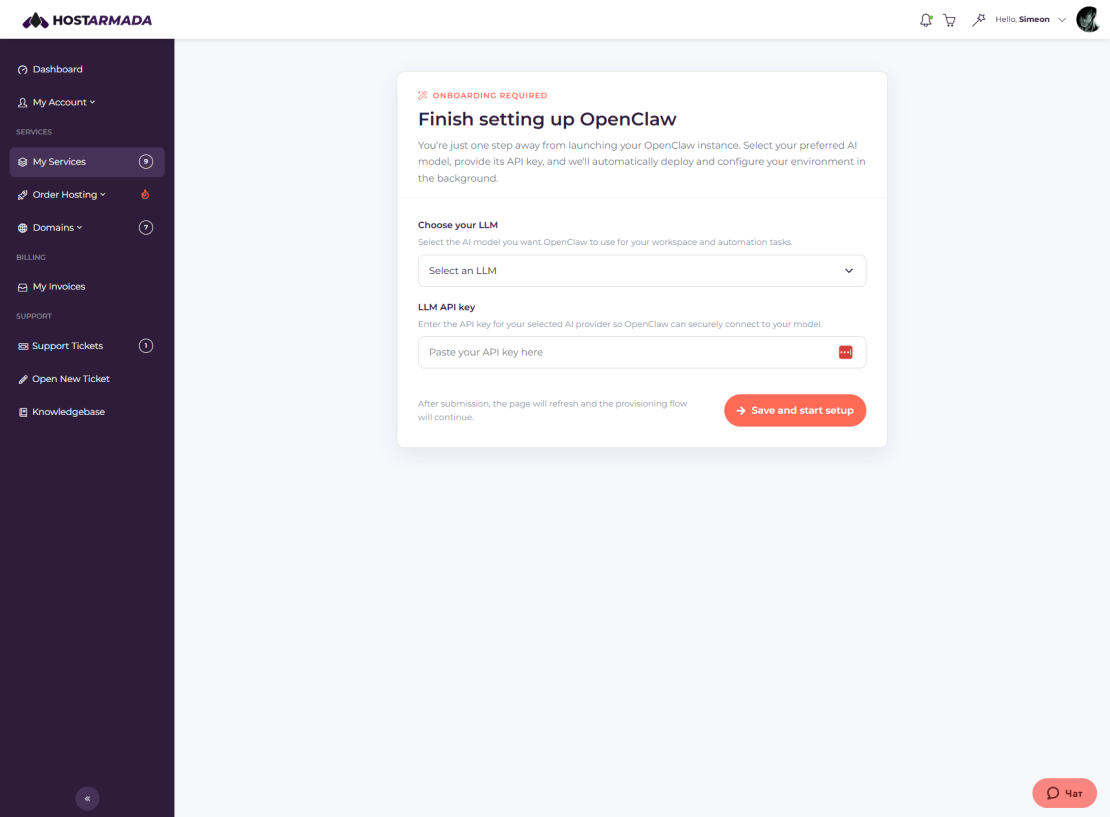
The submitted information is then used during the automated server and application deployment process.
4. Clear Setup Progress and Status Updates
After onboarding is completed, HostArmada begins creating the server.
The service status will initially appear as Creating while the physical server is being provisioned on our infrastructure.
Once the server is ready, the system automatically starts installing OpenClaw. The service status changes again, allowing customers to see that the application installation is in progress.
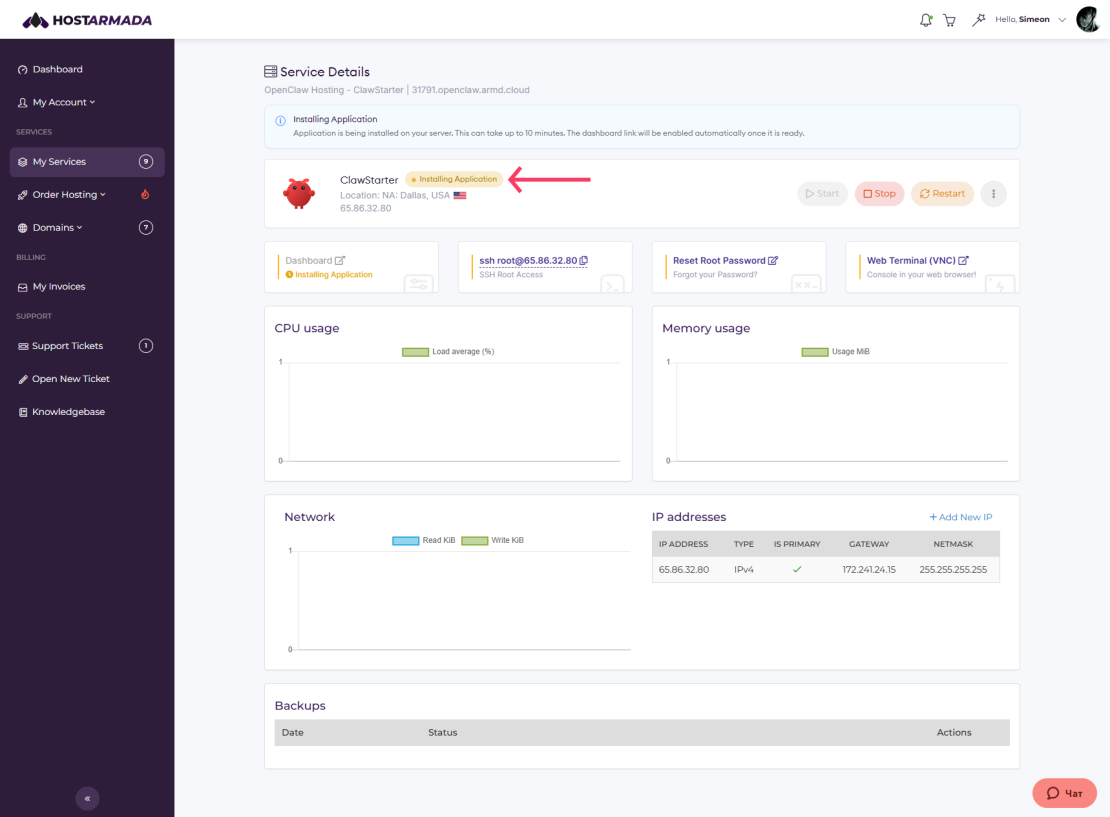
This gives customers a clearer picture of what is happening during setup instead of leaving them unsure about the current stage of deployment.
5. Direct Access to the OpenClaw Dashboard
When the OpenClaw installation is complete, a Dashboard link becomes available in the customer area.
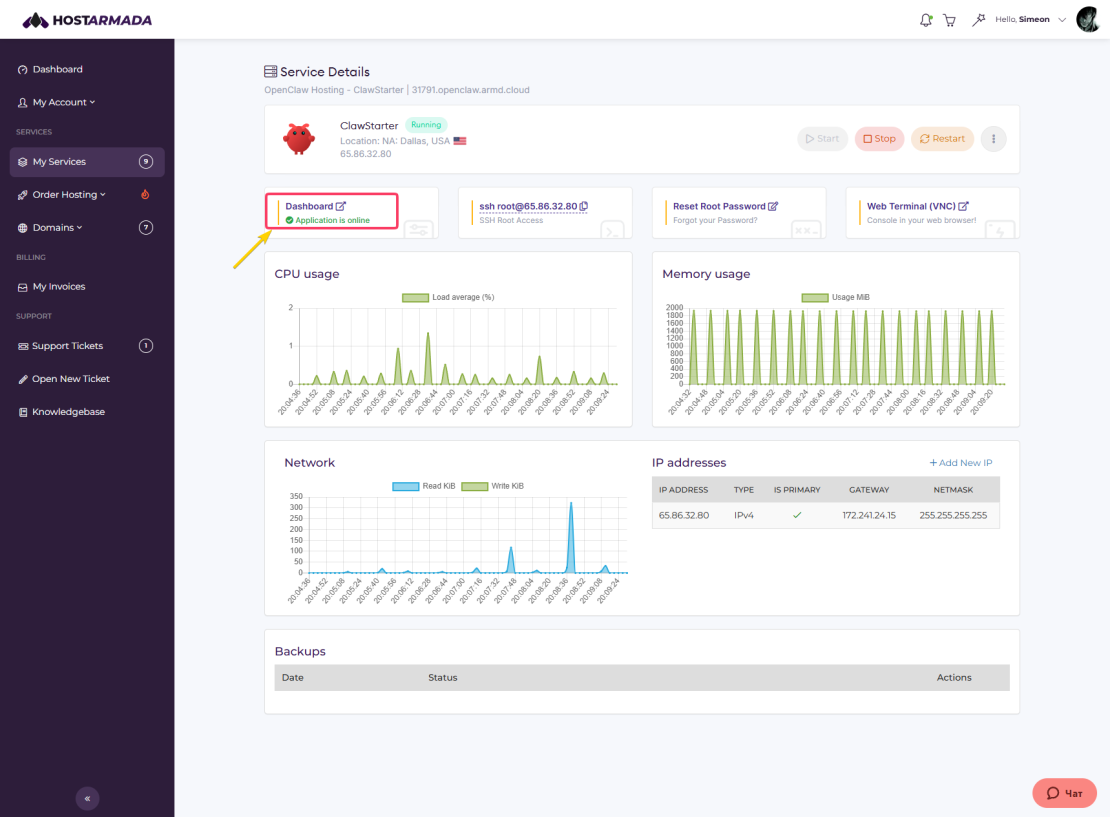
Clicking this link takes the customer directly to the OpenClaw dashboard. For OpenClaw services, the customer is logged in automatically, so there is no need to locate separate login credentials or manually enter the server address.
Dashboard behavior may differ for other applications. Some services may require an additional application-specific setup step after the server installation is complete.
6. Full Server Management Controls
The new OpenClaw hosting service keeps the server management features available with our unmanaged hosting products.
Customers can still perform common server actions, including:
- Starting the server
- Stopping the server
- Restarting the server
- Reviewing the current service status
- Reinstalling the service
These controls remain available through the HostArmada customer area.
7. Improved Reinstallation
The reinstall option has also been improved for OpenClaw hosting.
Reinstalling the service does more than recreate the server. The system also uses the information previously submitted during onboarding to install OpenClaw again with the same configuration details.
Customers do not need to repeat the onboarding process after each reinstall.
Note: Please keep in mind that reinstalling a server removes the existing data stored on that server. Important information should always be backed up before starting a reinstall.
Why We Changed the OpenClaw Hosting Setup
The previous OpenClaw setup was built around an existing unmanaged VPS service. It allowed us to offer OpenClaw hosting, but it was not flexible enough for the experience we wanted to create.
By introducing a dedicated product group, we can now build features around the needs of each application.
For OpenClaw customers, this means:
- A clearer product selection process
- No unnecessary domain selection step
- A dedicated onboarding flow
- Automated server provisioning
- Automated OpenClaw installation
- Visible setup progress
- Direct dashboard access
- Easier application reinstallation
This new structure also gives us a stronger foundation for adding more hosted applications in the future.
FAQs
HostArmada OpenClaw hosting is an application-focused hosting service that includes server provisioning, automated OpenClaw installation, a dedicated onboarding process, and direct dashboard access through the HostArmada customer area.
No. OpenClaw hosting does not require a domain name during checkout. HostArmada automatically assigns a hostname to the service, and the order takes you directly to the product configuration page.
The installation starts after payment and onboarding are completed. The total setup time can vary depending on server provisioning and application installation. Customers can follow the progress through the service status shown in their HostArmada account.
The reinstall process recreates the server and installs OpenClaw again using the information previously provided during onboarding. You will not need to complete the onboarding form again. Reinstallation removes existing server data, so you should create a backup before proceeding.
