

SEO / Tuesday July 21, 2026
How to Use Google Search Operators for SEO Indexation Audits

Google search operators help you check which pages Google has indexed, uncover duplicate or thin content, inspect URL structures, and identify pages that should not appear in search results.
Commands such as site:, intitle:, inurl:, and exact-match quotation searches provide a fast way to audit your site directly in Google. They do not replace Google Search Console or a full crawler, but they are useful for quick indexation checks and manual verification.
This guide explains how to combine these operators to audit indexation, duplicate content, keyword targeting, and low-value URLs.
What Are Google Search Operators?
Google search operators are special characters or commands that refine search results. Instead of performing a standard search, operators tell Google exactly what to look for.
For SEO professionals, these operators help answer questions like:
- Which pages are indexed?
- Are there duplicate or outdated URLs?
- Is Google indexing the right version of my site?
- Are important pages missing from search results?
You don’t need coding skills or paid software – just a browser and a bit of strategy.
Why Indexation Audits Matter for SEO
If a page isn’t indexed, it cannot rank. If the wrong pages are indexed, they can dilute authority, confuse search engines, and weaken your site’s overall performance. Indexation issues are common after site migrations, CMS changes, plugin updates, or even small technical misconfigurations.
Running regular indexation checks helps you:
- Ensure important pages are discoverable
- Identify outdated or low-value URLs in Google’s index
- Catch technical SEO issues early
- Improve crawl efficiency and keyword focus
Even with strong on-page optimization, poor hosting performance or unstable server responses can affect how Google crawls your site. This is why performance-optimized hosting environments, such as those provided by HostArmada, play a critical role in supporting SEO efforts.
1. Use the site: Operator to Check Indexed Pages
The most useful starting point for an indexation audit is the site: operator. It displays a sample of pages Google has indexed from a specific domain, although the reported result count is approximate.
Example:
site:yourwebsite.com

This search gives you a broad overview of your site’s presence in Google’s index. While the total number of results is only an estimate, the real value lies in scanning the types of pages that appear.
You should carefully review:
- URLs that no longer exist or should not be indexed
- Staging, test, or development pages
- Parameterized URLs with tracking codes
- Thin pages, such as empty tags or archives
If Google indexes many low-value URLs, important pages may become harder to monitor, internal ranking signals may become less focused, and users may encounter poor search results.
Important: Google’s
site:results are not a complete or exact count of indexed URLs. Use Google Search Console’s Page Indexing report and URL Inspection tool when you need authoritative page-level confirmation.
2. Audit Specific Website Sections and Folders
You can refine indexation checks by targeting specific folders or sections of your site.
Examples:
- site:yourwebsite.com/blog
- site:yourwebsite.com/category
- site:yourwebsite.com/products
This is particularly useful for larger sites where content is organized into directories. If key sections show very few indexed pages, it may indicate internal linking issues, crawl restrictions, or accidental noindex directives.
Conversely, if non-essential sections are heavily indexed, you may need to tighten your indexing strategy.
Pro Tip: A healthy site doesn’t aim to index everything – it aims to index the right things. Quality and relevance matter more than volume.
3. Find Duplicate Content with Exact-Match Searches
Duplicate content is one of the most common SEO problems, and it often goes unnoticed. Google search operators help quickly identify duplication.
Using quotation marks forces Google to return pages containing an exact phrase.
Example:
“we provide reliable hosting solutions for businesses”
If this phrase appears on multiple pages within your site, Google may struggle to determine which page is most relevant for ranking.
To narrow the results to your own site, combine quotation marks with the site: operator.
Example:
site:yourwebsite.com “we provide reliable hosting solutions for businesses”
This shows every indexed page on your domain containing that exact sentence. Repeated use of identical paragraphs, introductions, or product descriptions can weaken your SEO performance, even if the content was unintentionally duplicated.
4. Distinguish Boilerplate from Harmful Duplicate Content
Not all repetition is bad. Footer text, navigation elements, and legal disclaimers are expected to repeat across pages. The problem arises when core content sections are duplicated.
Pay close attention to:
- Page introductions
- Product descriptions
- Service explanations
- FAQ blocks reused across multiple pages
If the same main content appears on many URLs, consider consolidating pages or rewriting content to be more specific and unique.
5. Audit Title Keywords with the intitle: Operator
The intitle: operator lets you see which pages include a keyword in their title tags.
Example:
intitle:cloud hosting
This is useful for understanding keyword competition, but it’s even more powerful when combined with your own domain.
Example:
site:yourwebsite.com intitle:cloud hosting
If important keywords are missing from your title tags, you’re likely missing ranking opportunities. If too many pages target the same keyword, you may be causing keyword cannibalization.
A balanced approach ensures each page has a clear purpose and a distinct keyword focus.
6. Review Indexed URL Structures with inurl:
The inurl: operator searches for keywords within URLs.
Example:
site:yourwebsite.com inurl:blog
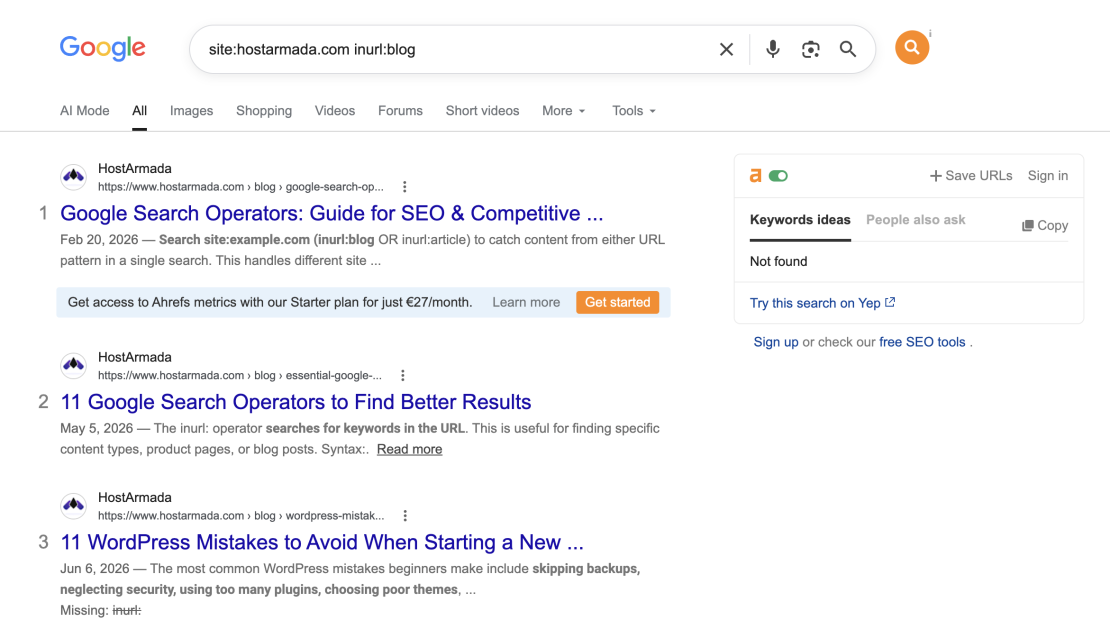
This helps you:
- Confirm consistent URL structures
- Identify parameter-based URLs
- Find duplicate or autogenerated pages
Clean, descriptive URLs are easier for users and search engines to understand. When combined with fast server response times and proper caching (areas where HostArmada’s hosting infrastructure excels), clean URLs improve crawl efficiency.
7. Finding Thin and Low-Value Pages
Thin content pages often exist without intent. They may rank for nothing, but still consume crawl budget and dilute site authority. This is why creating E-E-A-T and people-first content is important.
Search operators can help surface these pages.
Examples:
- site:yourwebsite.com “no results found”
- site:yourwebsite.com “page not found”
- site:yourwebsite.com “lorem ipsum”
You should evaluate whether these pages:
- Serve a real user purpose
- Can be improved with meaningful content
- Should be merged with other pages
- Should be excluded from indexing
Removing or improving low-value pages often leads to better overall SEO performance.
8. Check Whether Important Pages Are Indexed
Sometimes the problem isn’t over-indexation – it’s missing pages.
To check a specific page, use:
site:yourwebsite.com/important-page
If the page does not appear:
- Check for noindex directives
- Review canonical tags
- Ensure the page is internally linked
- Verify that the server returns a proper 200 status code
Hosting stability matters here. Pages hosted on slow or unstable servers may fail to be crawled consistently, delaying or preventing indexation.
9. Advanced Search Operator Combinations
More experienced users can combine operators to uncover deeper issues.
Examples:
- site:yourwebsite.com inurl:?utm=
- site:yourwebsite.com intitle:”thank you”
- site:yourwebsite.com “powered by”
These searches help detect tracking parameter duplication, confirmation pages being indexed, or leftover CMS footprints that shouldn’t appear in search results.
Pro tip: Search operators are excellent for spot checks and validation, but they work best alongside tools like Google Search Console and professional crawlers.
How to Interpret Search Operator Results
Using operators is easy. Understanding the results is where expertise comes in. Here are some of the red flags to act on:
- Too many low-value pages indexed
- Duplicate URLs ranking instead of main pages
- Important pages missing from site: results
- Old HTTP pages still indexed
- Excessive parameter URLs
In order to fix this:
- Apply noindex where appropriate
- Use canonical tags correctly
- Improve internal linking
- Clean URL structures
- Submit updated sitemaps in Google Search Console
A fast, secure hosting environment, such as HostArmada’s SSD-powered, cloud-based hosting, supports these fixes by improving crawl efficiency and page reliability.
Search Operators vs. Google Search Console and SEO Tools
Search operators don’t replace tools like Google Search Console or professional SEO platforms – but they complement them perfectly.
| Feature | Search Operators | SEO Tools |
| Quick index check | ✅ | ✅ |
| Duplicate content detection | ✅ | ✅ |
| Crawl error details | ❌ | ✅ |
| Manual verification | ✅ | ❌ |
Smart SEOs use both.
Best Practices for Ongoing Indexation Audits
Indexation changes over time as new content is published, site structures evolve, and technical settings are updated. Even well-optimized websites can gradually develop indexation issues if they are not reviewed regularly.
Performing routine indexation audits helps ensure that Google continues to index the right pages, ignores low-value URLs, and accurately reflects your current site structure.
Search operators make these checks quick and repeatable, but Google Search Console should remain the primary source for confirming page-level indexing status.
Here are some of the best practices you should follow:
- Run a site: check monthly to identify unexpected URLs, missing pages, or sudden shifts in indexed content.
- Audit new sections after publishing to confirm they are discoverable, indexed, and properly linked internally.
- Re-check after migrations or redesigns to ensure old URLs are dropping out, and new ones are indexed correctly.
- Monitor duplicate content quarterly by searching for repeated text that may cause ranking conflicts.
- Pair audits with performance monitoring to detect crawl or indexing delays caused by server or response issues.
Build Search Operators into Your SEO Audit Workflow
Search operators are often treated as quick tricks, but their real value lies in their consistent use. When applied regularly, they become an early-warning system for SEO issues that tools may overlook or report too late. They show you what Google is actually indexing, not what your CMS or analytics platform assumes is visible.
By integrating search operator checks into your ongoing SEO workflow, you gain better control over index quality. You can prevent low-value pages from diluting authority, ensure important content is discovered promptly, and catch duplication before it affects rankings. Over time, this leads to a cleaner index, clearer keyword focus, and more predictable search performance.
Most importantly, search operators encourage proactive SEO. Instead of reacting to traffic drops or ranking losses, you can identify indexation and content problems while they are still small and manageable.
Combined with sound technical practices, thoughtful content creation, and regular performance monitoring, these simple queries help align your site with how search engines actually evaluate and rank pages.
Google Search Operators FAQs
The simplest method is using the site: operator (e.g., site:example.com) combined with Google Search Console for deeper insights.
Yes. Use an exact-match quotation search with site:example.com to find repeated text within your own website. Use the same quotation search with -site:example.com to look for copies on other domains.
For most sites, a full audit every quarter is ideal, with quick indexation checks performed monthly or after major updates.
No. They complement SEO tools by providing quick, real-time visibility into Google’s index, but tools are still needed for technical diagnostics and tracking.
