

WordPress / Friday October 16, 2026
Best WordPress Speed Optimization Plugins (Latest Test Results)
The best WordPress speed optimization plugin depends on your web server, CDN setup, and whether you prioritize fast browser loading or stable performance under traffic.
Over the past few months, we tested several of the most popular WordPress performance solutions across two different web server environments:
- LiteSpeed
- NGINX
We also tested each setup with and without an external CDN wherever the plugin allowed us to do so.
Our goal was not simply to produce the highest possible GTmetrix or PageSpeed score. We wanted to understand how each configuration behaves during continuous traffic, how quickly a page appears in a real browser, and how much the underlying web server affects the final result.
The plugins and optimization solutions included in our tests were:
- LiteSpeed Cache
- WP Rocket
- NitroPack
- AccelerateWP with MAx Cache
Here’s what we found.
The Plugins We Tested
1. LiteSpeed Cache
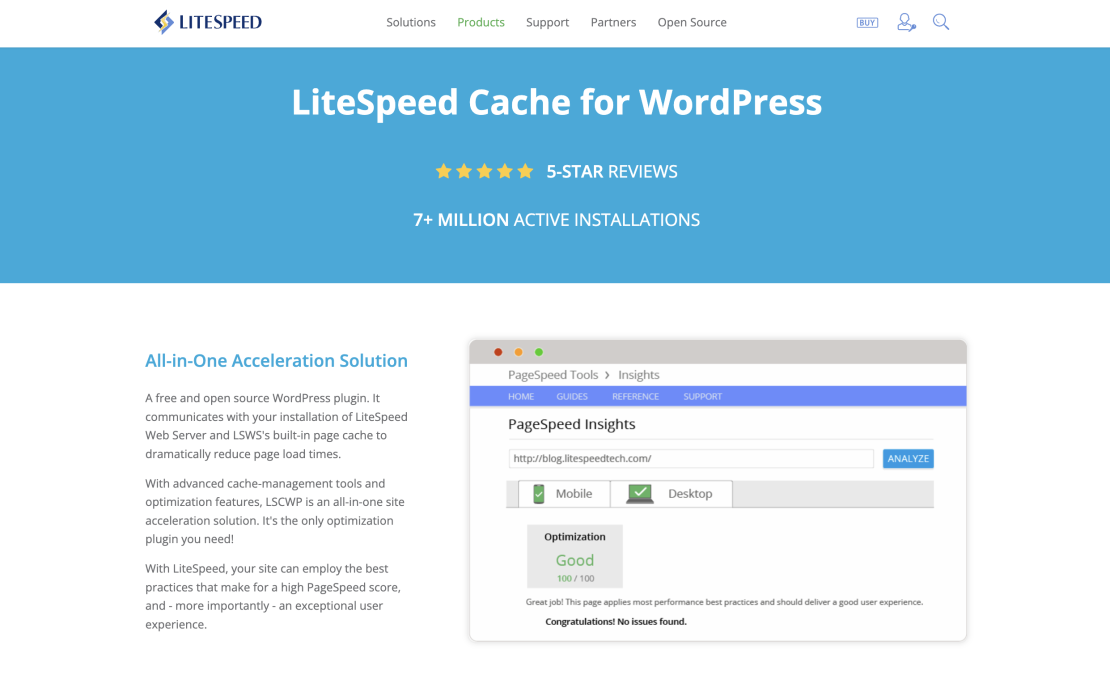
LiteSpeed Cache for WordPress is more than a standard WordPress caching plugin. Its full-page caching system communicates directly with the cache engine built into the LiteSpeed Web Server.
Instead of asking WordPress and PHP to rebuild a page for every visitor, LiteSpeed can serve an already compiled version of the page directly from its server-level cache. This reduces PHP processing, database work, and server load while delivering incredibly fast page load speeds to the visitor’s browser.
The plugin also includes many familiar optimization features, such as:
- CSS and JavaScript optimization
- Lazy loading
- Image optimization
- Browser caching
- Database cleanup
- Object-cache integration
- CDN support
- QUIC.cloud integration
LiteSpeed Cache can be installed on Apache or NGINX, but its main server-level page-caching functionality requires LiteSpeed Web Server, OpenLiteSpeed, or QUIC.cloud. On other web servers, it can still perform front-end optimization, but it cannot use the native LiteSpeed page-cache engine.
Best Suited For: Websites hosted on LiteSpeed Enterprise Web Server.
Main Advantage: Deep integration between WordPress and the web server.
Potential Drawback: Many of its most important caching benefits are unavailable on a standard NGINX or Apache setup.
2. WP Rocket

WP Rocket is a premium WordPress caching and performance plugin designed to work on a wide variety of hosting environments.
It creates cached HTML versions of WordPress pages and adds front-end optimizations such as:
- Page caching
- Cache preloading
- CSS and JavaScript optimization
- Lazy loading
- Delayed JavaScript execution
- Database cleanup
- CDN integration
- Browser caching
WP Rocket officially supports Apache, NGINX, LiteSpeed, OpenLiteSpeed, and Microsoft IIS. This makes it one of the more flexible choices when the hosting platform does not provide a tightly integrated server-level WordPress cache.
On Apache and LiteSpeed environments, WP Rocket can use server configuration rules for certain features. On NGINX, some behavior may depend on how the hosting provider has configured the server because NGINX does not process .htaccess files.
Best Suited For: Website owners who want a relatively straightforward premium optimization plugin that works across different hosting environments.
Main Advantage: Broad compatibility and a user-friendly configuration process.
Potential Drawback: It does not have the same native connection to LiteSpeed’s server-level cache that LiteSpeed Cache has.
3. NitroPack

NitroPack takes a different approach. It is an all-in-one, cloud-based website optimization service rather than only a traditional local caching plugin.
Its service combines:
- Page caching
- CSS optimization
- JavaScript optimization
- Critical CSS generation
- Image optimization
- Lazy loading
- Built-in CDN delivery
- Automatic resource compression
NitroPack stores most optimized resources on its CDN, while some page-cache files may also be stored on the website’s hosting account. Its CDN is a core part of the service rather than a completely separate optional addition.
This is important when interpreting our tests. NitroPack appears in the workbook labeled “without CDN,” but those test rows still use NitroPack’s integrated CDN. A completely CDN-free NitroPack comparison would not represent the product’s normal operating model.
Because much of the optimization work is performed through NitroPack’s platform, it can produce strong browser-based results on both LiteSpeed and NGINX.
Best Suited For: Website owners who want an automated service that handles caching, code optimization, image optimization, and CDN delivery in one package.
Main Advantage: Strong visual loading results with relatively little manual configuration.
Potential Drawback: The service is closely tied to its external optimization platform and CDN usage limits.
4. AccelerateWP with MAx Cache
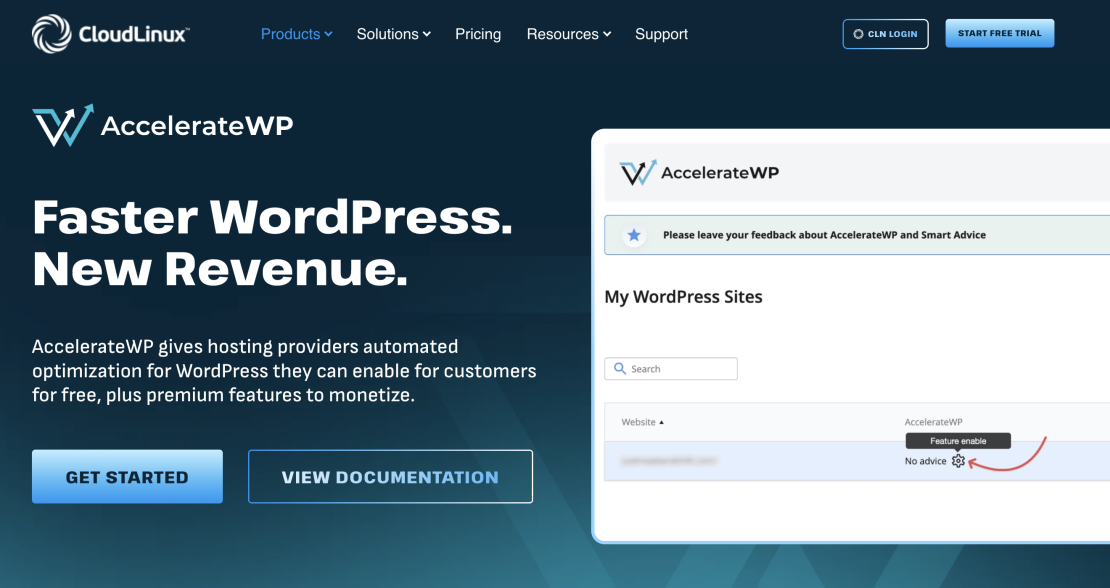
AccelerateWP is CloudLinux’s WordPress performance solution. In our tests, it was combined with MAx Cache on the NGINX server.
MAx Cache is a native web-server caching module. It can serve pre-generated static HTML pages directly through NGINX or Apache without starting PHP for every cached request.
This matters under heavier traffic. Bypassing PHP reduces the amount of work required to answer each request and helps the server handle more simultaneous visitors.
CloudLinux currently provides MAx Cache modules for both Apache and NGINX. On NGINX, the module reads the cache files generated through AccelerateWP and serves them directly from the web server.
AccelerateWP also provides features such as page optimization, object-cache integration, database cleanup, Heartbeat control, and CDN integration, depending on the hosting provider’s configuration.
Best Suited For: WordPress websites hosted on CloudLinux servers where the hosting provider has enabled AccelerateWP and the appropriate MAx Cache module.
Main Advantage: Server-level cache delivery on NGINX or Apache without invoking PHP on a cache hit.
Potential Drawback: Its strongest features depend on server-side components installed by the hosting provider. It is not simply a plugin that can reproduce the same setup on every hosting account.
How We Performed the Tests
A single performance score cannot describe the complete experience of a WordPress website.
For that reason, we used three different testing methods:
- k6 continuous-load testing
- GTmetrix
- Google PageSpeed Insights
Each test answers a different question.
The Web Server Environments
We tested two server environments:
LiteSpeed Web Server
LiteSpeed includes a native cache engine that can serve cached WordPress pages at the server level. When it is paired with the LiteSpeed Cache plugin, the web server and WordPress can coordinate cache generation, expiration, and purging.
This is why LiteSpeed Cache was tested only in the environment where its complete caching system could operate.
NGINX
NGINX is widely used as a high-performance web server and reverse proxy. It has an event-driven architecture and can handle large numbers of connections efficiently.
However, NGINX does not automatically provide a WordPress-aware full-page cache. The exact caching behavior depends on the server configuration, a hosting-level cache such as MAx Cache, or a WordPress caching plugin.
Testing NGINX gave us a useful comparison between plugin-managed caching and a server-level NGINX caching solution.
Which HostArmada Plans Provide These Web Servers?
Our Speed Reaper Shared Hosting plans are designed for websites where loading speed is a major priority. These plans allow us to provide LiteSpeed Web Server and its native caching technology.
LiteSpeed is also available with suitable configurations of our Managed Cloud Server plans. A managed server gives us more control over the web-server stack and allows the environment to be configured around the needs of the website.
Our other hosting environments may use a different web-server and caching stack, including NGINX-based technology. This is why we tested both LiteSpeed and NGINX instead of assuming that a plugin will produce the same result everywhere.
The most important point is that a WordPress plugin does not operate in isolation. The web server, PHP configuration, available CPU and memory, server cache, CDN, website design, and traffic pattern all influence the final result.
What Is k6 Testing?
k6 is a performance and load-testing tool that simulates traffic using virtual users.
Instead of opening a website once and measuring that single visit, k6 can send requests continuously and record how the server responds over time. Increasing the number of virtual users creates more simulated traffic.
For each configuration, our dataset contains approximately 7,000 requests and records:
- Average response time
- Median response time
- 90th-percentile response time
- 95th-percentile response time
- Maximum response time
- Failed-request percentage
- Data transferred
The percentile results are especially useful.
For example, a P95 response time of 250 milliseconds means that 95 percent of the measured responses completed within 250 milliseconds. This gives us a better picture than looking only at an average, which can hide occasional slow requests.
Why Test Continuous Traffic?
A website can look extremely fast when one visitor opens a cached page. That does not mean it will remain fast when traffic increases.
Continuous-load testing helps reveal:
- Whether response times increase under traffic
- Whether the server starts producing errors
- Whether the cache continues to work consistently
- Whether occasional requests become much slower than the average
- How efficiently the hosting stack handles repeated requests
This is particularly important for online stores, campaign landing pages, news websites, membership sites, and businesses that receive sudden traffic spikes.
All configurations in our k6 data completed the tests with a reported failed-request rate of 0 percent. The meaningful difference was therefore response speed and consistency rather than basic availability.
Why Use GTmetrix?
GTmetrix loads the page in a browser and records how its visible and technical resources behave.
Our dataset focuses on:
- GTmetrix grade
- Fully Loaded Time
- Speed Index
Fully Loaded Time measures when the page has finished its loading activity according to GTmetrix’s test conditions. GTmetrix notes that this can include resources that load after the main visible content, so it should not be treated as the only measure of user experience.
Speed Index focuses more closely on how quickly the visible content appears.
This makes GTmetrix useful for identifying cases where a website responds quickly at the server level but still takes longer to display because of CSS, JavaScript, fonts, images, or third-party scripts.
Why Use Google PageSpeed Insights?
Google PageSpeed Insights uses Lighthouse to evaluate page performance and identify potential improvements.
Lighthouse examines several parts of the page-loading process, including visual rendering, main-thread work, CSS, JavaScript, image delivery, and layout behavior.
The spreadsheets include the desktop Speed Index from these tests.
Speed Index measures how quickly content becomes visually visible while the page is loading. A lower result is better. Google currently considers a desktop Speed Index of up to approximately 1.3 seconds fast, between 1.3 and 2.3 seconds moderate, and above 2.3 seconds slow.
PageSpeed testing is useful because it focuses on what happens inside the browser. k6 focuses primarily on server response under load. We need both views to understand the complete performance picture.
Test Results With a CDN
LiteSpeed Server Results With a CDN
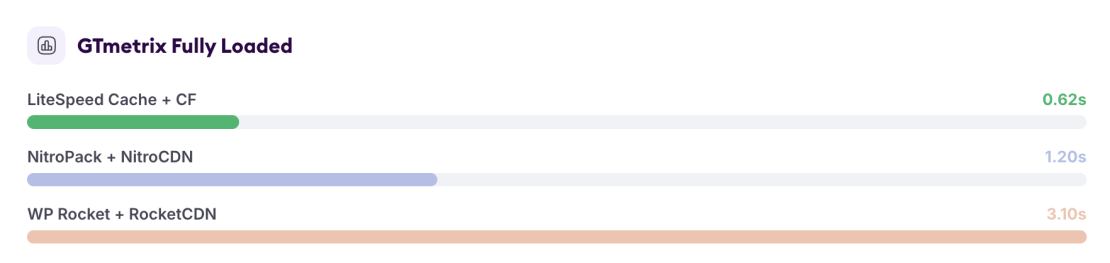
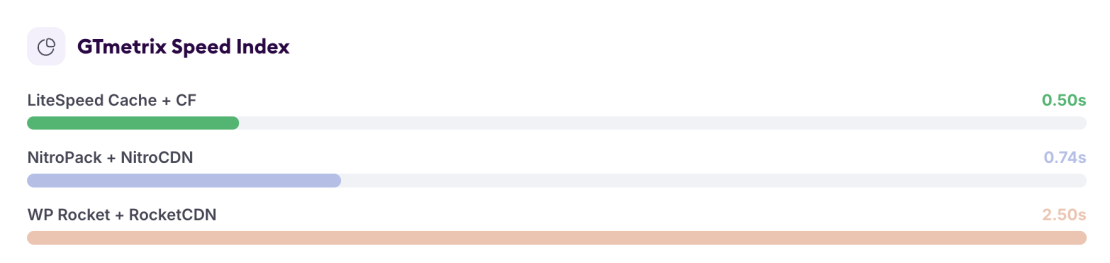
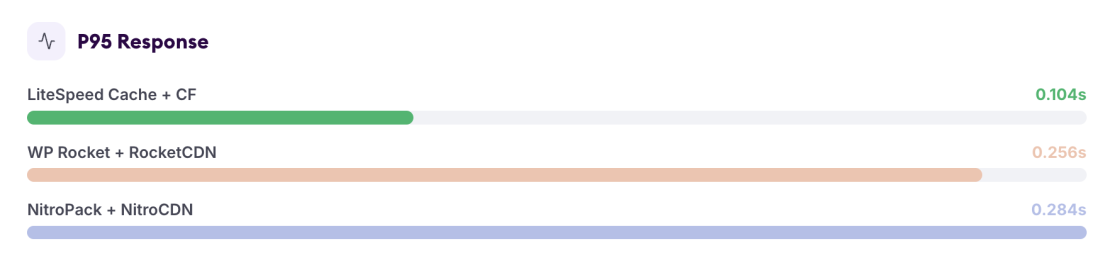
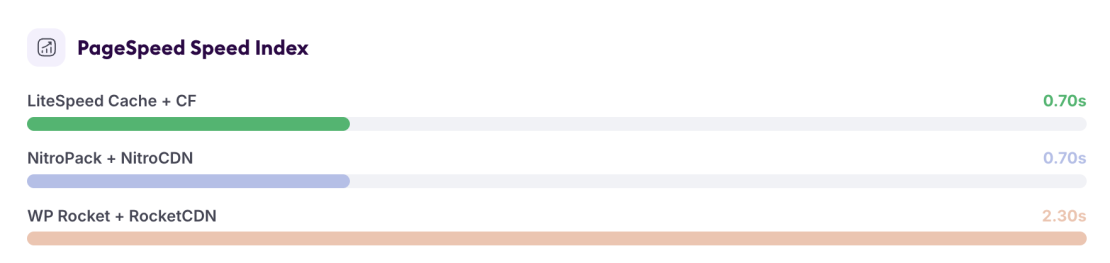
Winner on LiteSpeed With a CDN: LiteSpeed Cache With Cloudflare
This was the clearest result in the entire comparison.
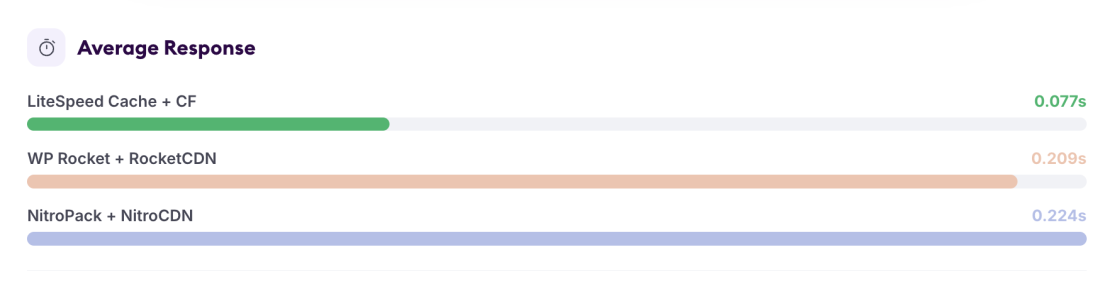
LiteSpeed Cache with Cloudflare recorded:
- The lowest average k6 response time
- The lowest median response time
- The lowest P90 response time
- The lowest P95 response time
- The fastest GTmetrix Fully Loaded Time
- The fastest GTmetrix Speed Index
- A PageSpeed Speed Index tied with NitroPack
Its average response time of 76.54 milliseconds was approximately 63 percent lower than WP Rocket’s and approximately 66 percent lower than NitroPack’s in the same LiteSpeed environment.
The result shows the advantage of matching the optimization plugin to the web server. LiteSpeed Cache was able to use the native LiteSpeed caching engine, while Cloudflare handled content delivery closer to visitors.
NitroPack also produced an excellent visual result. Its 0.74-second GTmetrix Speed Index and 0.70-second PageSpeed Speed Index were very strong, but its response times during the k6 test were considerably higher.
WP Rocket was stable and completed the test without errors, but it finished behind the other two solutions in both load testing and visual loading metrics.
NGINX Server Results With a CDN
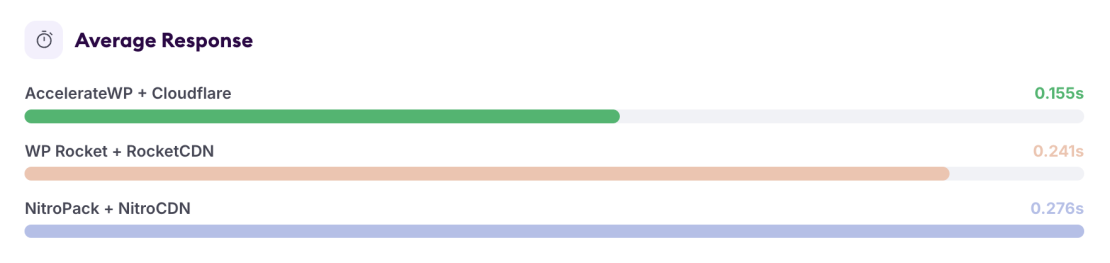
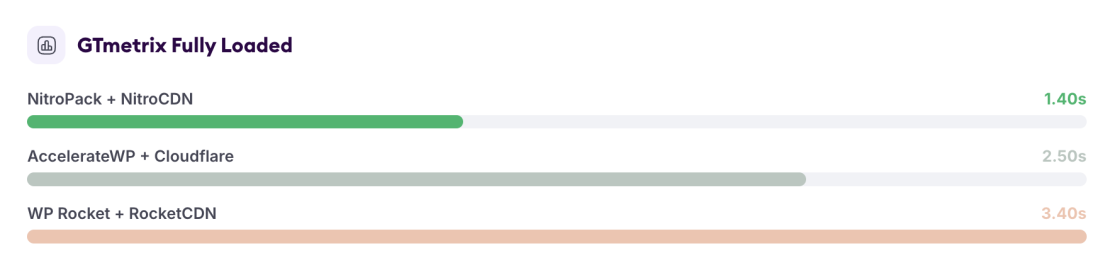
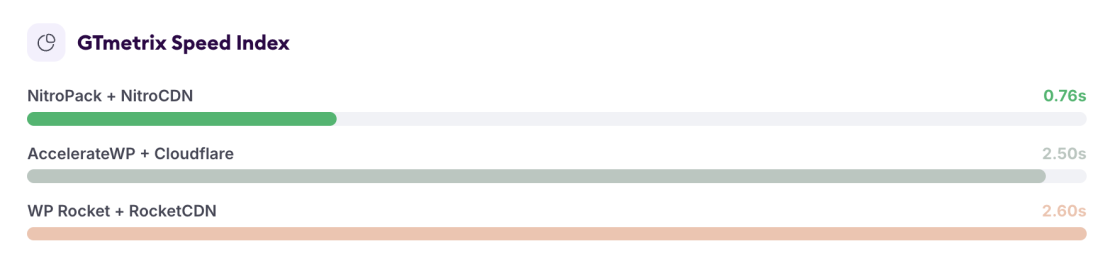
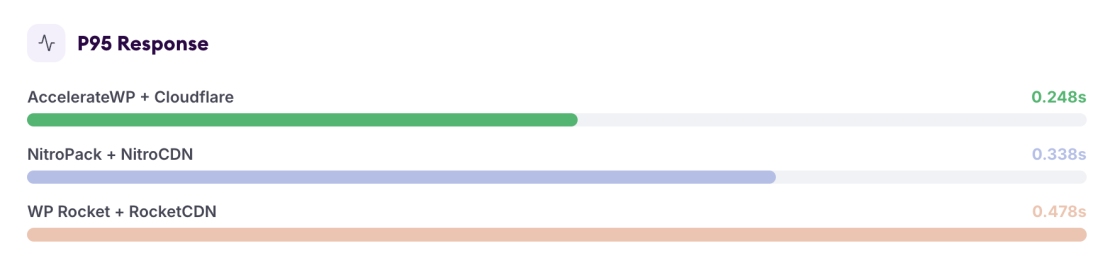
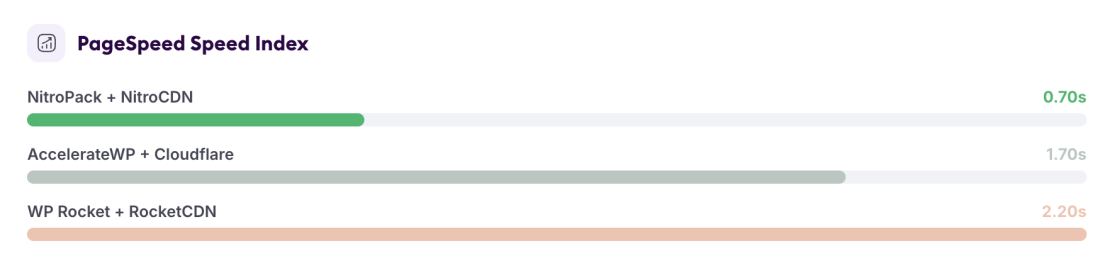
Winner on NGINX With a CDN: AccelerateWP for Load Handling, NitroPack for Visual Loading
There was no single solution that won every NGINX metric.
AccelerateWP with Cloudflare delivered the strongest k6 performance:
- 155.09-millisecond average response time
- 137.16-millisecond median response time
- 248.15-millisecond P95 response time
- 0 percent failed requests
Its average response time was approximately 36 percent lower than WP Rocket’s and approximately 44 percent lower than NitroPack’s.
NitroPack, however, was much faster in the browser-based tests:
- 1.40-second GTmetrix Fully Loaded Time
- 0.76-second GTmetrix Speed Index
- 0.70-second PageSpeed Speed Index
For websites expecting sustained or simultaneous traffic, AccelerateWP produced the strongest server-response result in this category.
For websites where visual loading scores and minimal configuration are the main priorities, NitroPack produced the better front-end result.
WP Rocket again provided stable performance but did not lead any of the main measurements.
Test Results Without an External CDN
There is an important qualification in this section.
The NitroPack rows still include NitroPack’s integrated CDN. NitroPack uses CDN delivery as a central part of its normal optimization process, so those results should not be treated as a strictly CDN-free configuration.
For the cleanest comparison of performance without an external CDN, the main comparisons are:
- LiteSpeed Cache versus WP Rocket on LiteSpeed
- AccelerateWP versus WP Rocket on NGINX
LiteSpeed Server Results Without an External CDN
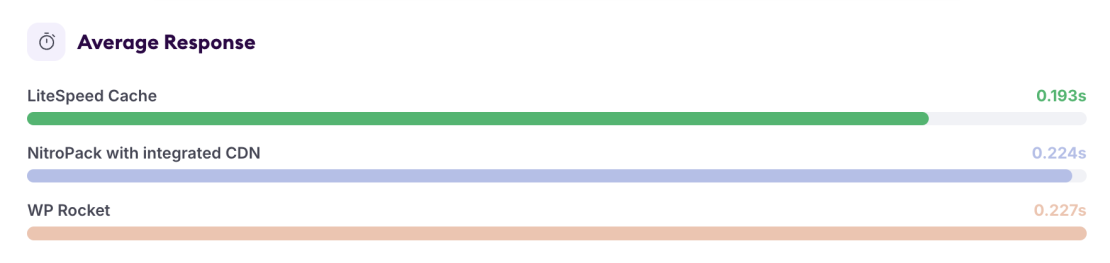
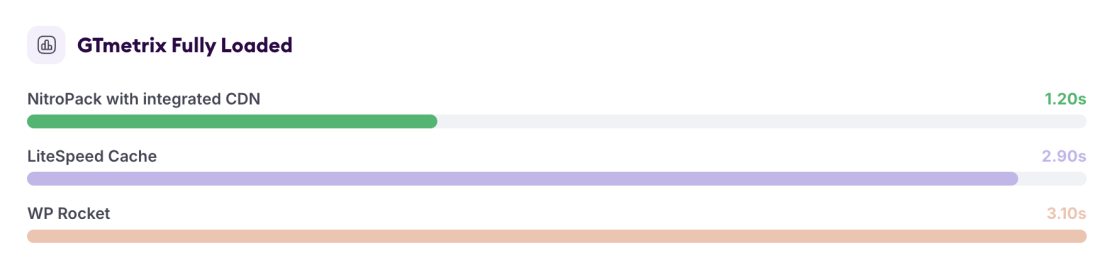
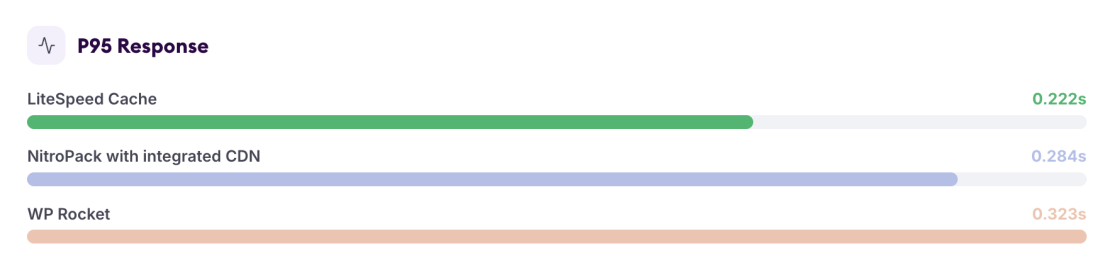
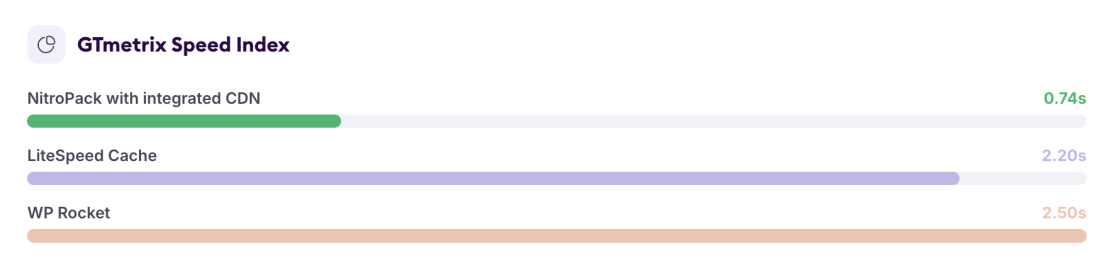
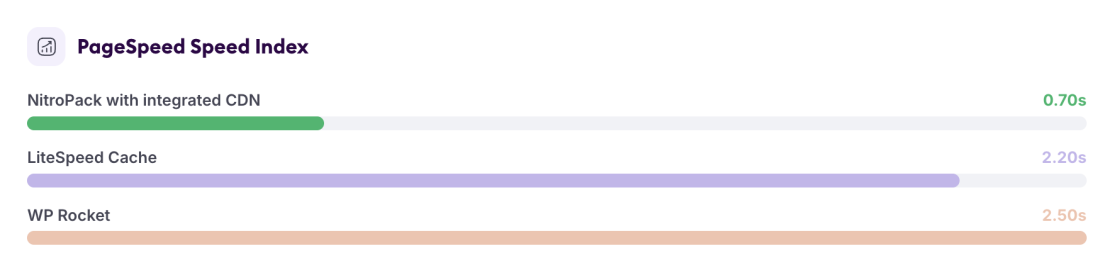
Winner on LiteSpeed Without an External CDN: LiteSpeed Cache
LiteSpeed Cache remained the strongest genuinely CDN-free option on the LiteSpeed server.
Compared with WP Rocket, it recorded:
- An approximately 15 percent lower average response time
- An approximately 31 percent lower P95 response time
- A faster GTmetrix Fully Loaded Time
- A faster GTmetrix Speed Index
- A faster PageSpeed Speed Index
The difference was not as dramatic as it was when Cloudflare was enabled, but LiteSpeed Cache still led every directly comparable metric.
NitroPack produced the fastest browser measurements in the workbook, but because those results include NitroPack’s integrated CDN, they belong in a different type of comparison.
NGINX Server Results Without an External CDN
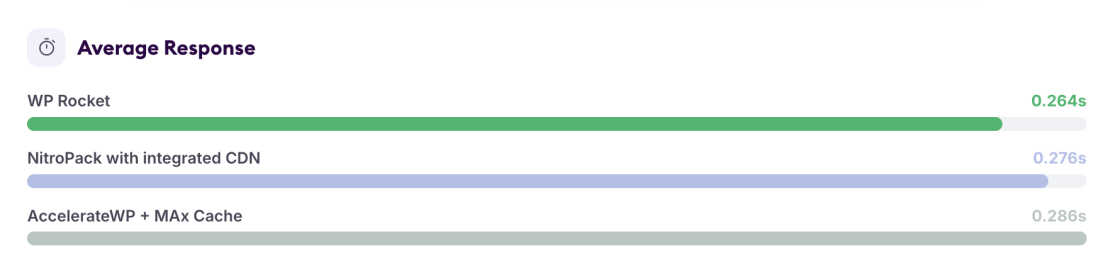
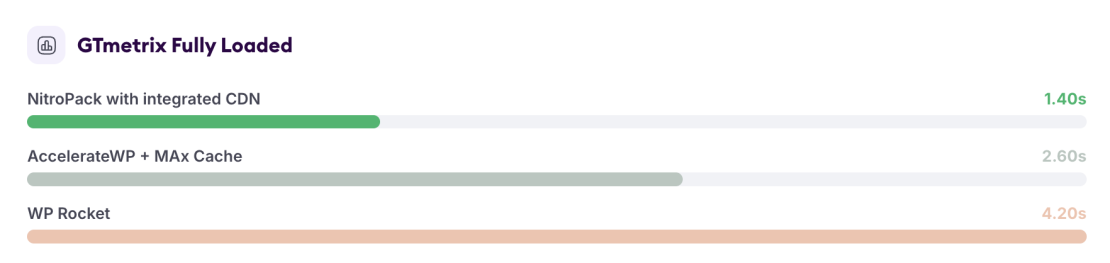
Winner on NGINX Without an External CDN: A Split Result
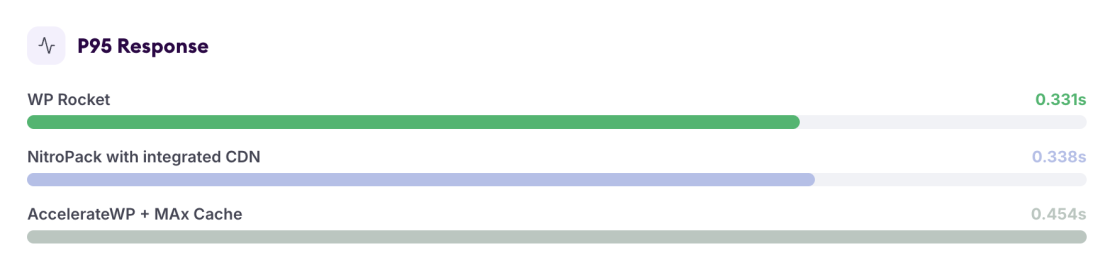
WP Rocket produced the better continuous-load numbers:
- 263.59-millisecond average response time
- 249.23-millisecond median response time
- 331.39-millisecond P95 response time
AccelerateWP was better in the browser-based tests:
- 2.60-second Fully Loaded Time compared with WP Rocket’s 4.20 seconds
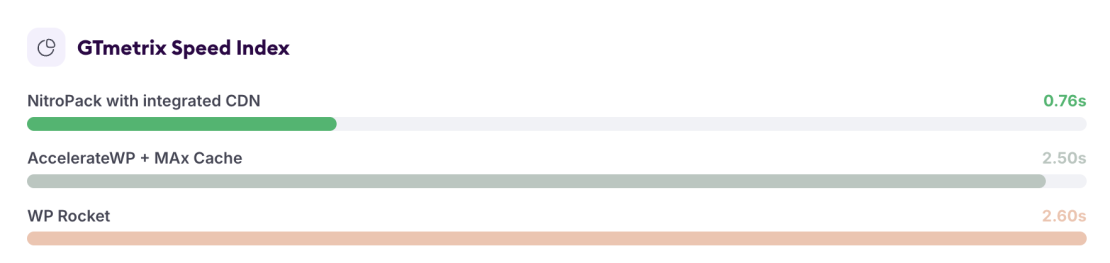
- 2.50-second GTmetrix Speed Index compared with 2.60 seconds
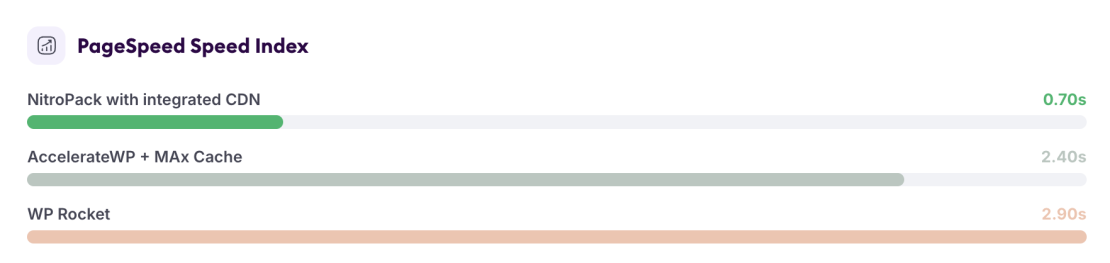
- 2.40-second PageSpeed Speed Index compared with 2.90 seconds
The difference in average k6 response time was relatively small, approximately 23 milliseconds. The difference in Fully Loaded Time was much larger at 1.60 seconds.
For that reason, AccelerateWP offers the more balanced browser experience in this category, while WP Rocket has a modest advantage in sustained request-response performance.
Overall Winners
Based on the complete test data, our category results are:
With CDN
LiteSpeed Web Server: LiteSpeed Cache with Cloudflare
NGINX Web Server: AccelerateWP with Cloudflare for continuous-load performance, NitroPack for browser and visual-loading performance
Without an External CDN
LiteSpeed Web Server: LiteSpeed Cache
NGINX Web Server: WP Rocket for continuous-load response time, AccelerateWP with MAx Cache for browser-loading results
These results also show why naming one plugin as the universal winner would be misleading. The best option depends on the web server and on what type of performance matters most for the website.
What Do We Recommend?
For the best combination of server response, traffic handling, caching efficiency, and front-end loading speed, our preferred setup is:
LiteSpeed Web Server + LiteSpeed Cache + Cloudflare
It produced the best overall results in our dataset and was the only configuration that clearly led both the continuous-load and browser-based tests.
This setup is available on our Speed Reaper Shared Hosting plans and can also be provided on suitable Managed Cloud Server configurations.
The result is not only about the WordPress plugin. LiteSpeed Cache performs best because it is connected to a cache engine built directly into the LiteSpeed web server. Adding Cloudflare then improves the delivery of static resources and reduces the distance between the website and its visitors.
When Should You Use LiteSpeed Cache?
Choose LiteSpeed Cache when:
- Your hosting account uses LiteSpeed Web Server
- You want server-level WordPress page caching
- Your website receives regular or high traffic
- You want detailed control over caching and front-end optimization
- You are comfortable testing settings carefully
It is our first recommendation for WordPress websites hosted on our Speed Reaper or compatible Managed Cloud Server configurations.
Using LiteSpeed Cache on standard NGINX hosting is generally not the best use of the plugin because its main server-level caching engine will not be available.
When Should You Use WP Rocket?
Choose WP Rocket when:
- Your hosting environment does not offer a specialized server-level WordPress cache
- You want one plugin that can move between different web servers
- You prefer a simpler premium interface
- You want solid caching and front-end optimization without depending on an external optimization platform
- You are using NGINX and your host does not provide AccelerateWP with MAx Cache
WP Rocket did not win the overall comparison, but it remained stable in every test and completed all k6 runs without failed requests.
It was also the fastest strictly non-CDN NGINX configuration in average and P95 response time.
When Should You Use NitroPack?
Choose NitroPack when:
- You want an automated optimization service
- PageSpeed and visual-loading results are your main priority
- You do not want to configure separate caching, image optimization, and CDN tools
- Your website has a manageable number of monthly page views
- You are comfortable using a service that processes and delivers resources through an external platform
NitroPack produced some of the strongest GTmetrix and PageSpeed results in our testing, especially on NGINX.
It is particularly attractive for small business websites, brochure websites, landing pages, and other projects where the owner wants strong browser scores without spending much time adjusting individual settings.
For high-traffic websites, it is important to consider plan limits, CDN bandwidth, page-view allowances, and the website’s behavior during cache misses.
When Should You Use AccelerateWP with MAx Cache?
Choose AccelerateWP when:
- Your hosting provider runs CloudLinux and offers AccelerateWP
- MAx Cache is enabled on the web server
- Your website is hosted on NGINX or Apache
- You want cached pages to be served without starting PHP
- Sustained traffic and server efficiency are important
AccelerateWP was especially impressive when combined with Cloudflare on NGINX. It delivered the best NGINX k6 result in our CDN comparison.
It is a strong option for hosting environments that cannot use LiteSpeed Cache’s native server integration but can provide their own server-level cache module.
The main requirement is that the hosting provider must support the full stack. Installing the WordPress plugin alone will not reproduce the same results if MAx Cache and the related server components are unavailable.
What the CDN Changed
The clearest CDN improvement occurred with LiteSpeed Cache.
Without Cloudflare, LiteSpeed Cache recorded an average response time of 192.95 milliseconds. With Cloudflare, that dropped to 76.54 milliseconds.
That is an improvement of approximately 60 percent in the measured average response time.
Its GTmetrix Fully Loaded Time also improved from 2.90 seconds to 0.62 seconds, while its GTmetrix Speed Index improved from 2.20 seconds to 0.50 seconds.
The CDN made a smaller difference to some other configurations, and the exact effect will always depend on factors such as:
- Test location
- CDN edge location
- Whether the resource was already cached
- Cache rules
- Website size
- Number of static resources
- Origin-server performance
A CDN should therefore be treated as an additional layer of optimization, not as a replacement for fast hosting or efficient server caching.
Final Thoughts
The fastest WordPress setup in our tests was not produced by a plugin alone.
It came from matching the plugin, web server, server-level cache, and CDN:
LiteSpeed Web Server + LiteSpeed Cache + Cloudflare
The practical lesson is simple: check which web server your hosting plan uses before choosing a WordPress optimization plugin.
A highly rated plugin cannot fully compensate for an unsuitable server stack. When the hosting platform and caching technology are designed to work together, the difference can be significant.
FAQs About Best WordPress Speed Optimization Plugins
LiteSpeed Cache was the best overall performer in our tests when used with LiteSpeed Web Server and Cloudflare. On NGINX, the best choice depended on whether server response time or visual loading speed was the main priority.
LiteSpeed Cache generally performs better on LiteSpeed Web Server because it uses the server’s native caching engine. WP Rocket is more flexible and can be a better option on hosting environments without a dedicated server-level WordPress cache.
A CDN can improve loading speed by serving static files from locations closer to visitors. In our tests, the largest improvement came from combining LiteSpeed Cache with Cloudflare.
LiteSpeed Web Server produced the strongest overall results in our tests when paired with LiteSpeed Cache. NGINX can also perform very well, especially when it is configured with a server-level caching solution such as MAx Cache.
