

AI / Monday October 5, 2026
Can AI Read Your Page? Technical Checks for AI Crawlers
Can AI read your website properly?
It’s a more practical question than it sounds. AI crawlers and live fetchers from tools like ChatGPT, Claude, and Perplexity may visit your pages to find information, build search results, or answer a user’s question in real time. But reaching your website does not always mean they can access the content you actually want them to see.
A robots.txt rule, a security setting, slow server response, or content loaded only through JavaScript can all get in the way. And when that happens, an AI assistant may miss important information, rely on another source, or give the user an incomplete answer.
So before worrying about “AI optimization,” it’s worth checking something more basic first: can AI actually read your page?
Different Kinds of AI Visitors
Crawler controls are provider-specific. Training crawlers, search crawlers, and user-triggered fetchers may follow different access rules. Before blocking an AI user agent, check the provider’s current documentation and decide whether you want to restrict training, search visibility, live retrieval, or all three.
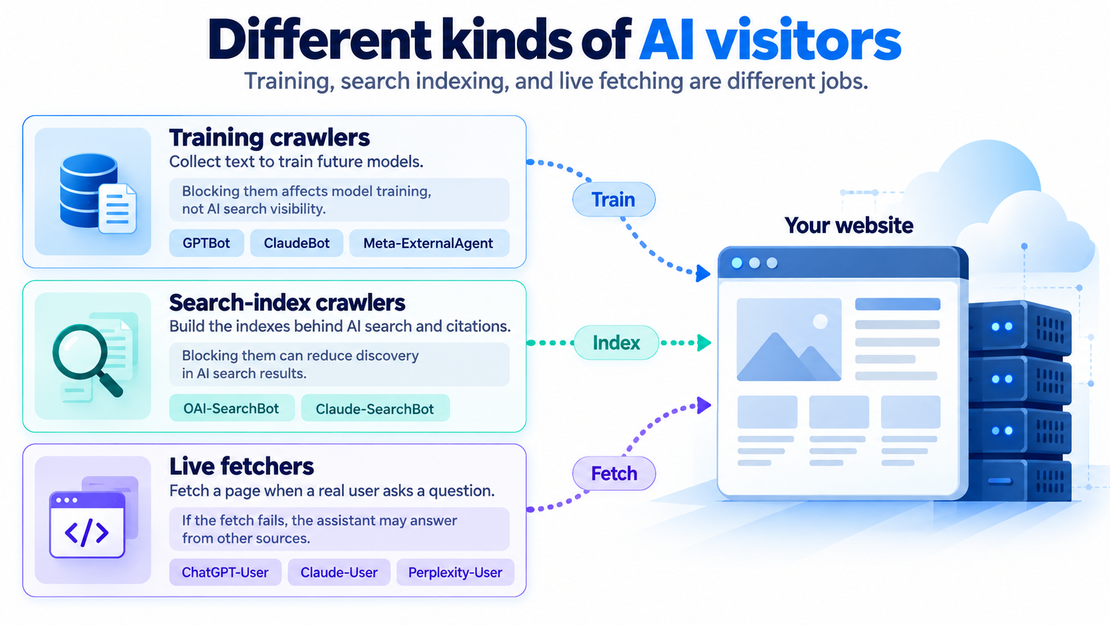
These visitors come for different reasons:
- Training crawlers (GPTBot, ClaudeBot, Meta-ExternalAgent) collect text to train future models. Blocking them is a legitimate policy choice, and plenty of publishers make it.
- Search-index crawlers (OAI-SearchBot, Claude-SearchBot) build the indexes behind ChatGPT search and its equivalents. Blocking search-index crawlers can prevent your pages from appearing in that provider’s AI search results, depending on how the platform discovers and retrieves sources.
- Live fetchers (ChatGPT-User, Claude-User, Perplexity-User) are the interesting ones. They aren’t crawlers in the classic sense. Each visit is a real person whose assistant is fetching your page right now to answer a question. If the fetch fails, the assistant answers from whatever else it can reach.
The common mistake is treating all of this as one thing called “AI bots.” OpenAI, Anthropic, and Perplexity support separate robots.txt rules for each role, and OpenAI publishes verification IP ranges for its agents. You can opt out of training and stay fully visible in AI search. Some sites that block everything may not realize it; it could be their security plugin, their hosting, or a toggle someone clicked.
Why AI Sees Less of Your Site Than Google Does
Googlebot renders pages in a headless browser, and given enough time, it sees roughly what your visitors see. In Vercel’s crawler study, the major OpenAI, Anthropic, and Perplexity agents it tested did not execute JavaScript. Vercel measured this across millions of requests: what the bots read is the raw HTML your server sends in its first response. What you want AI to know may not be in that response at all, and this is a very common case for many modern websites. Pricing tables loaded from an app, reviews pulled in client-side, anything behind a “load more” – could all be invisible.
I recently audited a SaaS company and found out their pricing page was rendered entirely in JavaScript. Ask Claude or ChatGPT what the product costs: they’ll try to fetch the page, fail to find anything useful besides the header menu, and default to their memory or third-party info, which may or may not be outdated.
There’s another constraint that gets even less attention: token spend budget. When an assistant fetches a page mid-conversation, it rarely reads all of it. More often, AI reads a slice. If that slice gets spent on navigation, fancy markup, or inline SVG logos, the budget can run out before the content starts.
How Hosting and Site Code Affect AI Crawler Access
Hosting and security settings affect how quickly the server responds and whether the request gets through.
- Response speed. A live fetch happens while a human waits. If the request times out, the page content won’t arrive. Server caching can help by serving a saved copy instead of rebuilding the page for each visit.
- Bot protection. Firewalls, CDN “bot fight” modes, and security plugins can allow a page to open in a browser while challenging automated requests. That can be an intentional policy, but it’s worth checking whether it also blocks the agents you want to allow.
- Rendering strategy. If your content is client-rendered, something needs to produce real HTML for bots: server-side rendering, static generation, or prerendering that serves crawlers a snapshot.
- What comes before the essential content. This problem is structural: open the page source and check how far down the first sentence you want AI to read appears.
The Manual Check
If you want a quick hands-on check, you can try this:
- The view-source test. Open your most important page, right-click, and select View Page Source. This shows the HTML sent by the server before the browser runs JavaScript to build or update the page. Search for a distinctive sentence from the piece. If it’s there, that text arrived in the server’s response. If it appears only on the finished page, JavaScript may have added it afterward.
- The ask-ChatGPT test. Ask ChatGPT, with web access on: “Fetch [your URL] and summarize what’s on it.” Then push harder for something specific: “What does this company charge?” Wrong or vague answers are a signal to investigate whether the assistant could retrieve and extract the relevant content, although they do not prove that page access failed.
- The robots.txt read. Open [your domain]/robots.txt and look for GPTBot, OAI-SearchBot, ClaudeBot, PerplexityBot. Anything disallowed is a decision; confirm it’s one you actually made.
- The firewall check. In your hosting control panel, CDN dashboard, or raw access logs, search recent traffic for “GPTBot” or “ClaudeBot”. You want to see whether they visit at all, and what status code they get when they do. Rows of 403s or challenge pages mean your security layer is bouncing them.
- The speed check. Any free speed test that reports time-to-first-byte is useful: a multi-second TTFB hurts you with humans and Google too, but for a live AI fetch it’s the closest thing to a closed door.
The Automated Check
Treat automated audit results as diagnostics rather than proof that a particular AI provider has crawled, indexed, or will cite the page.
To automate the less inspiring parts of manual checks, I built this AI readiness test, a free tool that checks whether anything stands between a given page and AI’s ability to read it.
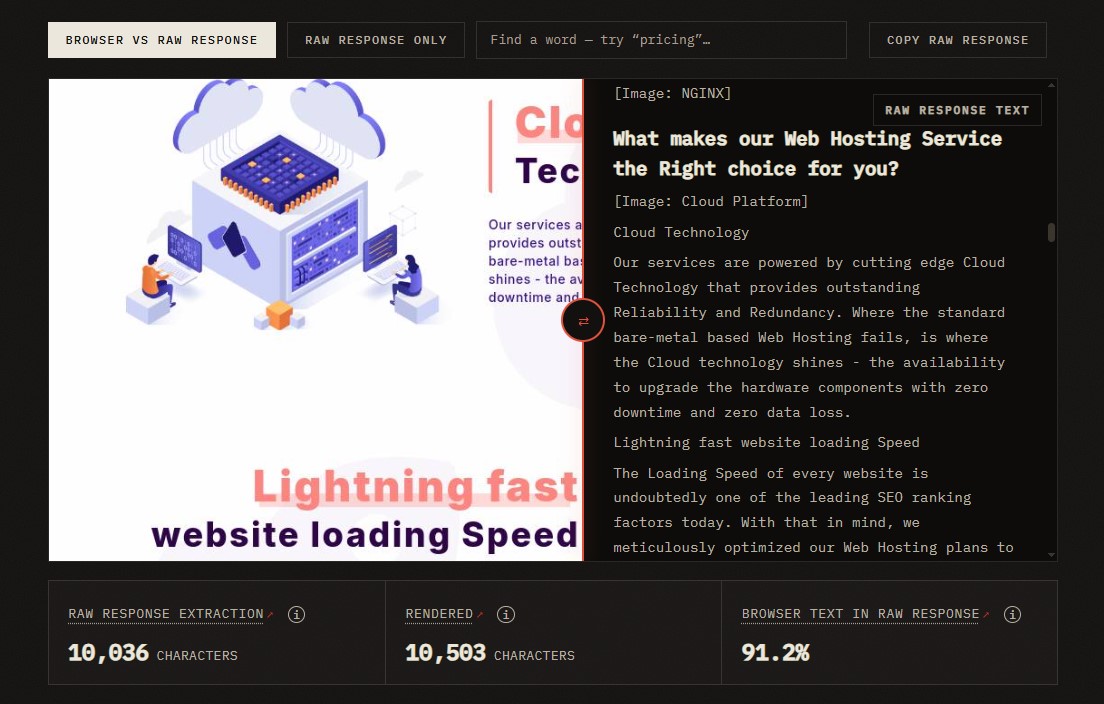
HostArmada’s homepage test: 91.2% of the browser-visible text present in the raw server response.
For example, when I ran HostArmada’s homepage through the test, the raw response showed 10,036 extracted characters vs. 10,503 after rendering. The coverage check found that 91.2% of the browser-visible text was already present in the raw response. In other words, most of the page is available before JavaScript runs.
If you want to compare your website to a competitor’s, the comparison feature lets you apply the same checks to two pages: the report shows which information was delivered, what needs investigation, and what to ask a developer or hosting support to check.
What to Fix First for AI Crawlability
Unblock what you didn’t mean to block. Believe it or not, it’s the most common failure, so it comes first. Decide your training-bot policy deliberately; allow the search and live-fetch agents unless you have a specific reason not to.
Get your content into the HTML (if you can). If you’re on WordPress with a standard theme, you’re probably in good shape already. Classic sites can be well-prepared for AI crawlers (the irony!).
Speed comes next. Server-level caching and hosting that holds down time-to-first-byte during traffic spikes do an important job here.
After the changes, you can run the same checks again, then go further by tracking which pages appear as sources in AI answers to see how your AI visibility changes over time.
Making Your Website Readable for People and AI
Your website speaks to people and the AI systems serving them. The AI audience is a bit stricter: it may not scroll past your boilerplate or come back later to try again. Everything it needs, though, is perfectly reasonable – fast responses, open doors, and plain structure. Sounds like old-fashioned SEO advice? Sure, because it is. We just have one more compelling reason to follow it.
This article was contributed by Alex Rostovtsev, an SEO & AI search specialist at Elfsight and Beamtrace. Among other things, Alex experiments with how AI systems perceive the web and builds tools based on his findings. You can find more of his work at alexros.tv.
