

Crawlers / Friday November 28, 2025
How to Achieve a Better Crawling Performance for Your Website?
Web crawlers determine whether your content gets found, indexed, and ranked in search results. When crawlers can’t efficiently access your site, even your best content stays invisible to search engines (and that means zero organic traffic!).
Your site’s performance directly affects how crawlers behave. Slow-loading pages waste crawl budget. Server errors cause crawlers to skip pages. Poor site structure buries important content where bots never find it. Understanding this connection is the first step to fixing it.
Dive deeper to learn web crawler SEO impact, what technical issues slow them down, and practical ways to optimize your site so search engines can find and rank your content faster.
How Crawlers Work and Why It Matters
Search engines use automated bots called crawlers (like Googlebot) to discover and read web pages. These bots start at your homepage or sitemap, follow internal links, and gather information about each page they visit. This process is called crawling, and it’s the first step before your content can appear in search results.
Every URL goes through three core stages:
- Discovery. Google finds your page through internal links, backlinks, your sitemap, or manual submissions.
- Crawling. Googlebot fetches the page and analyzes its content, code, media, and structure.
- Indexing. The page is added to Google’s index, making it eligible to rank.
Any disruption in these stages impacts your crawling and indexing SEO performance, and your page simply won’t rank. A page blocked by robots.txt won’t be crawled. A page with duplicate content might be crawled but not indexed. Understanding where the breakdown happens helps you fix the right problem.
What Affects Crawl Budget and Why You Should Care
Crawl budget is the number of pages a crawler will visit on your site within a given timeframe. Google doesn’t crawl everything, it crawls what it can and what it thinks is worth its resources.
Crawl budget plays a major role in crawling and indexing SEO, especially for:
- E-commerce sites with thousands of product pages.
- News and media sites publishing daily.
- Websites with large archives or user-generated content.
- Sites undergoing migrations or URL restructuring.
Think of it as a limited resource. If your important pages aren’t seen because crawlers get stuck on low-quality, slow, or duplicate pages, your most valuable content might never be indexed.
How Site Performance Directly Impacts Crawling
Server speed doesn’t just influence users; it affects how aggressively Googlebot crawls your site. The higher your server performance and the faster its response time, the more likely Google is to increase its crawl rate. On the other hand, slow or error-prone websites get crawled less.
Here are the key server metrics that influence website performance crawlers, affecting how many pages Google can process efficiently:
| Performance Factor | Impact on Crawling | Target |
| Server Response Time | Faster = more pages crawled | Under 200ms |
| Error Rate | High errors reduce crawl frequency | Under 1% |
| Uptime | Frequent downtime decreases crawl budget | 99.9%+ |
| Page Load Speed | Affects how many pages can be processed | Under 2.5s |
Sites with consistently fast response times often see 50%+ more pages crawled. For businesses publishing fresh content regularly, this difference can determine whether Google discovers your updates in hours or weeks.
Core Web Vitals: User Experience That Affects Crawlers
Core Web Vitals measure page experience from a user’s perspective, but they also impact how efficiently crawlers process your site. These three metrics work together to determine both user satisfaction and crawler efficiency:
- Largest Contentful Paint (LCP). Measures how fast your main content loads (target: under 2.5 seconds).
- Interaction to Next Paint (INP). Tracks how quickly pages respond to clicks (target: under 200ms).
- Cumulative Layout Shift (CLS). Evaluates how stable your page is while loading (target: under 0.1).
Improving these metrics helps Google load, interpret, and process your pages more efficiently. Faster rendering = more URLs crawled in the same time window.
The Rise of AI Crawlers (and the Problems They Introduce)
AI crawlers from OpenAI, Anthropic, and Amazon now represent a significant share of crawler traffic. This surge has created unexpected challenges for site owners who report 75% increases in bandwidth usage, monthly costs exceeding $1,500 from AI crawler traffic alone, and degraded site performance during peak crawling periods.
Here are the warning signs of excessive AI crawler activity:
- Large traffic spikes from cloud provider IPs
- Higher bandwidth usage without matching user growth
- Noticeable slowing during peak crawling hours
- Increased hosting costs with no added conversions
Yes, you can block AI crawlers using robots.txt (for example: User-agent: GPTBot), but doing so may exclude your content from AI-based search tools or answer engines. So consider your long-term visibility goals before blocking.
Common Technical Issues That Block Crawlers
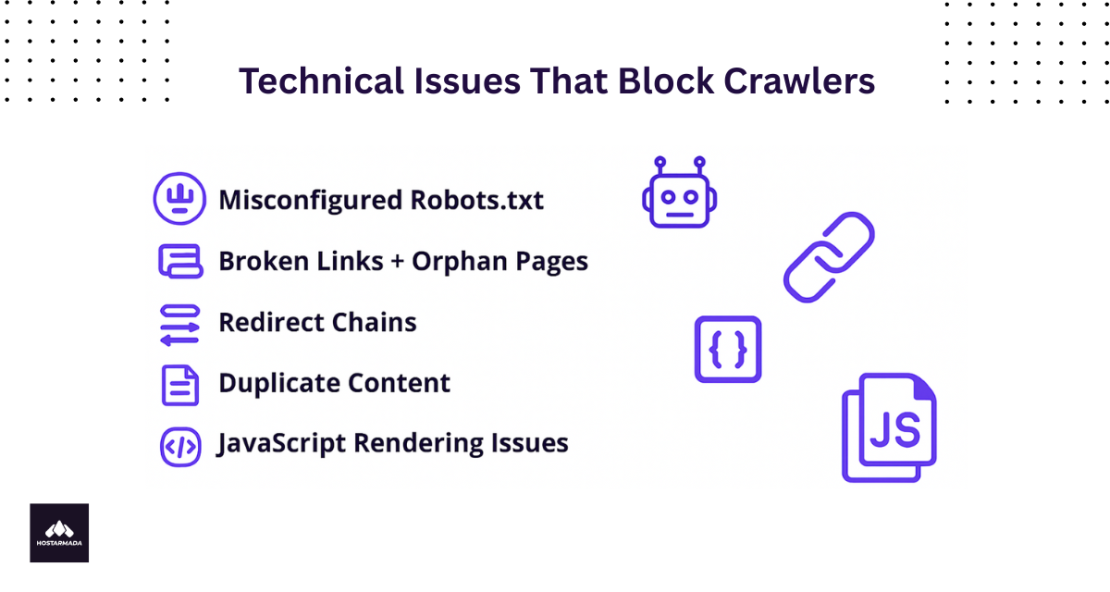
Most crawlability issues come from preventable technical mistakes. Catching them early prevents major drops in indexation and organic traffic.
Below are some of the most common technical blockers along with their fixes.
Misconfigured Robots.txt
Your robots.txt file tells crawlers which parts of your site to skip. It’s meant to block admin areas, duplicate content, or staging sites. However, a single rule can unintentionally hide important sections of your site.
Example: During site development, someone adds Disallow: /blog/ to prevent crawling unfinished posts. After launch, nobody removes it, and your entire blog stays invisible to Google.
How to check: Visit yoursite.com/robots.txt and look for any Disallow rules blocking important sections.
Fix: Remove or update rules that block valuable content. Test changes in Google Search Console’s robots.txt Tester before publishing.
Broken Links and Orphan Pages
Broken internal links send crawlers (and users) to pages that don’t exist anymore. They waste crawl budgets and create a poor user experience.
Orphan pages exist but have no internal links pointing to them. Google might not discover them unless they’re in your sitemap.
Example: You create a landing page for a product launch but forget to link it from your navigation or relevant product pages. Google never finds it, and the page gets zero organic traffic.
Fix: Run regular site audits with seo audit tools to find broken links and orphan pages. Fix broken links and add internal links to orphan pages from relevant content.
Redirect Chains
A redirect chain happens when one URL redirects to another, which redirects to another. Each hop wastes crawl budget and slows down discovery.
Example: Old URL → New URL → Newer URL → Final URL
Each redirect adds delay. After multiple hops, Googlebot might give up entirely.
Fix: Make redirects direct. If Page A needs to redirect to Page C, skip Page B entirely and point A straight to C.
Duplicate Content
When multiple pages have identical or nearly identical content, Google wastes the crawl budget figuring out which version to index. Common causes include:
- Product variations (same product in different colors)
- URL parameters (tracking codes, filters, sorting)
- HTTP vs HTTPS versions
- WWW vs non-WWW versions
Fix: Use canonical tags to tell Google which version is the original. Consolidate similar pages when possible and set your preferred domain in Search Console to prevent duplicate versions from competing against each other.
JavaScript Rendering Issues
If your content loads via JavaScript (common with React, Angular, or Vue.js), crawlers might see a blank page or miss important content entirely.
Example: Your product descriptions load with JavaScript. Googlebot sees the page skeleton but misses the actual content, so the page never ranks for product-related searches.
How to test: Use Google Search Console’s URL Inspection Tool to see exactly what Googlebot renders. Compare it to what users see.
Fix: Implement server-side rendering (SSR) so critical content appears in the initial HTML. This ensures crawlers can access it even if JavaScript doesn’t execute properly.
How to Optimize for Better Crawler Performance
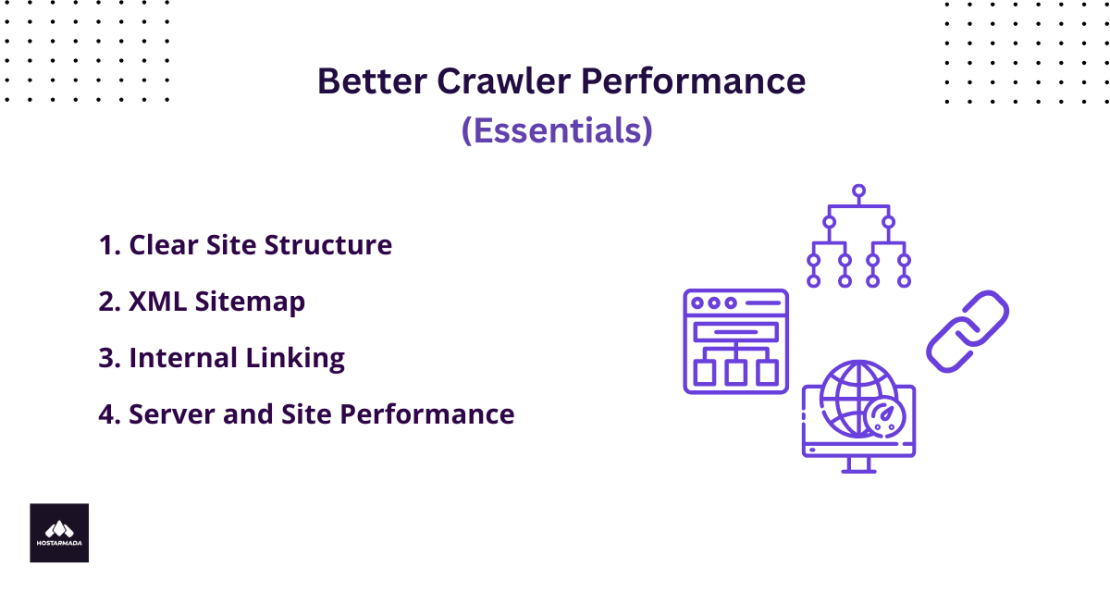
Now that we understand the problems, let’s focus on solutions. The good news is that most crawler issues can be prevented with systematic optimization. Focus on the following areas:
1. Make Your Site Structure Clear
A clear site structure makes sure important content is easy to reach. If pages are too deeply buried, Googlebot may crawl them less often (or not at all). You can ensure this by removing or noindexing pages that waste crawl budget. This includes:
- Outdated blog posts with no traffic
- Thin product pages with minimal content
- Duplicate category pages
- Parameter URLs creating infinite variations
- Old tag/archive pages nobody visits
Pro Tip: Check Search Console for pages with zero impressions over 90 days. These are prime candidates for consolidation or removal.
2. Optimize Your XML Sitemap
A sitemap should highlight only your most important pages. Avoid adding everything on your site, this dilutes signals.
Include your homepage and main category pages, top-performing blog posts, key product or service pages, and recent high-quality content. And exclude thank you pages, checkout and cart pages, internal search results, and paginated pages beyond page 1.
Submit your sitemap through Google Search Console and update it when adding important new pages.
Pro Insight: Many SEOs obsess over creating the “perfect” sitemap with every single page, but this actually dilutes your signal. Instead, create a curated sitemap containing only your 500-1,000 most important pages. This tells search engines, “These are our priority pages, crawl these first.” The rest will still get discovered through internal linking, but you’re guiding crawlers to what matters most.
3. Improve Internal Linking
Internal links guide crawlers and help them understand which pages matter most. Pages with no internal links are harder for search engines to find and may not be indexed. Here are some of the best practices to follow:
- Link to important pages from your homepage
- Add contextual links within content (3-5 per page)
- Keep important content within 3 clicks of the homepage
- Use descriptive anchor text (not “click here”)
- Link from high-authority pages to newer content
For example, when you publish a new guide, link to it from related older posts, your homepage, and relevant category pages. This helps Google discover it faster and signals its importance in your site’s hierarchy.
4. Boost Server and Site Performance
Speeding up your website boosts crawl rate and improves user experience. Reduce large files, compress images, and remove unnecessary code to improve server response time. Practical optimization steps include:
- Enable Gzip or Brotli compression.
- Serve next-gen image formats (WebP/AVIF).
- Use a CDN for global distribution.
- Implement caching (browser + server-side).
- Remove unused JavaScript and CSS.
- Improve database efficiency.
- Upgrade to high-performance hosting if needed.
Aim for:
- <200ms response times.
- Clean code and minimal scripts.
- Passing Core Web Vitals thresholds.
Pro Tip: Don’t chase perfect scores on testing tools like PageSpeed Insights at the expense of functionality. We’ve seen developers remove important features to squeeze out an extra 5 points, only to hurt user experience and conversions. Focus on the metrics that actually impact real users – field data from Search Console is more valuable than synthetic lab scores. Aim for “good” thresholds, not perfect 100s.
Ongoing Monitoring to Maintain Crawl Health
Crawler optimization isn’t a one-time fix. It requires continuous monitoring. Regular monitoring should include the following.
Use Google Search Console
Google Search Console’s Crawl Stats report helps spot crawl trends, identify inefficiencies, and understand whether Googlebot’s priorities align with yours.
Check these reports weekly:
- Coverage Report: Which pages are indexed vs. excluded.
- Crawl Stats: Crawl requests, response time, errors.
- URL Inspection Tool: See how Google renders important pages.
Watch out for:
- Drops in crawl volume
- Rising 5xx errors
- Pages stuck in “Discovered – not indexed”
- Unexpected duplicate content flags
Run Regular Site Audits
Run a full audit monthly for large sites, quarterly for smaller sites. You can use tools like Screaming Frog, Ahrefs, or Semrush to:
- Find broken links and fix them.
- Identify orphan pages and add internal links.
- Spot redirect chains and simplify them.
- Check for noindex tags on important pages.
- Review robots.txt for accidental blocks.
How HostArmada Helps Improve Web Crawler SEO Impact
If you care about SEO, crawlability, and site performance, you already know that technical improvements can only go so far when your hosting can’t keep up. A high-performance hosting environment significantly improves how website performance crawlers access and process your site.
Even with perfect on-page optimization, slow servers, frequent timeouts, or inconsistent performance can limit how often search engines crawl your site – and how quickly new content gets indexed.
There are countless hosting providers offering “speed” and “uptime,” but if you want a hosting environment built to support search engine crawling, reliability, and long-term performance, you’ll want to explore HostArmada.
HostArmada provides a fast, stable, and technically optimized foundation that helps search engines access your content more efficiently. No complex setup required. Here’s how it helps improve crawlability and overall site performance:
- Lightning-Fast SSD Storage. Delivers sub-200ms server response times that search engines reward
- Global CDN Integration. Ensures fast content delivery worldwide, improving Core Web Vitals
- Optimized Server Configurations. Fine-tuned for maximum crawl efficiency and minimal downtime
- 99.9% Uptime Guarantee. Keeps your site accessible to crawlers 24/7
- Free Daily Backups. Protects your content and maintains search visibility
- Expert Technical Support. Our team helps diagnose and resolve crawl issues quickly
For small businesses and large e-commerce platforms alike, HostArmada ensures your site stays fast, stable, and accessible. These are the three factors that directly influence how often and how deeply search engines crawl your pages.
And the best part?
With hosting plans starting at just $1.99/month (triennial billing cycle), it provides one of the most cost-effective ways to strengthen your technical SEO foundation without increasing operational overhead.
FAQ
Crawl rate is how fast Google crawls your site (requests per second). Crawl budget is the total number of pages Google will crawl in a given period. Server speed affects crawl rate. Site quality and size affect crawl budget. But both influence crawling and indexing SEO results.
Check Google Search Console’s Crawl Stats report. Look at crawl requests per day, average response time, and any errors. If important pages aren’t indexed or crawl requests are declining, you likely have crawlability issues.
Yes, but they’re a tiebreaker, not the main ranking factor. When two pages have similar content quality, better Core Web Vitals give you the edge. More importantly, faster sites keep users engaged longer, reduce bounce rates, and improve conversions- indirect SEO benefits that compound over time.
Server improvements show results in 3-7 days. Newly accessible content typically gets indexed within 1-2 weeks. For comprehensive crawl budget optimization on large sites, expect meaningful improvements in 4-8 weeks. Consistent monitoring and gradual improvements work better than one-time fixes.
