

Human Resources / Tuesday July 14, 2026
How To Manage and Work With WordPress Developers Effectively
Managing WordPress developers effectively requires clear goals, defined responsibilities, consistent communication, and timely feedback throughout the project.
Hiring the right developer is only the beginning. Many WordPress projects run into trouble after work starts because expectations are unclear, approvals are delayed, feedback is inconsistent, or requirements change without a structured process.
You do not need technical expertise to manage a developer successfully. You need a simple framework that keeps everyone aligned on the project goals, scope, timeline, responsibilities, and approval process.
In this guide, you will learn how to work with WordPress developers, create a useful project brief, manage timelines and revisions, provide actionable feedback, avoid becoming a bottleneck, and recognize when a project is starting to go off track.
Successful WordPress Projects Need More Than a Good Developer
A great developer doesn’t automatically create a great project. The quality of the final result depends just as much on communication, planning, feedback, and decision-making as it does on technical expertise.
Many website owners assume that once they hire the right person, the project will naturally move from idea to completion. In practice, successful projects rely on collaboration. Developers bring technical knowledge, but they still need clear goals, timely approvals, and useful feedback to make the right decisions.
A redesign project can illustrate how quickly things start to drift when that collaboration breaks down. The developer completes every assigned task on schedule, but approvals take days to arrive, priorities change halfway through the work, and feedback comes from multiple stakeholders with different opinions. Deadlines start moving, frustration builds, and the project loses momentum. The technical work may be solid, yet the overall experience feels unsuccessful.
Many project problems begin long before the first line of code is written. Unclear expectations, rushed decisions, and other hiring mistakes often stay hidden during the selection process and only become visible once work is underway.
The most successful WordPress projects treat development as a partnership rather than a transaction. When both sides understand their responsibilities and work toward the same objective, it becomes much easier to manage developers effectively and keep projects moving in the right direction.
Start Your WordPress Project With Clear Goals
The fastest way to improve a WordPress project is to define what success looks like before development begins. Clear goals help you manage developers more effectively by removing guesswork and giving everyone a shared target.
Many website owners start with requests instead of outcomes. They ask for a new homepage, a different checkout process, or a redesigned navigation menu. Those requests describe what the developer should build, but they don’t explain why it matters. A developer can deliver every requested feature and still miss the actual business objective because you never clearly defined it.
This happens more often than most people realize. A company might ask for a faster website when the real concern is declining conversions on mobile devices. Another business may request a complete redesign when the underlying problem is that visitors can’t find important information. The solution changes dramatically once the goal becomes clear.
Before any work starts, define the outcome you’re trying to achieve:
- Increase online sales
- Generate more leads
- Improve mobile usability
- Reduce page load times
- Simplify content management
- Improve user engagement
Notice that none of these describes specific development tasks. They describe business goals. Once those goals are established, both you and the developer can make better decisions throughout the project.
Clear objectives also help determine the type of expertise you’ll need. For example, performance improvements require a different skill set than custom plugin development or WooCommerce optimization. Understanding your goals makes it easier to evaluate the WordPress developer skills that best match the project.
Strong web project management starts with clarity. When everyone understands the destination, discussions become more productive, priorities become easier to set, and development work stays focused on delivering meaningful results rather than simply completing a checklist.
Build a Simple Project Brief Before Work Begins
A project brief isn’t pointless paperwork. It’s one of the most effective tools you’ll have when you manage developers and keep a project moving in the right direction.
Many problems that appear during development actually start much earlier. Goals may be clear in your head, but never documented. Priorities may seem obvious to you, but remain unclear to everyone else. When expectations live inside conversations, emails, or meeting notes, important details inevitably get lost.
We’ve seen projects save weeks of back-and-forth simply because the client invested an hour in creating a clear brief before work started. The document doesn’t need to be lengthy or technical. It simply needs to explain what you’re trying to achieve and provide enough context for informed decisions.
A simple project brief should include:
- The project goal. Explain the business objective you’re trying to achieve.
- The current problem. Describe what’s not working today.
- The desired outcome. Define what success looks like once the project is complete.
- Pages or features affected. Identify the areas of the website involved.
- Important requirements. Include functionality, integrations, compliance requirements, or technical limitations.
- Timeline expectations. Share deadlines, launch dates, or important milestones.
- Approval process. Clarify who can approve work and request changes.
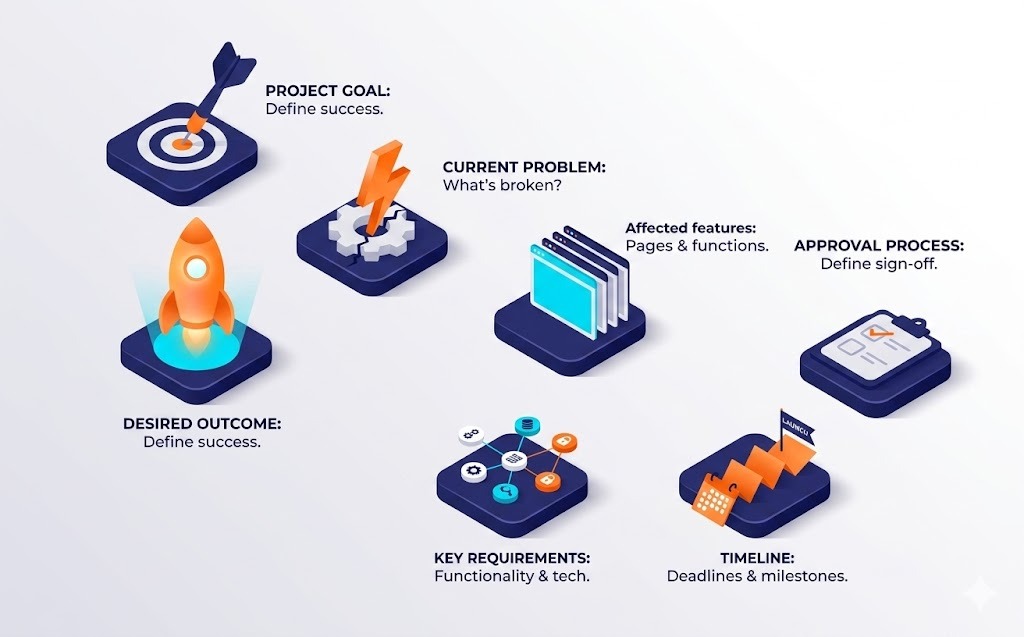
This level of preparation creates a stronger foundation for web project management. It reduces assumptions, speeds up decision-making, and gives developers the information they need to make good choices without constantly asking for clarification.
Set Communication and Collaboration Rules
Projects rarely slow down because people stop working. More often, they slow down because nobody agreed on how decisions, feedback, and communication would happen in the first place.
A developer may assume feedback will arrive within a day. The client may expect weekly progress updates. One person prefers email, while another sends requests through chat messages. Individually, these differences seem minor. Over time, they create friction that can affect timelines, priorities, and the overall working relationship.
One pattern we see repeatedly is that teams often spend more time fixing communication problems than technical ones. A simple conversation at the beginning of the project can eliminate many of those issues before they appear.
Before development starts, agree on a few basic rules:
- Choose a primary communication channel
- Decide how quickly both sides should respond
- Establish how often project updates will be shared
- Define who can approve completed work
- Clarify who can request changes
- Decide how feedback should be delivered
These agreements don’t need lengthy documentation or formal contracts. The goal is simply to create shared expectations. When everyone understands how the project will operate, it becomes much easier to manage developers effectively and maintain strong client-developer communication throughout the engagement.
The benefit extends beyond efficiency. Clear working agreements reduce frustration, prevent unnecessary misunderstandings, and help both sides focus on solving problems instead of debating the process.
Define Project Roles Before Work Begins
A project can become surprisingly complicated when everyone assumes someone else is handling an important task. Content isn’t ready, approvals are delayed, access credentials haven’t been provided, and suddenly development stops while people figure out who owns what.
This often happens because responsibilities were never clearly defined. Website owners sometimes expect developers to make business decisions, write content, or approve design direction. Developers, on the other hand, may assume the client will provide assets, review work promptly, and coordinate internal stakeholders. Neither side is necessarily wrong. They simply entered the project with different expectations.
Before work begins, make sure everyone understands their role. A basic responsibility framework usually looks like this:
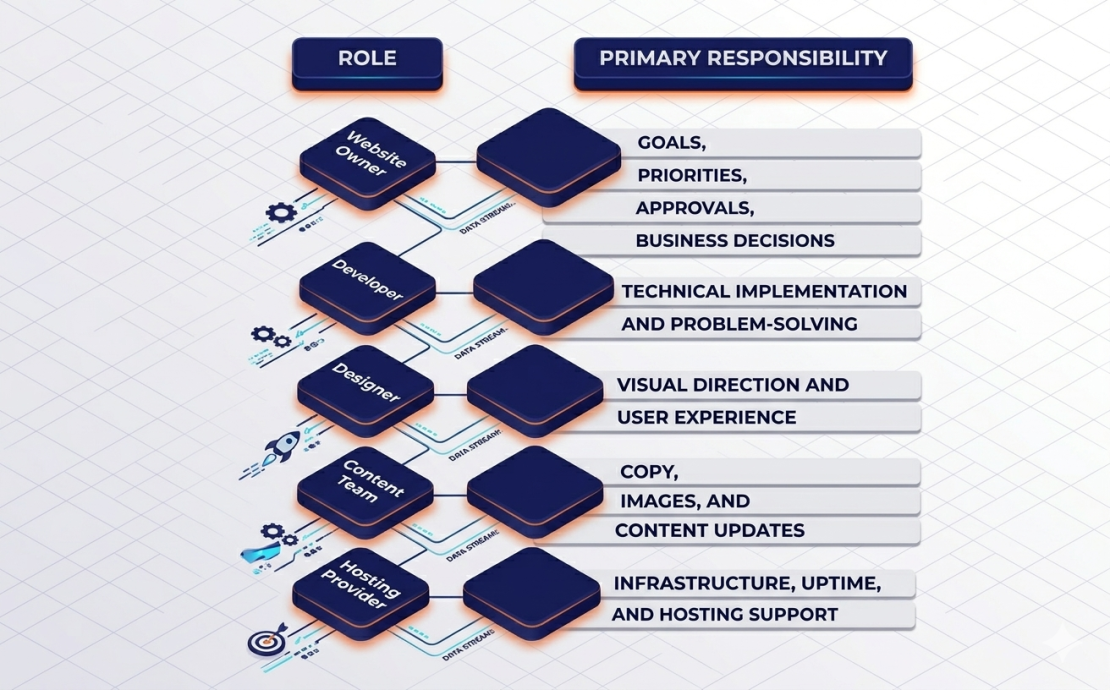
Understanding the typical WordPress developer role helps prevent many of these misunderstandings. Developers are responsible for building and maintaining technical solutions. They can provide recommendations and guidance, but they shouldn’t become the sole decision-maker for every aspect of the project.
The clearer the ownership structure becomes, the easier it is to manage developers effectively. Decisions happen faster, fewer tasks fall through the cracks, and everyone can focus on the responsibilities they are best equipped to handle.
Don’t Become the Project Bottleneck
We often see website owners step into the role of project manager during the planning phase, only to disappear once the development work begins. The logic is understandable. After all, the tasks have been assigned, timelines have been discussed, and the developer is now responsible for execution.
The problem is that most projects still require regular input from the client. When that input doesn’t arrive on time, progress slows down regardless of how productive the developer is. Some of the most common bottlenecks include:
- Delayed approvals
- Missing content or images
- Unanswered questions
- Late stakeholder feedback
- Last-minute priority changes
Most developers can adapt to changing requirements. What slows projects down is uncertainty. When nobody knows whether a decision has been approved or whether additional changes are coming, progress naturally slows.
If you want to manage developers effectively, treat responsiveness as part of your responsibility. Quick decisions won’t solve every problem, but they remove one of the most common obstacles standing between a project and a successful launch.
Manage WordPress Project Timelines With Clear Milestones
Managing developer timelines is much like a road trip. You don’t stop every five minutes to check whether you’re getting closer to your destination. Instead, you measure progress at meaningful points along the route.
Development projects work best when they follow the same principle. Rather than focusing on daily activity, focus on milestones:
| Approach | Likely Outcome |
| Milestone-based reviews | Clear visibility and steady progress |
| Constant status requests | Reduced productivity and fragmented focus |
| Scheduled check-ins | Better planning and fewer surprises |
| Unplanned interruptions | More context switching and slower delivery |
A milestone could be a completed homepage, a finished checkout flow, a staging deployment, or a testing phase. These checkpoints give you visibility into progress without requiring constant updates.
This approach becomes even more important because expectations vary depending on the hiring model. A solo freelancer may provide updates differently from an agency with dedicated project managers. Understanding these differences becomes easier when evaluating a freelance vs agency developer arrangement.
Good web project management focuses on outcomes rather than activity. If you want to manage developers effectively, establish clear milestones, agree on reporting intervals, and give people the space to do their best work between those checkpoints.
Give Feedback Developers Can Actually Use
“I don’t like it.”
That’s not feedback. It’s an opinion that offers no guidance on how to resolve the problem.
The issue isn’t that the comment is negative. The issue is that the developer has no idea what should change. Is the problem the design, the layout, the copy, the functionality, or something else entirely?
Compare the difference:
| Less Helpful Feedback | Actionable Feedback |
| “This page feels wrong.” | “The contact form pushes important content too far down the page.” |
| “Can you make it better?” | “Can we make the CTA button more visible on mobile?” |
| “I don’t like the design.” | “The text is difficult to read because the contrast is too low.” |
| “Something is broken.” | “The checkout button doesn’t work on Safari.” |
Good feedback identifies the issue, explains the desired outcome, and provides enough context for the developer to act on it. When possible, include screenshots, page URLs, or short screen recordings. A two-minute explanation today can save hours of back-and-forth later.
Another useful habit is consolidating feedback. Instead of sending ten separate emails throughout the day, collect comments into a single review round. This gives the developer a complete picture of the required changes and makes it easier to prioritize the work.
If you want to manage developers effectively, focus on clarity rather than volume. The goal isn’t to provide more feedback. The goal is to provide feedback that leads directly to a solution.
How to Manage Revisions Without Losing Momentum
Revisions are a normal part of every project. New ideas emerge, requirements evolve, and sometimes the first version simply reveals a better direction.
The problems usually begin when revisions and new requirements are treated as the same thing.
Changing the wording of a button is a revision. Replacing the entire checkout process with a subscription system is a new feature. One may take a few minutes. The other could affect timelines, budgets, testing, and deployment plans.
When additional work is needed, follow a simple process:
- Define the requested change.
- Confirm whether it’s a revision or a new requirement.
- Assess the impact on timeline and cost.
- Approve the change before development begins.
- Update project priorities if necessary.
This approach protects both sides. Clients gain visibility into how changes affect the project, while developers can plan their work without constantly shifting priorities. It’s also one of the simplest ways to manage developers without turning every revision into a discussion about deadlines, budgets, and responsibilities.
The reality is that few projects finish exactly as originally envisioned. That’s perfectly normal. What matters is creating a process for evaluating changes instead of treating every new idea as an immediate task.
Many issues that surface during revision cycles often trace back to decisions made much earlier in the process, including how you hire a WordPress developer and define the project’s scope from the start.
Choose Simple WordPress Project Management Tools
Project management tools don’t solve project management problems. They simply make good processes easier to follow.
Many website owners spend too much time searching for the perfect platform when a simple system would do the job. The goal isn’t to build a sophisticated workflow. The goal is to keep tasks, decisions, feedback, and progress organized in one place.
A few categories of tools cover most project needs:
| Purpose | Examples |
| Project tracking | Trello, ClickUp, Asana |
| Team communication | Slack, Microsoft Teams |
| Feedback and reviews | Loom, MarkUp.io, annotated screenshots |
| Documentation | Google Docs, Notion |
| File sharing | Google Drive, Dropbox |
The best setup is usually the simplest one that everyone will actually use. A shared task board, a communication channel, and a place to store documentation are often enough for effective web project management.
Some developer hiring sites also include built-in messaging, milestone tracking, and collaboration tools. If you’re working through one of those platforms, there may be little reason to introduce additional software unless the project becomes more complex.
Whatever tools you choose, consistency matters more than features. A basic workflow that everyone follows will usually outperform an advanced system that nobody updates.
Recognize When a WordPress Project Is Going Off Track
We’re yet to see a project that doesn’t encounter challenges. Timelines shift, requirements evolve, and unexpected technical issues appear. Those situations are normal.
What isn’t normal is when problems become patterns.
Pay attention to warning signs such as:
- Repeated missed milestones without explanation
- Long periods of silence
- Vague progress updates
- The same issues appear repeatedly
- New work is being completed while older problems remain unresolved
- Important decisions that never seem to get finalized
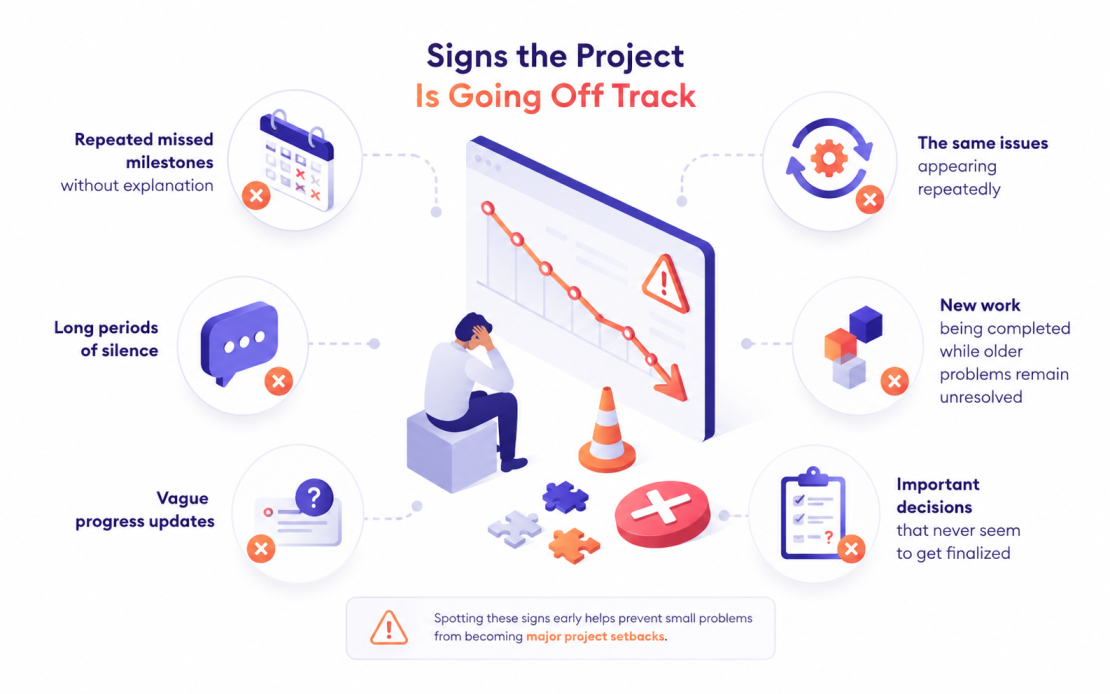
Not every delay points to a communication problem. Sometimes developers uncover technical issues that require investigation and resolution before work can continue. For example, performance bottlenecks, plugin conflicts, or other common WordPress errors can affect timelines even when the project itself is being managed properly.
The key is transparency. Most clients are surprisingly understanding when they know what’s happening. Frustration usually arises when progress becomes difficult to measure or when nobody can explain why work has slowed down.
Strong client-developer communication makes these situations easier to navigate. When expectations, priorities, and progress remain visible, it’s much easier to identify small issues before they grow into larger problems.
Great WordPress Projects Are Built on Partnership
Many website owners assume the success of a project depends primarily on the developer they hire. Experience shows that the relationship between the client and the developer often matters just as much.
The most successful projects share a few common traits:
- Goals are clearly defined.
- Responsibilities are clearly understood.
- Feedback is specific and actionable.
- Decisions are made on time.
- Problems are addressed before they become larger obstacles.
None of these practices requires technical expertise, yet they often have a greater impact on the final result than any individual feature or design decision.
Learning how to manage developers effectively isn’t about creating more meetings, more documentation, or more oversight. It’s about creating enough structure for good work to happen consistently. When expectations are clear and communication remains productive, developers can focus on solving problems instead of chasing approvals, clarifying requirements, or revisiting old decisions.
Of course, even the best collaboration benefits from the right technical foundation. Reliable hosting, staging environments, backups, and responsive support all help development projects move forward with fewer interruptions.
That’s one of the reasons many website owners choose HostArmada as the home for their WordPress websites.
Whether you’re launching a new project or improving an existing one, the right hosting environment can make collaboration easier for everyone involved. If you’re evaluating your options, take a look at our hosting plans and find the solution that best fits your next project.
FAQs
Set clear project goals, document the scope, define responsibilities, agree on communication rules, and provide timely, specific feedback.
For most projects, weekly updates or milestone-based check-ins provide enough visibility without interrupting the developer’s work.
It should include the project goal, current problem, desired outcome, required features, affected pages, timeline, budget, and approval process.
Determine whether the request is a revision or a new requirement, then confirm its impact on the timeline, cost, and project scope before approving it.
