

Blog / Wednesday March 4, 2026
WordPress Child Theme: What It Is and When To Use One

You should use a WordPress child theme when you want to customize a theme without losing your changes during updates. It is the recommended way to modify a WordPress theme safely while keeping the original theme files intact.
Customizing themes is common when building or managing a WordPress website. Whether you want to adjust styles, edit templates, or add custom functionality, making changes directly to a theme can cause problems later when the theme is updated.
We’ve compiled this guide to help you learn what a WordPress child theme is, how it works, and when you should use one. You’ll also see when a child theme is necessary and when you can safely skip it.
What Is a Parent and Child Theme?
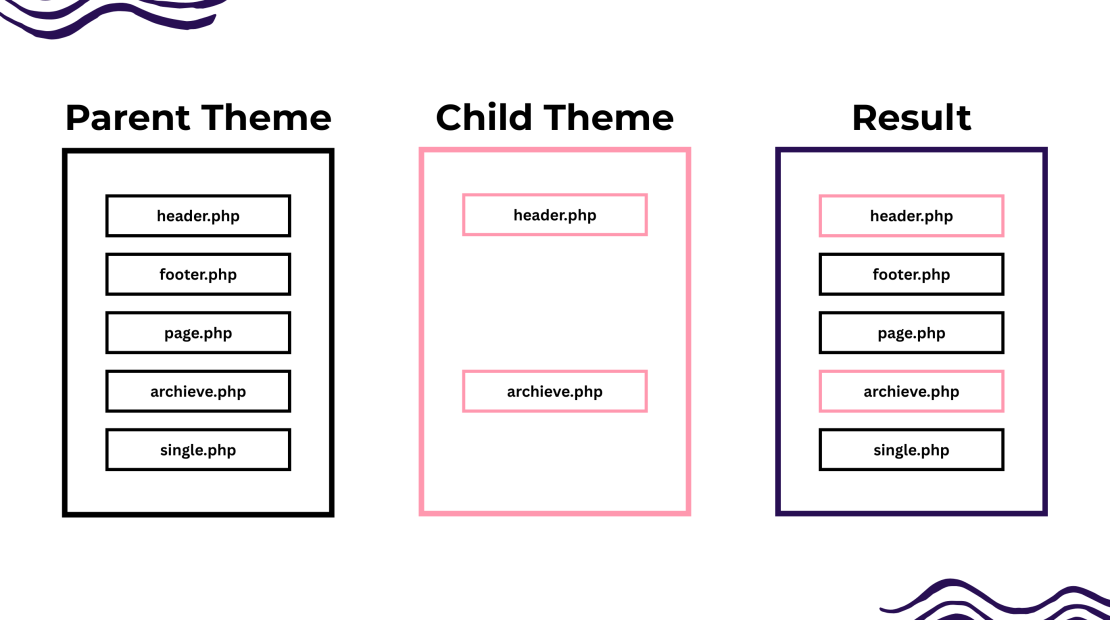
A child theme, as defined by the WordPress Codex, is a theme that “inherits the functionality and styling of another theme, called the parent theme.” Let’s have a closer look.
Parent Theme
A parent theme in WordPress is a complete theme that contains all the templates, styles, and functionality needed to run a website. Whether you have an e-commerce website, an online business card, a one-pager, or anything in between on WordPress, you have a theme that encapsulates all essential files, styles, and functions needed for your website to have any structure or design.
Naturally, a parent theme can operate as a stand-alone theme, and it doesn’t need a child theme. As this theme is the building block of your website, it lays down all its essentials. Because of this, most people don’t go beyond the parent theme, as it often offers everything you need for a fully functional website.
Child Theme
A child theme in WordPress is a theme that inherits the design, templates, and functionality of the parent theme. It allows you to customize styles, templates, and code without modifying the parent theme files, so your changes remain safe when the parent theme is updated.
As you might have guessed, a child theme needs a parent one to function, as it doesn’t have any styles and functions on its own. It only copies those of the parent, as they inherit part of their files, including styles and template structures. Thus, how good your child’s theme is will depend on your chosen parent theme.
For example:
If your parent theme lacks any cornerstone functionality your website needs, the child theme will lack it as well. So be mindful when browsing in the WordPress theme library and pick a template that aligns with your vision and needs. This way, the child theme will have a strong foundation, and you won’t have to develop it from the bottom.
The beauty of child themes lies in their ability to safeguard your customizations. Child themes ensure that your design and code modifications remain intact when the parent theme receives updates. This separation of concerns is crucial for website stability and long-term maintenance.
Child themes are a developer’s best practice for adding extra features or styles to a WordPress theme. They should never directly edit core WordPress, plugin, or theme files except for starter themes specially designed for theme developers.
Why Use a Child Theme?
Using a child theme is important for developers who want to enhance the website’s performance but keep its customization intact. Using a child theme is the most efficient way to work on your website without compromising its security and continuity.
In fact, security is the most compelling reason to use a child theme. Whenever you update your website, there is a risk that something will go wrong. You are compromising your website’s security or simply losing your customizations. The child theme acts as a protective layer, allowing you to modify the appearance, functionalities, and templates without altering the parent theme. This practice ensures that any changes you make to the child theme remain intact, shielding you from the hassle of re-implementing customizations after each parent theme update.
Furthermore, a child theme lets you add functionality and templates that the parent theme lacks. This is invaluable if you want to enhance your website’s usability. It will enable you to add new features, modify existing ones, and create unique templates that align with your specific requirements.
Using a child theme is practically mandatory if you frequently change your website’s CSS. If you make these changes in the parent theme, they will most likely be overwritten by the next update. The child theme will house your CSS modifications, protecting them from updates.
Advantages of Using a Child Theme
Child themes are beneficial for anyone wanting to go further in their WordPress website development. Here are some of the advantages of using a child theme:
1. Fallback Safety
A child theme adds a safe layer for customizing your WordPress site. When you modify templates or styles in a child theme, the original files in the parent theme remain unchanged.
If a file or function is not included in the child theme, WordPress automatically loads it from the parent theme. This fallback system helps prevent errors and keeps the website working even if a customization is incomplete.
2. Customization Without Risk
The same goes for any customization you may want to do on your website. For example, if your brand grows, you might consider changing your typography to a unique, brandable, and recognizable style. This is standard practice for big brands, so following their steps is a great idea.
When changing your typography, it’s advisable not to touch the main files and code. There are many reasons for this, but mainly, any update can erase your customization and bring you back to square one. So, by using a child theme, any changes you make are safely stored within it, ensuring your customizations are preserved even when the parent theme is updated.
3. Safe Updates
One of the primary advantages of using a child theme is that it lets you update the parent theme without overwriting your customizations. When a new parent theme version becomes available, you can confidently update it, knowing that all your design and functionality modifications are securely preserved within the child theme. On the other hand, you can’t ignore updates, as they often address security issues, breaches, and bugs. Thus, leaving your parent theme without updating is a security risk. In other words, updates are inevitable, but erasing your customization is definitely avoidable.
4. Offers Flexibility
Using a child template is not only about preserving your customizations and functionality during updates, but also about making it easier to develop them. The child theme is often much more flexible than the parent theme. This means you can extend the theme’s functionality without necessarily writing pages of code. You can selectively modify template files and functions to cater to your specific needs, effectively customizing your website without delving into complex coding.
5. Ideal for Beginners
Child themes are the perfect training ground for aspiring web developers or DIY website owners who prefer to build their own sites. If you are new to WordPress theme development, a child theme can save you a lot of time while simplifying the learning process immensely. Child themes typically consist of just two files, style.css and functions.php, making them more manageable and less overwhelming for beginners. Additionally, the reduced number of files in a child theme simplifies debugging, allowing developers to pinpoint and address issues more easily.
Disadvantages of Using a Child Theme
While using a child theme has its pros, that doesn’t mean it has no downsides. So, consider the following disadvantages carefully before going for a child theme.
1. Steep Learning Curve
Probably the most significant disadvantage of a child theme is the learning curve. You can’t just hop on in and start changing. You need to invest some time in learning the ins and outs of operating and programming your child theme. Moreover, you need some, albeit basic, programming knowledge to change your website’s code.
Furthermore, you must learn the ins and outs of your parent theme. This learning curve can slow down your development process, particularly if you’re new to WordPress theme development. Still, once you learn what the parent theme is capable of, it becomes much easier.
2. Dependence on Parent Theme
Being dependent on a third party to have your website functioning is a hassle. Especially if you want to make modifications, unfortunately, child themes are extremely reliant on parent themes, meaning they can’t exist without the parent.
For example, if you want to create a photography portfolio using a theme but you also want to add your signature style and typography to your website, you will install a child theme on a specific photography theme. But if the theme owner discontinues the theme, all your work will be for nothing. You can’t just keep using abandoned themes, as this poses a significant security risk to you and your customers. Thus, you must start from the bottom and build your child theme anew with a new parent theme.
So, to avoid this, you must consider only reliable themes from respected sources. This way, you will ensure that your child’s theme modifications will be long-lasting.
3. Limited Scope of Changes
Child themes are primarily designed for making small to medium alterations to an existing theme. If you intend to perform a complete overhaul of your website’s design or introduce complex new functionality that goes beyond the boundaries of your existing WordPress theme, child themes might not be the ideal solution. In such cases, opting for a custom theme developed from scratch to align with your unique requirements would be a more suitable approach.
4. Slowing Down Your Website
Although it is not necessary, this issue occurs if you go on and make extensive customizations to your child theme. When you customize, browsers are forced to load an additional file. Depending on the file size, your website speed may suffer.
To avoid this, you must find a suitable parent theme and make only minor customizations in your child theme. This way, your additional files will be significantly lighter.
For additional insights and tips to speed up wordpress websites, we recommend implementing practical optimization strategies from reliable sources, using lightweight themes, and leveraging caching techniques to enhance your site’s performance.
5. Parent Theme Limitations
It’s also important to mention that not all parent themes are designed to be used with child themes. Attempting to create a child theme for a parent theme that is not well-suited for this purpose can break the parent theme and render it unusable. Careful consideration of the parent theme’s compatibility with child themes is essential before proceeding with customization.
Regardless of these downsides, using a child theme is more than a recommendation. It’s a standard for many WordPress developers. But this begs the question: if you’re not a developer, do you really need a child theme?
Do You Need a Child Theme for Your WordPress Site?
The answer is, it depends. You can use a child theme if you want to make changes to the general code of your website, and you don’t want to lose it when your parent theme updates. However, you must have some CSS and PHP coding skills or at least work with someone who does.
Using a child theme is also a sensible choice for substantial projects that involve adding extra features, functions, or custom code to the parent theme. It provides a structured environment for managing and organizing your customizations.
Furthermore, if you are a developer trying to streamline your work while creating quality themes, you will need a child theme. This can significantly reduce your development time and enhance productivity.
Finally, if you make frequent modifications to your functionalities, design, or style, a child theme is a must. It will keep everything organized and prevent this customization from being overwritten.
When You Can Skip the Child Theme
You can skip a child theme if you are not modifying theme files such as templates, functions, or styles. For example, a child theme is usually unnecessary when you only add content, use plugins for customization, or apply changes through the WordPress Customizer or block editor.
So, using a child theme is entirely up to you. But if you do want to make some more significant changes, we strongly suggest building a child theme.
How To Build a Child Theme
There are several ways to build a child theme. Plugins are the obvious choice. Still, they do come from a third-party user. So make sure the plugin’s developer is trusted, or build a child theme yourself. If you have basic coding knowledge, this is not that complicated. We created a step-by-step guide to help you build your own child theme so you can be sure no third party will have access to your code.
Still, before you even get to the child theme, you need reliable, fast, and secure hosting to support your work. HostArmada offers just that and more. So, check out our plans and enjoy lightning-fast speed, 99.9% uptime, and top-notch security. This is the easiest way to boost your traffic, user experience, and customer satisfaction.
FAQs
A WordPress theme controls the overall design and functionality of a website. A child theme inherits the design and features of a parent theme but allows you to make customizations without modifying the original theme files. This ensures that your changes are not lost when the parent theme is updated.
A child page in WordPress is a page that exists under another page (called the parent page) in the site hierarchy. Child pages help organize content and create structured URLs, such as example.com/parent-page/child-page.
Yes, you should use a child theme if you plan to customize a WordPress theme’s code, templates, or styles. A child theme keeps your modifications safe when the parent theme receives updates.
To create a WordPress child theme:
1. Create a new folder in /wp-content/themes/.
2. Add a style.css file with the parent theme information.
3. Create a functions.php file to enqueue the parent theme stylesheet.
4. Activate the child theme in Appearance → Themes in the WordPress dashboard.
