Most WordPress websites are not hacked because the hosting stack is weak. They get hacked because most security solutions are built to react instead of prevent.
That distinction matters more than most people realize.
For years, the standard WordPress security stack has looked like this:
IP-based firewalls filter incoming traffic
Web Application Firewalls (WAFs)
Malware scanners
Manual plugin and theme updates
On paper, this looks solid. In practice, it leaves a critical gap. By the time these systems detect a threat, the damage is often already done.
Here is what most people miss: Over 90% of WordPress vulnerabilities originate from plugins and themes, not the core platform.
91% of new vulnerabilities were found in plugins, and 9% were found in themes. There were only 6 vulnerabilities reported in the WordPress core, but these were low priority issues.
And once a vulnerability becomes public, attackers move fast. In many cases, exploitation begins within hours, while website owners are still unaware that there is a problem.
This creates what security professionals call the update gap, the window between a vulnerability being discovered and a fix actually being applied.
And that is exactly where most attacks happen.
So in this article, we will break down:
Why traditional WordPress hosting security fails in real-world scenarios
Where the biggest risk actually sits
And how Armada V-Shield, powered by Patchstack, is built to close that gap
Because adding more layers of security is not the solution anymore.
The Real Problem: Why WordPress Hosting Security Fails?
Reactive Security Is Already Too Late
Most web hosting security systems are built around one idea: detect the threat, then respond. That sounds reasonable, until you look at how attacks actually happen.
Firewalls and malware scanners are designed to:
Block known attack patterns
Detect suspicious behavior
Clean infected files after the fact
The problem is timing.
By the time a firewall recognizes a threat or a scanner flags malicious code, the attacker may have already gained access. At that point, you are not preventing an attack – you are dealing with the aftermath.
This is the core flaw of reactive security. It assumes you can respond fast enough. In reality, attackers move faster.
The Plugin Vulnerability Crisis
The biggest risk in WordPress is not the core system. It is the ecosystem around it. Plugins and themes that power most WordPress websites are also responsible for the majority of vulnerabilities.
According to Patchstack data, over 90% of WordPress vulnerabilities originate from plugins and themes. That alone should change how you think about security.
Here is why this matters:
Thousands of plugins are actively used across millions of websites
Many are developed by small teams or individual developers with limited resources
Security practices in development vary widely
New vulnerabilities are discovered continuously
Updates are often delayed
This creates a large and constantly evolving attack surface. Even if your hosting environment is secure, a single vulnerable plugin can expose your entire website.
There is also a common misconception that regular updates fully solve this problem.
Many website owners assume that enabling auto-updates is enough. The logic seems sound: once a vulnerability is discovered, a plugin update is released, and applying that update removes the risk.
In practice, it is not always that simple.
There are cases where plugin vendors release a new version and state in the changelog that a security issue has been fixed, while the underlying vulnerability is not fully resolved. In such situations, the plugin may still be considered vulnerable despite being updated to the latest version.
This creates a false sense of security.
Relying only on updates assumes that every patch is complete and immediately effective, which is not always the case. As a result, even websites that follow best practices and keep their plugins up to date can remain exposed to known vulnerabilities.
The Update Gap (Where Most Attacks Begin)
Now we get to the real issue: even when a vulnerability is discovered, it is not fixed immediately for your WordPress website. Typically, the WordPress plugin/theme vulnerability discovery and resolution process is:
Vulnerability discovery
Vulnerability disclosure
Vulnerability patching
WordPress theme/plugin update
The delay between when a vulnerability becomes publicly known and when you update your WordPress plugin/theme is known as the update gap. And it exists on almost every WordPress website.
Typically, users delay updates for valid reasons:
Fear of breaking functionality
Lack of time or awareness
Compatibility concerns
Attackers do not wait – they actively scan for vulnerable versions as soon as details become public. In many cases, exploitation begins within hours. So even if you update regularly, there is still a window where your site is exposed.
Server Security and WAF Protection Do Not Equal Application Security
Most hosting providers invest heavily in securing both the server environment and incoming traffic. This typically includes network-level protections, firewall configurations, and Web Application Firewalls (WAFs) designed to filter malicious requests.
WAFs play an important role. They can block known attack patterns, filter suspicious traffic, and reduce exposure to common threats. However, their effectiveness depends largely on predefined rules and known signatures.
This creates an important limitation.
First, when a new vulnerability is discovered, especially in a plugin or theme, there is often a delay before WAF rules are updated to detect and block related exploits. During that time, attackers can take advantage of techniques that may not yet be recognized by the firewall.
Second, increasing the strictness of WAF rules to improve protection often comes at a cost.
Aggressive configurations can lead to false positives, where legitimate user requests are mistakenly blocked or challenged. This can impact real visitors, disrupt user experience, and in some cases lead to lost traffic or missed conversions.
This creates a trade-off between security and accessibility that is difficult to balance using generic rule-based systems.
In other words, WAFs are effective against known threats, but less reliable when dealing with newly disclosed vulnerabilities or highly specific attack patterns. At the same time, tightening protection can introduce unintended side effects for legitimate users.
As a result, even a well-configured hosting environment with an active WAF can still leave WordPress applications exposed during the critical window between vulnerability disclosure and protection.
Most hosting protects the server. Armada V-Shield protects what actually gets attacked.
Introducing Armada V-Shield (Powered by Patchstack)
What Is Armada V-Shield?
Armada V-Shield is an add-on security service available with HostArmada’s WordPress Hosting plans. It gives you the option to integrate advanced, application-level protection into your website through the Patchstack security plugin.
At its core, Armada V-Shield focuses on protecting your WordPress website, where most vulnerabilities actually exist: inside the plugins and themes.
Once activated, the Patchstack plugin scans your website and identifies all installed plugins and themes. It then matches those components against Patchstack’s continuously updated vulnerability database, which tracks known security issues across the WordPress ecosystem.
This allows the system to determine exactly which vulnerabilities are relevant to your specific website, rather than applying generic protection rules.
How Armada V-Shield Changes the Security Model?
Instead of relying on broad, pre-configured rule sets, Armada V-Shield applies protection based on the actual components running on your website.
Once vulnerabilities are identified, Patchstack generates targeted security rules that inspect incoming requests and block attempts to exploit those specific weaknesses. This approach focuses on protection where it is needed, without introducing unnecessary overhead.
In practical terms, this means:
Your website is continuously checked against a live, constantly updated vulnerability database
Only relevant threats are monitored and filtered
Exploitation attempts are blocked at the application level
Protection is active even before updates are applied
Another important aspect of this approach is how it is implemented.
Armada V-Shield does not modify your website’s core files, plugins, or themes in any way. It operates externally by inspecting incoming requests and filtering malicious activity before it reaches the application layer. This ensures full compatibility with your existing setup.
At the same time, because protection is applied only to relevant vulnerabilities and not through large, generic rule sets, the system avoids unnecessary processing. This results in no noticeable performance impact on your website.
This model addresses one of the biggest limitations of traditional WordPress security. Instead of relying entirely on immediate patching or broad traffic filtering, it reduces exposure by securing vulnerable components directly.
Because protection is tailored to your website’s actual setup, it remains both efficient and effective, even as your plugin and theme stack evolves.
How Armada V-Shield Fixes the Traditional WordPress Hosting Security?
Armada V-Shield is not just an additional security layer. It changes how protection is applied within a WordPress hosting environment.
Traditional security models depend heavily on user action. Website owners are expected to keep plugins updated, monitor vulnerabilities, and react quickly when issues arise. In reality, this process is inconsistent. Updates are delayed, vulnerabilities are missed, and exposure windows remain open longer than expected.
Armada V-Shield reduces this dependency.
By identifying vulnerabilities and applying targeted protection automatically, it shifts security from a manual process to a managed one. This ensures that protection is not dependent on how quickly a user reacts, but is instead applied continuously in the background.
This leads to several important improvements.
Armada V-Shield reduces exposure time. Even if a vulnerable plugin is not updated immediately, protection is already in place to block known exploitation attempts.
Armada V-Shield improves consistency. Security is applied uniformly across websites, regardless of how actively they are maintained.
Armada V-Shield adds application-level intelligence. Instead of relying only on infrastructure or traffic filtering, protection is based on the actual components and risks within each website.
This combination addresses a key limitation in traditional hosting security. It does not replace existing protections such as firewalls or server hardening, but extends them into the application layer where most vulnerabilities exist.
In that sense, Armada V-Shield is not simply adding another tool. It is closing a gap in how WordPress security is typically implemented, making protection more aligned with how real-world attacks occur.
How to Activate Armada V-Shield
Step-by-Step Activation
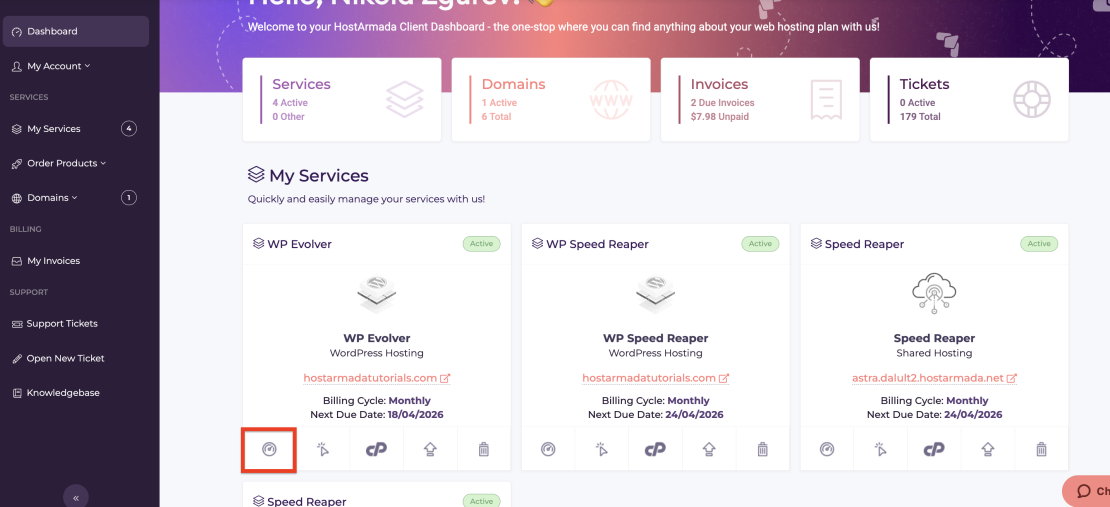
Activating Armada V-Shield is designed to be straightforward and requires no technical knowledge. Since this is an add-on service, you can purchase it with each new HostArmada WordPress Hosting plan or you can add it to your already existing WordPress Hosting plans from the “Addon Boosters” section of your HostArmada Client area.
Once purchased, head to the product dashboard page.
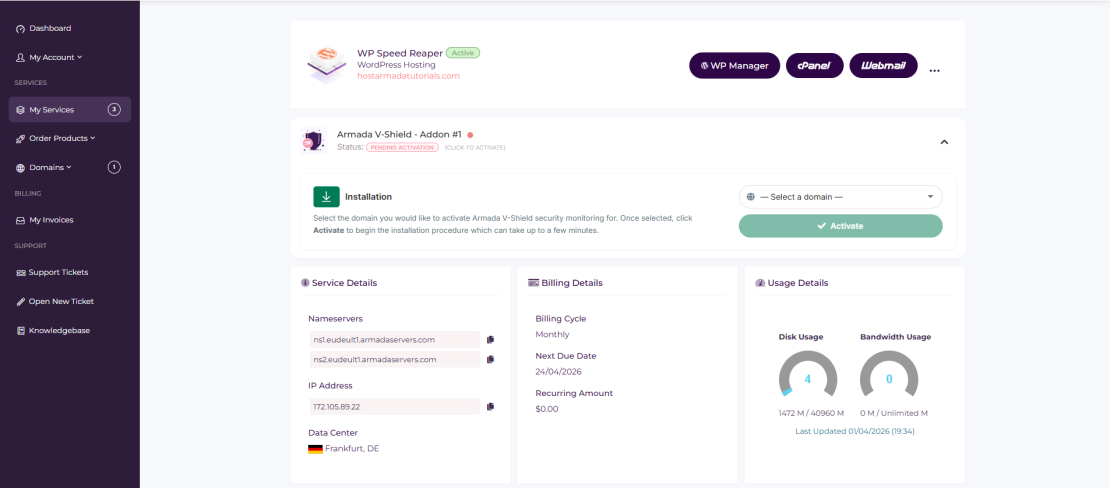
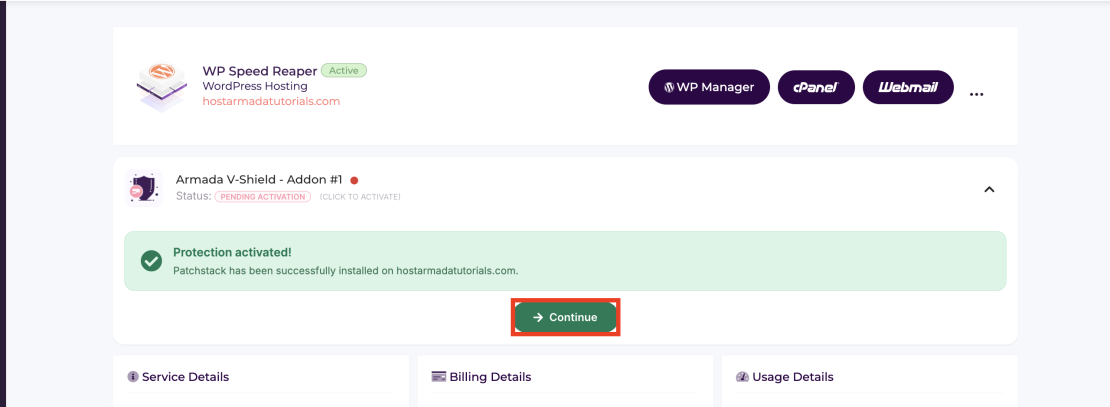
You will find the newly added “Armada V-Shield” drop-down panel that will prompt you to select a domain for the service to be installed.
The installation will be completed in the background. Please bear in mind that if you do not have an active WordPress installation on the domain, the installer will get it installed for you automatically.
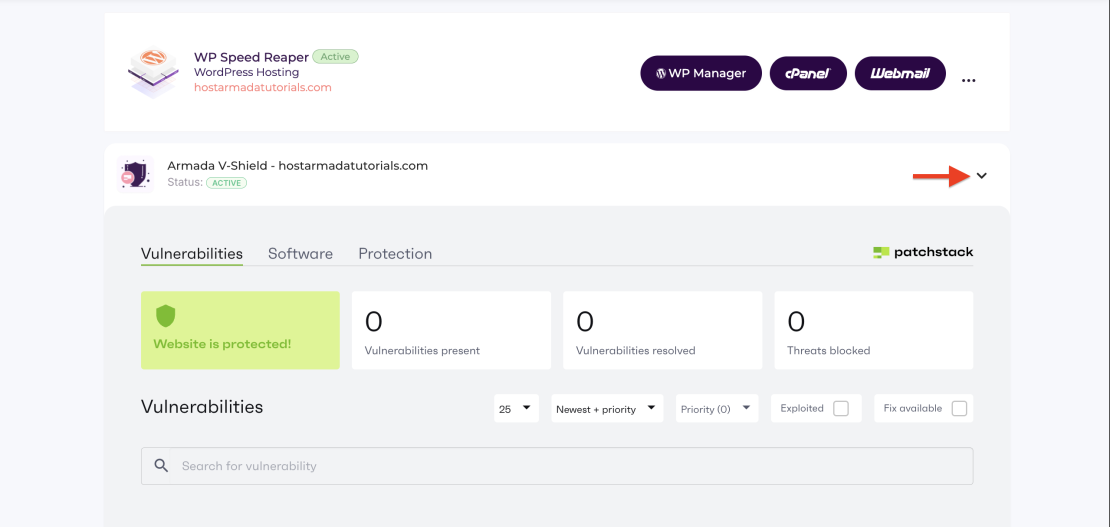
When the installation is completed, the page will refresh, and you just need to expand the “Armada V-Shield” section to see the dashboard that will give you all the security details you need.
A detailed purchase/activation guide can be found here.
What Happens After Activation
After activation, Armada V-Shield begins working immediately in the background. The system will:
Scan your website to detect installed plugins and themes
Match them against Patchstack’s vulnerability database
Identify any known security risks affecting your setup
Apply targeted protection rules for those vulnerabilities
Monitor incoming requests and block exploitation attempts
All of this happens without requiring manual configuration.
There is no need to install additional plugins, configure firewall rules, or monitor vulnerability reports manually. The protection layer is applied automatically and continuously adapts as new vulnerabilities are discovered.
What You Do Not Have to Worry About
One of the main advantages of Armada V-Shield is that it removes the need for constant manual oversight. With the service active, you do not need to:
track newly disclosed vulnerabilities across plugins
react immediately to every security update
configure complex security rules
rely solely on generic protection systems
This does not replace regular updates or good maintenance practices, but it significantly reduces the risk during the periods when updates are delayed or not immediately applied.
Continuous Innovation: What’s Coming Next?
Armada V-Shield is not a static feature. It is part of our evolving approach to WordPress security that will continue to expand as new threats emerge and technologies improve.
As the WordPress ecosystem grows, so does the volume and complexity of vulnerabilities. Addressing this requires more than a one-time solution. It requires continuous development, deeper integration, and smarter automation.
Our focus moving forward is centered around a few key areas.
Expanding Vulnerability Intelligence
Our partnership with Patchstack provides us with direct access to the largest vulnerability intelligence databases in the WordPress ecosystem since 2024.
We are working to extend that value beyond protection and make it more accessible to our customers. The goal is not only to secure websites, but also to provide better visibility into the risks they face.
We believe that awareness should not be limited. Every website owner should have the ability to understand how vulnerable their website is and what risks are present. Making this information more transparent and easier to access is a key part of our long-term vision.
Deeper Integration with our Hosting Platform
Future updates will focus on tighter integration between Armada V-Shield and the HostArmada platform. This may include:
More visibility into detected vulnerabilities directly within the Client Area
Clearer insights into how your website is being protected
Simplified management across multiple websites
This ensures that users not only benefit from protection but also understand how it is applied.
Who Should Use Armada V-Shield
Armada V-Shield is designed to grow alongside the threats it protects against. As new challenges emerge in the WordPress ecosystem, the service will continue to evolve to address them effectively.
Armada V-Shield is designed for any WordPress website that relies on plugins and themes, which effectively means most websites. However, its value becomes especially clear in scenarios where security risks are harder to manage manually.
Website Owners and SMBs
Small and medium-sized businesses often rely on WordPress for their online presence, but do not have dedicated security teams.
For these users, Armada V-Shield provides an additional layer of protection without requiring ongoing monitoring or technical expertise. It reduces the need to track vulnerabilities manually and helps maintain security even when updates are not applied immediately.
Agencies and Developers Managing Multiple Websites
Managing multiple WordPress websites increases complexity and risk. Keeping every plugin up to date across dozens of installations is time-consuming and often inconsistent.
Armada V-Shield helps standardize protection across all websites by automatically identifying vulnerabilities and applying targeted security rules. This allows agencies and developers to reduce manual workload while maintaining a consistent level of security.
eCommerce and High-Traffic Websites
Websites that handle transactions or large volumes of traffic are particularly sensitive to downtime and security breaches.
A single exploited vulnerability can result in lost revenue, reputational damage, or data exposure. Armada V-Shield helps reduce this risk by protecting against known vulnerabilities even before updates are applied, providing an additional safeguard during critical periods.
Anyone Using Multiple Plugins or Third-Party Components
The more plugins and themes a website uses, the larger its attack surface becomes.
Armada V-Shield is particularly valuable in these environments because it focuses protection on the exact components in use. This makes it well-suited for websites that depend heavily on third-party functionality.
In practice, if your website depends on plugins or themes to function, it is exposed to the type of risks Armada V-Shield is designed to mitigate.
Final Thoughts: Security That Actually Works
WordPress security has traditionally been built around reacting to problems. Firewalls filter traffic, scanners detect infections, and updates are applied after vulnerabilities are discovered. While these measures are important, they do not fully address how modern attacks actually happen.
As we’ve seen, the real risk lies in the period between vulnerability disclosure and patching. This is where most attacks occur, and it is also where traditional security approaches are least effective.
Armada V-Shield changes that.
By focusing on the actual components used within your website and applying targeted protection based on known vulnerabilities, it reduces exposure at the point where it matters most. Instead of relying entirely on detection or immediate updates, it adds a layer of protection that works continuously in the background.
This does not replace good practices such as keeping your website updated or maintaining a secure hosting environment. It strengthens them by addressing a critical area that is often left unprotected.
If your website relies on plugins and themes, which most WordPress websites do, then this is not a theoretical risk. It is a practical one that requires a more precise approach to security.
Armada V-Shield is designed to provide that approach.
If you are already a HostArmada customer, you can purchase Armada V-Shield directly from your Client Area and start protecting your website immediately.
If you are looking for a WordPress hosting solution that goes beyond standard security measures, explore our hosting plans and see how Armada V-Shield can be integrated into your setup.
Security is no longer just about adding more layers. It is about applying the right protection at the right time. And that is exactly what Armada V-Shield is built to do.
Simeon is a Co-Founder and the CEO of HostArmada, specializing in web hosting infrastructure, website performance, and website security. With a strong technical background, and over 15 years of experience, he focuses on making hosting reliable and accessible, while sharing insights that help users manage and grow their websites.